
Participant
September 16, 2023

P: (macOS Sonoma) Photoshop 2023/2024 Save for Web shows incomplete preview

  • September 16, 2023
  • 184 replies
  • 38213 views

Have just updated to Photoshop 2024 and my save to web panel is now not displaying correctly - see screengrab.  How can I adjust it to have the full image fill the four windows?  cheers, Bob
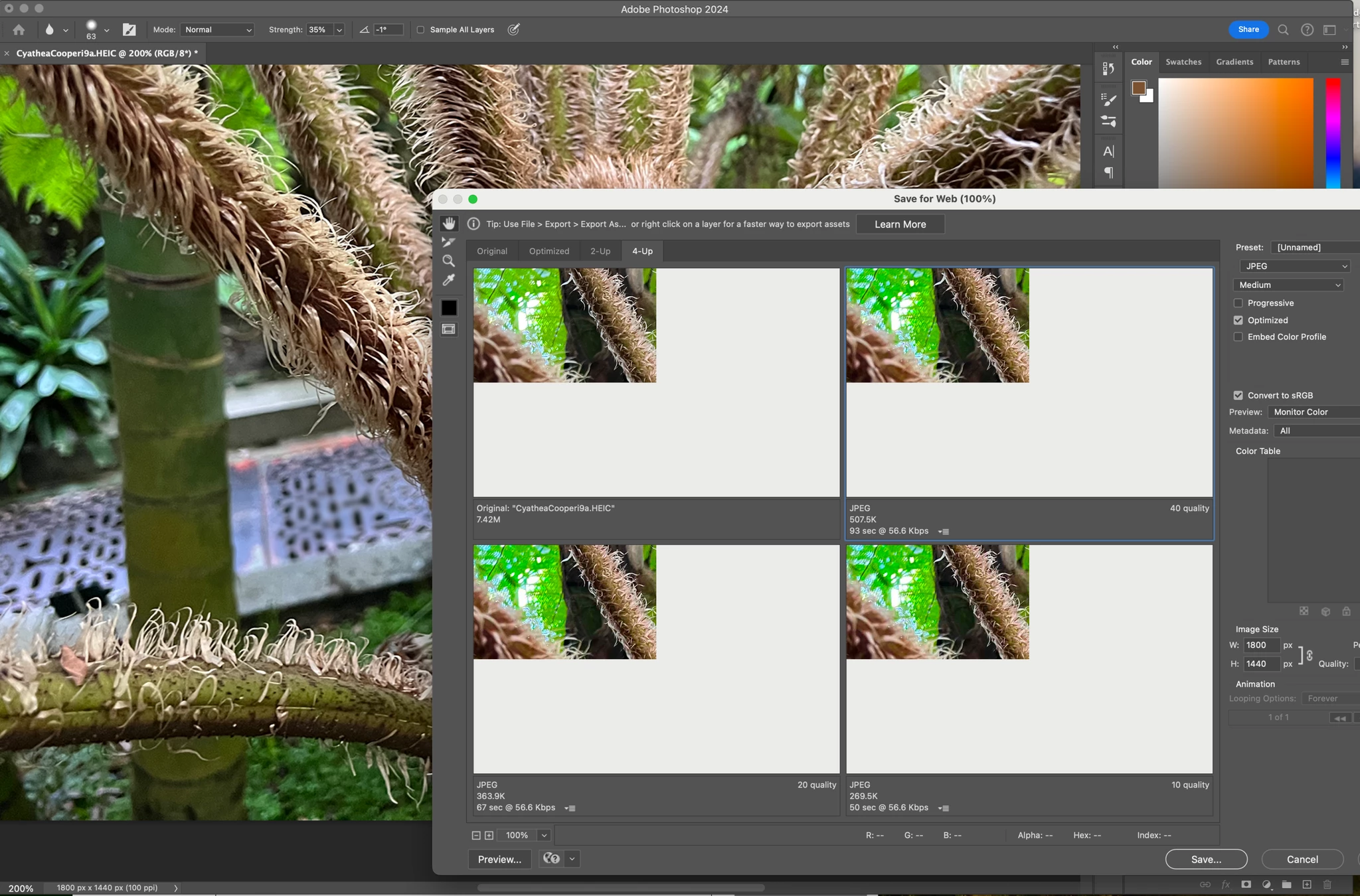


184 replies

Participant
October 18, 2023

Lucky chap. That was the first thing I tried, didn’t work. May be do to the monitors I use: LG Ultrafine and ther MacBook Pro internal. 😕😕

Known Participant
October 17, 2023

I can confirm that when you move the blank "Export For Web" window to a second (or third in my case) the image shows up perfect, just not on the maion monitor.

silk-m
Community Expert
Community Expert
October 17, 2023

My suggestion is to wait another week or so without doing anything. It will definitely improve.
If you really can't wait, I won't stop you from taking various improvement methods.


Best.

--Susumu Iwasaki
Participant
October 17, 2023

If you're looking for a workaround since we don't know when Adobe will fix this issue, the only things I know that work is downgrading your MacOS back to 13 Ventura or using a second monitor.

The issue is related to the 14 Sonoma OS update. I went back to 13 Ventura and the issue with Save for web (legacy) gif preview was gone and it all worked fine again. If you want to try downgrading back to 13 Ventura please see the information I put in my previous comment in this thread here.

The 3 options are:
1. Use Photoshop on a second monitor. For some reason, the gifs can be previewed fine on an external monitor.
2. Downgrade back to 13 Ventura with a TimeMachine backup.
3. If you have no backup, create a bootable installer. I included the steps on how to do this in my previous comment here.


Cheers.

Participant
October 17, 2023

Same

Community Expert
October 17, 2023

Same issue here

Participant
October 17, 2023

Same for me. I upped to Sonoma last night. The images save properly, just the preview is more of a 'sneak peek' lol.

Participant
October 17, 2023

Same problem in Beta 25.2.0

Participant
October 17, 2023

hello, 

any solution to this problem? 

DavidB
Known Participant
October 16, 2023

Same here on Mac M1 Mac Book Pro with Photoshop 2024!