



ajabon grinsmith
Community Expert
Community Expert
March 11, 2022

P: Moving a child layer of a masked group preserves the missing area

  • March 11, 2022
  • 6 replies
  • 523 views

This is a bug report posted on a Japanese forum.
I was able to confirm reproduction with version 2021 (22.5.6). It does not reproduce in earlier versions.

The bug is that if there is a masked group on the document and two or more child layers of the group are active and moved by mouse dragging, the invisible area outside the mask is not displayed.
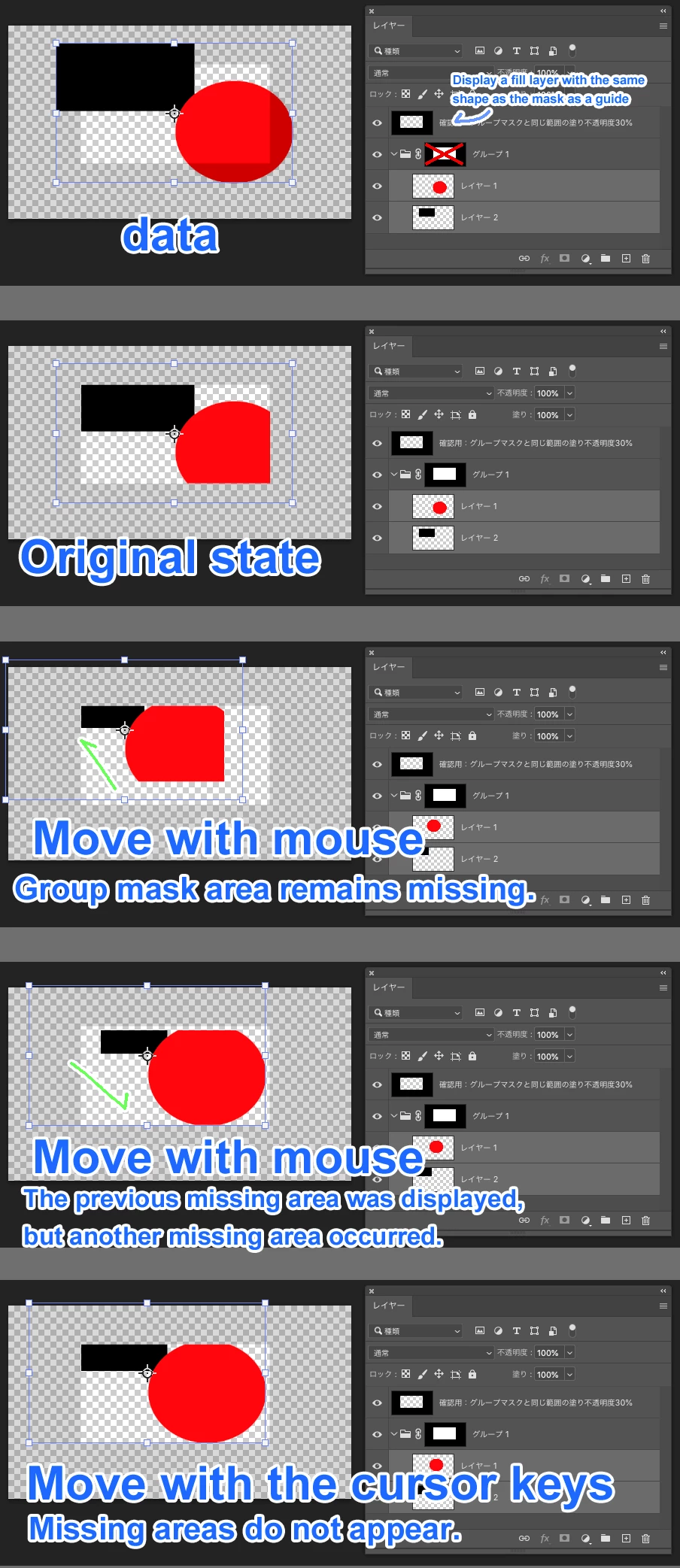
https://community.adobe.com/t5/photoshop%E3%83%95%E3%82%A9%E3%83%BC%E3%83%A9%E3%83%A0-discussions/%E8%A4%87%E6%95%B0%E3%81%AE%E3%83%AC%E3%82%A4%E3%83%A4%E3%83%BC%E3%82%92%E7%A7%BB%E5%8B%95%E3%81%97%E3%81%9F%E9%9A%9B-%E8%A6%AA%E3%82%B0%E3%83%AB%E3%83%BC%E3%83%97%E3%81%AE%E3%83%9E%E3%82%B9%E3%82%AF%E3%81%A7%E5%88%87%E3%82%8A%E5%8F%96%E3%82%89%E3%82%8C%E3%82%8B/td-p/12805719


This topic has been closed for replies.

6 replies

Jeff Arola
Community Expert
Community Expert
March 12, 2022

I reproduced the issue by:


1. making two separate shape layers that overlap

   (two or more layers is required)

   (layers do not need to overlap)


2. rasterize both shape layers


3. put both shape layers into a Group


4. use the Rectangular Marquee Tool to make a selection that fits inside both shapes


5. add a layer mask from the selection to the Group


6. select both shape layers and attempt to move them with the Move tool and that's when

    the revealed parts previously hidden by the layer mask are cutoff.


The issue, as far as i can tell, only occurs with raster layers and not vector content.

ajabon grinsmith
Community Expert
Community Expert
March 12, 2022

The first poster on the Japan forum confirmed reproduction on Windows 10 and I on macOS 10.14.6. We have determined that the problem can occur on any platform.

Mark.Dahm
Community Manager
Community Manager
March 11, 2022

@ajabon grinsmith , @Jeff Arola , Mac or Windows? Having trouble reproducing on Mac 12.2.1.

Legend
March 11, 2022

Thanks. Engineering will investigate.

ajabon grinsmith
Community Expert
Community Expert
March 11, 2022

Naturally, I tried 2022... I just made a mistake in the description.

thanks!

Jeff Arola
Community Expert
Community Expert
March 11, 2022

Also occurs in the newest photoshop 2022 (photoshop version 23.2.1)