


Participating Frequently
February 26, 2020

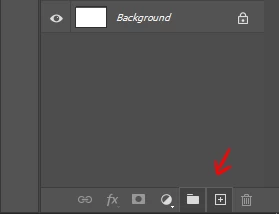
P: "New Layer" and "New Group" buttons in the Layers panel stay down after clicking on it

  • February 26, 2020
  • 56 replies
  • 3408 views

Hello,

since the last update, almost every time I click on the New Layer and/or New Group buttons in the Layers panel, the buttons become stuck and unusable. I have to restart Photoshop to reset their state.
Not game breaking but definitely annoying.


Regards
This topic has been closed for replies.

56 replies

Inspiring
March 29, 2020
ROSA thanks you saved me from more frustration!!
RosaPerry
Inspiring
March 27, 2020
Hi David,

Thanks so much for getting back to me and thanks for pursuing this issue with the DEVs. 

Much appreciated. Rosa.
Rosa
David Mohr
Participating Frequently
March 26, 2020
Thanks, Rosa!
I appreciate the screenshot!  8-)
I think the DEVs have a handle on the issue now, though I haven't seen a fix yet.
Thank you.  We'll get this fixed for you,David
Known Participant
March 26, 2020


In the latest PS I am seeing a bug where the 'create layer folder' button becomes greyed out (as if it is being selected) then becomes unusable until restarting PS. 

It's happened when selecting 3 or more layers then pressing the button whilst CTRL held down. It doesn't create the folder and instead becomes unusable, presumably sitting in a constant limbo state. 

Using on Win10 Pro 64bit.
RosaPerry
Inspiring
March 26, 2020
Hi David

Working on artwork now in Photoshop and have attached a screenshot. The Add Folder, Add Layer and Delete Buttons are non responsive. I have been working on this piece for just a little over 3 hours.

Adobe Photoshop Version: 21.1.1 20200312.r.121 2020/03/12: c839971b587  x64
Operating System: Windows 10 64-bit
Version: 10 or greater 10.0.18362.329
System architecture: Intel CPU Family:6, Model:14, Stepping:3 with MMX, SSE Integer, SSE FP, SSE2, SSE3, SSE4.1, SSE4.2, AVX, AVX2, HyperThreading
Physical processor count: 4
Logical processor count: 8
Processor speed: 3408 MHz
Built-in memory: 32627 MB
Free memory: 17927 MB
Memory available to Photoshop: 29878 MB
Memory used by Photoshop: 60 %


Rosa
Participant
March 25, 2020
Adobe Photoshop Version: 21.1.1 20200312.r.121 2020/03/12: c839971b587  x64
nothing else unusual
David Mohr
Participating Frequently
March 25, 2020
Howdy Rosa and Amie,
Are you both of Win10?  Would you mind sharing your version number from Help > System Info?  Anything else unusual in your display or mouse setup?
Thanks,David
Participant
March 25, 2020
I am also still experiencing this issue with the most current update.
RosaPerry
Inspiring
March 25, 2020
I'm still experiencing this in 21.1.1
Rosa
Jeans76
Known Participant
March 25, 2020
Why you guys don't install the new PS Version 21.1.1 ? - There should be fixed this bug, on my machine windows works it now again.