


Participating Frequently
February 26, 2020

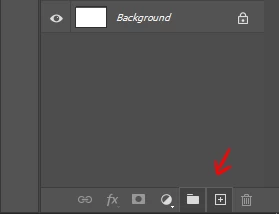
P: "New Layer" and "New Group" buttons in the Layers panel stay down after clicking on it

  • February 26, 2020
  • 56 respuestas
  • 3393 visualizaciones

Hello,

since the last update, almost every time I click on the New Layer and/or New Group buttons in the Layers panel, the buttons become stuck and unusable. I have to restart Photoshop to reset their state.
Not game breaking but definitely annoying.


Regards
Este tema ha sido cerrado para respuestas.

56 respuestas

RosaPerry
Inspiring
March 25, 2020
I hope it works for you. Let me know 🙂
Rosa
Delkin525
Known Participant
March 25, 2020
I'll have to try that, thanks. Hopefully they hot fix this soon.
RosaPerry
Inspiring
March 25, 2020
This solution has helped me as an easy fix, instead of restarting Photoshop:

I grab a layer and drag it down to the lower button which has been frozen and the lower button then behaves as normal.

I don't know why, but it does for me. Saves me saving my work and restarting Photoshop.
Rosa
Delkin525
Known Participant
March 25, 2020
This happens all the time and it's super annoying. It can happen to any of the lower buttons on the layers panel and usually the only way to fix it is to restart Photoshop. I attached screenshots of the buttons frozen in time... Please fix this Adobe, this is a first. I'm running latest version of Photoshop on Windows 10 with all current updates.


Inspiring
March 22, 2020
I, too, have this issue.  Mac OS Catalina, don't use Chrome at all.  Photoshop 21.1.0.  Making things very difficult.
Inspiring
March 20, 2020
The new mask, new layer, and delete layer buttons at the bottom of the layers panel seem to stick down periodically for me as well.
Jeans76
Known Participant
March 13, 2020
Bug PS 21.1.0: Layer opacity: now you have to click at certain percentages, previously you could see the changes live in the photo while holding down the mouse button. Good: Layer modes work without a click.
Just_GiGi
Participant
March 12, 2020
Happening to me too. Win10 English. No other programs running, no plug-ins installed, not connected to the internet, and all drivers up to date. Has been happening since the last update of PS 21.1
Inspiring
March 10, 2020


After a few hours it does this, the buttons to create new layer in the layers panel are highlighted a lighter colour. It then won't let me click on them. It recently changed the add new mask button too. Restarting photoshop fixes this, is there anything i'm doing wrong?
laurenm20608169
Participant
March 10, 2020
I also have this problem.  I am using Mac Mojave.  Many of us are awaiting the fix for this.  It's a time suck and workflow disturbance.