


Known Participant
January 30, 2023

P: Path tool delete anchor point turning into bezier curve

  • January 30, 2023
  • 14 replies
  • 1534 views

Can you please fix this strange behaviour in later releases. 
Currently using 24.1.1 release. 

Create a rectangle using the rectangle tool. 
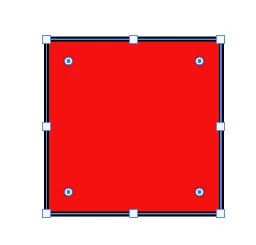
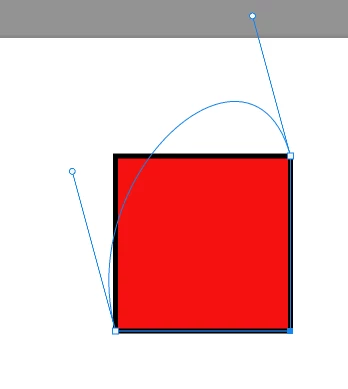
click delete anchor point. Presuming I would be old behaviour of just removing the anchor point. 
Get crazy bezier curve going on instead. WHY!!!


This topic has been closed for replies.

14 replies

kiddacAuthor
Known Participant
March 24, 2023

Nick thats a whole different problem. Try and transform a shape, and before you finish transforming that stupid box pops up and finishes your transform. That checking constraint path dragging fixes that horrendous bug too.

Known Participant
March 24, 2023

hi, I found a better solution,no need to check "Contstrain Path Dragging", just check "Don't show again" when the dialog box pops up, and then this problem is completely solved. I guess Adobe will never fix this little bug.

kiddacAuthor
Known Participant
March 23, 2023

In fact I have just found my own solution to this issue. 

The problem. Draw a shape. i.e Rectangle. Click Delete anchor point tool. Shape adds a stupid bezier curve that is no use to any one. 

The solution. Draw a shape. i.e Rectangle. Select either Path selection tool, or direct selection tool. AND THEN MAKE SURE... Contstrain Path Dragging IS checked. 


kiddacAuthor
Known Participant
March 23, 2023

this still hasn't been fixed in 24.2 release. Can you fix this mess please.

Known Participant
February 10, 2023

Same bug, every update breaks something that was working before, incredible! In our company, such programmers will be fired directly.

jane-e
Community Expert
Community Expert
February 1, 2023

Thank you @CShubert 


Jane


CShubert
Community Manager
Community Manager
January 31, 2023

Thanks @kiddac and to @jane-e for confirming, will pass this on to the team to look into.


Thank you,

Cory

jane-e
Community Expert
Community Expert
January 30, 2023

I tested on both my Windows laptop and iMac. I can reproduce in on Windows, but it works as expected on macOS.


Jane


kiddacAuthor
Known Participant
January 30, 2023

davescm
Community Expert
Community Expert
January 30, 2023

I can't reproduce it here either using Photoshop v24.1.1 on Windows 11 v22H2


Can you create a short screen video showing your full screen and the exact steps - just in case we are missing some subtle difference


Dave


Edit : Scratch that - I can reproduce it. If I use the pen tool and just click to delete I get the beziers. I was using the direct selection tool (white arrow) when I tested previously. It is the same going back to v22.