


Known Participant
January 30, 2023
Open for Voting

P: Path tool delete anchor point turning into bezier curve

Can you please fix this strange behaviour in later releases. 
Currently using 24.1.1 release. 

Create a rectangle using the rectangle tool. 
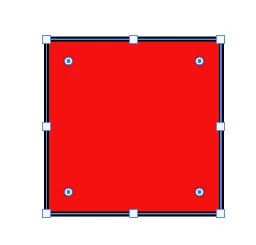
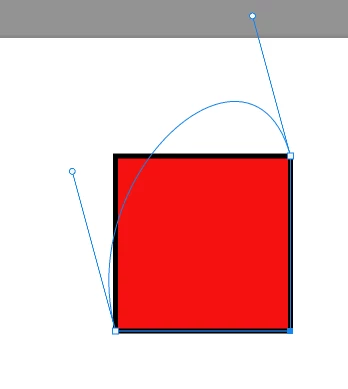
click delete anchor point. Presuming I would be old behaviour of just removing the anchor point. 
Get crazy bezier curve going on instead. WHY!!!


This topic is closed to new replies. Start a new post to keep the conversation going.

14 replies

kiddacAuthor
Known Participant
January 30, 2023

I have also unplugged my wireless mouse and tried a wired mouse. Same issue. So its not my mouse causing it

Translate
kiddacAuthor
Known Participant
January 30, 2023

I also uninstalled photoshop and reinstalled.
I have also just tried reseting preferences and still get the same result.

Translate
kiddacAuthor
Known Participant
January 30, 2023

This is on 2 different machines using latest photoshop.
My home machine and also my office work machine.

Translate
Inspiring
January 30, 2023

Hi,


I cannot reproduce this issue on my side, the deleted anchor point has an expected result, as shown on my screenshot.

Could be a corrupted preference setting, maybe you can reset the preference and try again in a new PSD ?

My spec: PS 24.1.1 - Win10 - 5900X - RTX 3070 - 64GB

Rds,

Translate