


Participant
November 7, 2023

P: Photoshop 25.0 Graphics Processor Compatibility Check fails: Unknown GPU

  • November 7, 2023
  • 179 replies
  • 26363 views

Hello, I just updated to Photoshop 2024 but I cannot get it to work with GPU acceleration. When I start Photoshop, I get this error: 


I am running a Windows 10 PC with two Nvidia RTX 3090 video cards and a 5950x CPU. 


So far, I have tried:

- Setting Photoshop and sniffer.exe to use my, uh, 'high performance 3090' as opposed to my 'power saving' 3090 (excellent work, Windows)  
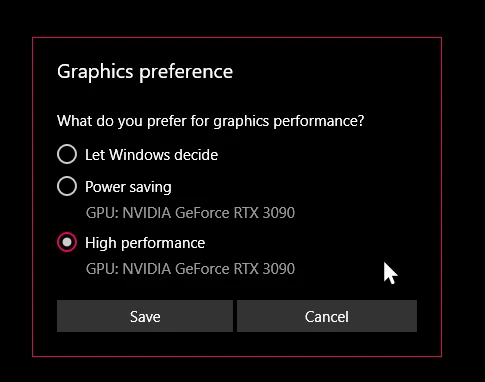
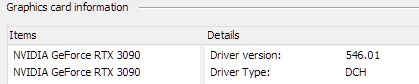
- Updated to the latest Nvidia studio drivers and installed all Windows 10 updates
 

- Removed 'sniffer.exe' from the Photoshop folder as suggested, causes Photoshop to not boot. 

- Enabled "Older GPU Mode" in the Technology Previews, get same error so I disabled it again. 

-  Tried setting the GPU in Nvidia Control Panel, but I don't have a "Preferred GPU" setting like a laptop or PC with integrated graphics. 

- Disabled SLI

- Uninstalled and reinstalled Photoshop 2024

- Manually ran sniffer.exe, it sees the video cards just fine
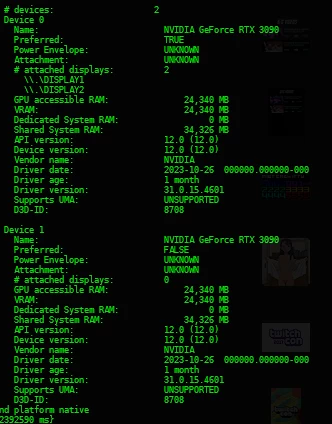
 

Thanks for the update Adobe, it works really well

179 replies

Participating Frequently
November 14, 2023

@Mark.Dahm I disable Topaz plugins - no changes. The same issue is there still.

Thanks!

Participating Frequently
November 14, 2023

My system in not laptop. Also, I CAN'T disable any of GPU's, because I use BOTH for rendering tasks and etc.

We need solution for this issue ASAP.

It WAS WORKED before latest Adobe updates in 2024 and 2025 BETA.

Issue COULD be in Nvidia drivers or in Adobe updates.

I think it's mostly from Adobe updates, because we have issues with Sniffer not closing and Photoshop.exe not closing and staying in Memory, so I need to kill it from Task Manager to be able to start new sesion. 


Thanks!

rm79
Participant
November 13, 2023

I am experiencing the same issue with dual GPUs (RTX 4090 and 3090). It's less than ideal but a temporary workaround is to simply disable one of them in the device manager.


Adobe Photoshop Version: 25.1.0 20231016.r.120 ca99df2 x64
Number of Launches: 125
Operating System: Windows 11 64-bit
Version: 11 or greater 10.0.22621.2428
System architecture: AMD CPU Family:15, Model:1, Stepping:0 with MMX, SSE Integer, SSE FP, SSE2, SSE3, SSE4.1, SSE4.2, AVX, AVX2, HyperThreading
Physical processor count: 16
Logical processor count: 32
Processor speed: 3400 MHz
Built-in memory: 130996 MB
Free memory: 84035 MB
Memory available to Photoshop: 103773 MB
Memory used by Photoshop: 70 %
Crash Handler: Adobe
DCX Version: 7.13.2
SAM SDK Version: 6.9.6
ACP.local Status:
- SDK Version: 3.4.0
- Core Sync Status: Reachable and compatible
- Core Sync Running: 6.6.4.2
- Min Core Sync Required: 4.3.66.28
Live Edit Client SDK Version: 4.0.4
C2PA library version: adobe_c2pa/0.7.6 c2pa-rs/0.25.2
NGL Version: 1.35.0.19
Chalkboard: Disabled.
D3D12Warp renderer: Disabled.
Manta Canvas: Enabled.
Alias Layers: Disabled.
Highbeam: Enabled.
Wintab Digitizer Services
Spec Version 1.4
Impl Version 1.39
Num Devices 2
Image tile size: 1028K
Image cache levels: 4
Font Preview: Medium
HarfBuzz Version: 7.3.0
TextEngine: Unified Text Engine
======= GPU
Native API stable: False
OpenGL API stable: False
OpenCL API stable: False
GPUDeny: 0
GPUForce: 0
useGPU: 0
useOpenCL: 0
isGPUCapable: 0
GPUName: Unknown GPU
GPUVendor: UNKNOWN
IsNativeGPUCapable: 0
IsOpenGLGPUCapable: 0
IsOpenCLGPUCapable: 0
HasSufficientRAM: 0
GPU accessible RAM: 0 MB
Required GPU accessible RAM: 1,500 MB
UseGraphicsProcessorChecked: 1
UseOpenCLChecked: 1
Windows remote desktop: 0
Windows available feature level: UNKNOWN
Windows required feature level: 12.0
Windows has required feature level: 1
Display: 1
Display Bounds: top=0, left=0, bottom=1440, right=3440
Display Type: SDR
Display: 2
Display Bounds: top=-1440, left=-827, bottom=0, right=4293
Display Type: SDR
------- Sniffer output
[0 ms]
Launch GPUSnifferThread

[0 ms]
Start RunAllAPIs

[0 ms]
"C:\Program Files\Adobe\Adobe Photoshop 2024\sniffer.exe" -baseTimeMS=2069028 -comment=Photoshop Version: Adobe Photoshop 25.1.0 20231016.r.120 ca99df2 x64

[1438 ms]
Start GetSnifferResult

[19005 ms]
*** RunAllAPIs timeout

[19005 ms]
Start native

[19005 ms]
"C:\Program Files\Adobe\Adobe Photoshop 2024\sniffer.exe" -baseTimeMS=2069028 -comment=Photoshop Version: Adobe Photoshop 25.1.0 20231016.r.120 ca99df2 x64 -native

[21449 ms]
*** GetSnifferResult timeout

------- Sniffer output
======= GPU
License Type: Subscription
Serial number: 90970737582091873524
GUIDBucket:
Composite Core GPU (comp_core_gpu): on
Composite Core Threads (MultithreadedCompositing): on
Composite Core UI (comp_core_ui): off
Composite Core Feature Prefs (CompCoreFeaturePrefs): off

Application folder: C:\Program Files\Adobe\Adobe Photoshop 2024\
Temporary file path: C:\Users\robmo\AppData\Local\Temp\
Photoshop scratch has async I/O enabled
Scratch volume(s):
Startup, 1.82T, 500.1G free
Required Plugins folder: C:\Program Files\Adobe\Adobe Photoshop 2024\Required\Plug-ins\
Primary Plugins folder: C:\Program Files\Adobe\Adobe Photoshop 2024\Plug-ins\

Installed components:
ACE.dll ACE 2023/07/11-03:51:57 79.4142c44 79.4142c44
act_tracing.dll Copyright (c) 2021 Adobe. All Rights Reserved 1.0.58
AdobeLinguistic.dll Adobe Linguisitc Library 2d5dab2
AdobeOwl.dll Adobe Owl 5.5.0
AdobePDFL.dll PDFL 2023/07/07-12:59:17 79.62ab650 79.62ab650
AdobePIP.dll Adobe Product Improvement Program 8.2.0.16
AdobeSVGAGM.dll AdobeSVGAGM 79.1887391 79.1887391
AdobeXMP.dll Adobe XMP Core 2023/06/25-20:01:55 79.1462899 79.1462899
AdobeXMPFiles.dll Adobe XMP Files 2023/06/25-20:01:55 79.1462899 79.1462899
AdobeXMPScript.dll Adobe XMP Script 2023/06/25-20:01:55 79.1462899 79.1462899
AGM.dll AGM 2023/07/11-03:51:57 79.4142c44 79.4142c44
AID.dll AID DLL 1.0.0.58
AIDE.dll AIDE 2023/07/11-13:54:27 79.43e3035 79.43e3035
aifm.dll AIFM 1.0 23.68434
AILib.dll Adobe Illustrator 2024 28.0.0
aiport.dll AIPort 1.0 23.68434
ARE.dll ARE 2023/07/11-03:51:57 79.4142c44 79.4142c44
AXE8SharedExpat.dll AXE8SharedExpat 2023/06/25-20:01:55 79.8fc6e4e 79.8fc6e4e
AXEDOMCore.dll AXEDOMCore 2023/06/25-20:01:55 79.8fc6e4e 79.8fc6e4e
BIB.dll BIB 2023/07/11-03:51:57 79.4142c44 79.4142c44
BIBUtils.dll BIBUtils 2023/07/11-03:51:57 79.4142c44 79.4142c44
boost_chrono.dll photoshopdva 22.0.0
boost_date_time.dll photoshopdva 22.0.0
boost_filesystem.dll photoshopdva 22.0.0
boost_regex.dll photoshopdva 22.0.0
boost_system.dll photoshopdva 22.0.0
boost_threads.dll photoshopdva 22.0.0
CoolType.dll CoolType 2023/07/11-03:51:57 79.4142c44 79.4142c44
CRClient.dll Adobe Crash Reporter Client DLL 13.2.0.202308091502_65b8636
DirectML.dll DirectML Redistributable Library 1.10.1+230125-1155.1.dml-1.10.177341d
dnssd.dll Bonjour 3,0,0,2
dvaaccelerate.dll photoshopdva 22.0.0
dvaappsupport.dll photoshopdva 22.0.0
dvaaudiodevice.dll photoshopdva 22.0.0
dvaaudiodsp.dll photoshopdva 22.0.0
dvacore.dll photoshopdva 22.0.0
dvacrashhandler.dll Adobe Audition CC 2017 10.0.0
dvamarshal.dll photoshopdva 22.0.0
dvamediatypes.dll photoshopdva 22.0.0
dvametadata.dll photoshopdva 22.0.0
dvametadataapi.dll photoshopdva 22.0.0
dvametadataUI.dll photoshopdva 22.0.0
dvanet.dll photoshopdva 22.0.0
dvaplayer.dll photoshopdva 22.0.0
dvascripting.dll photoshopdva 22.0.0
dvatransport.dll photoshopdva 22.0.0
dvaui.dll photoshopdva 22.0.0
dvavulcansupport.dll photoshopdva 22.0.0
dynamic-torqnative.dll Unified Extensibility Platform uxp-7.3.0-6
dynamiclink.dll photoshopdva 22.0.0
ExtendScript.dll ExtendScript 2022/08/18-12:50:45 82.4 82.4
filterport.dll FilterPort 1.1 O
icucnv73.dll International Components for Unicode Build 14.0.1.04ee3a5
icuin73.dll International Components for Unicode Build 14.0.1.04ee3a5
icuuc73.dll International Components for Unicode Build 14.0.1.04ee3a5
ippcc.dll ippCC. Intel(R) Integrated Performance Primitives. Color Conversion. 2021.6 (r0xbffe3c5b)
ippcck0.dll ippCC. Intel(R) Integrated Performance Primitives. Color Conversion. 2021.6 (r0xbffe3c5b)
ippccl9.dll ippCC. Intel(R) Integrated Performance Primitives. Color Conversion. 2021.6 (r0xbffe3c5b)
ippccy8.dll ippCC. Intel(R) Integrated Performance Primitives. Color Conversion. 2021.6 (r0xbffe3c5b)
ippcore.dll core. Intel(R) Integrated Performance Primitives. Core Library. 2021.6 (r0xbffe3c5b)
ippcv.dll ippCV. Intel(R) Integrated Performance Primitives. Computer Vision. 2021.6 (r0xbffe3c5b)
ippcvk0.dll ippCV. Intel(R) Integrated Performance Primitives. Computer Vision. 2021.6 (r0xbffe3c5b)
ippcvl9.dll ippCV. Intel(R) Integrated Performance Primitives. Computer Vision. 2021.6 (r0xbffe3c5b)
ippcvy8.dll ippCV. Intel(R) Integrated Performance Primitives. Computer Vision. 2021.6 (r0xbffe3c5b)
ippi.dll ippIP. Intel(R) Integrated Performance Primitives. Image Processing. 2021.6 (r0xbffe3c5b)
ippik0.dll ippIP. Intel(R) Integrated Performance Primitives. Image Processing. 2021.6 (r0xbffe3c5b)
ippil9.dll ippIP. Intel(R) Integrated Performance Primitives. Image Processing. 2021.6 (r0xbffe3c5b)
ippiy8.dll ippIP. Intel(R) Integrated Performance Primitives. Image Processing. 2021.6 (r0xbffe3c5b)
ipps.dll ippSP. Intel(R) Integrated Performance Primitives. Signal Processing. 2021.6 (r0xbffe3c5b)
ippsk0.dll ippSP. Intel(R) Integrated Performance Primitives. Signal Processing. 2021.6 (r0xbffe3c5b)
ippsl9.dll ippSP. Intel(R) Integrated Performance Primitives. Signal Processing. 2021.6 (r0xbffe3c5b)
ippsy8.dll ippSP. Intel(R) Integrated Performance Primitives. Signal Processing. 2021.6 (r0xbffe3c5b)
ippvm.dll ippVM. Intel(R) Integrated Performance Primitives. Vector Math. 2021.6 (r0xbffe3c5b)
ippvmk0.dll ippVM. Intel(R) Integrated Performance Primitives. Vector Math. 2021.6 (r0xbffe3c5b)
ippvml9.dll ippVM. Intel(R) Integrated Performance Primitives. Vector Math. 2021.6 (r0xbffe3c5b)
ippvmy8.dll ippVM. Intel(R) Integrated Performance Primitives. Vector Math. 2021.6 (r0xbffe3c5b)
JP2KLib.dll JP2KLib 2023/06/25-23:50:00 79.15070c2 79.15070c2
libeay32.dll The OpenSSL Toolkit 1.0.2zf
libifcoremd.dll Intel(r) Visual Fortran Compiler 10.0 (Update A)
libiomp5md.dll Intel(R) OpenMP* Runtime Library 5.0
libmmd.dll Intel(R) C/C++/Fortran Compiler Mainline
libzip.dll photoshopdva 22.0.0
LogSession.dll LogSession 8.2.0.16
mediacoreif.dll photoshopdva 22.0.0
Microsoft.AI.MachineLearning.dll Microsoft® Windows® Operating System 1.14.20230410.1.429e1e3
mkl_avx2.2.dll Intel(R) oneAPI Math Kernel Library 2022.1
mkl_avx512.2.dll Intel(R) oneAPI Math Kernel Library 2022.1
mkl_core.2.dll Intel(R) oneAPI Math Kernel Library 2022.1
mkl_def.2.dll Intel(R) oneAPI Math Kernel Library 2022.1
mkl_mc3.2.dll Intel(R) oneAPI Math Kernel Library 2022.1
mkl_sequential.2.dll Intel(R) oneAPI Math Kernel Library 2022.1
mkl_vml_avx2.2.dll Intel(R) oneAPI Math Kernel Library 2022.1
mkl_vml_avx512.2.dll Intel(R) oneAPI Math Kernel Library 2022.1
mkl_vml_def.2.dll Intel(R) oneAPI Math Kernel Library 2022.1
mkl_vml_mc3.2.dll Intel(R) oneAPI Math Kernel Library 2022.1
MPS.dll MPS 2023/06/27-19:07:31 79.51aea8a 79.51aea8a
onnxruntime.dll Microsoft® Windows® Operating System 1.14.20230410.1.429e1e3
opencv_world452.dll OpenCV library 4.5.2
pdfport.dll PDFPort 2020/11/19-11:34:27 79.625377 79.625377
Plugin.dll Adobe Photoshop 2024 25.1
PlugPlugExternalObject.dll Adobe(R) CEP PlugPlugExternalObject Standard Dll (64 bit) 11.5.2
PlugPlugOwl.dll Adobe(R) CSXS PlugPlugOwl Standard Dll (64 bit) 11.5.2.130
PSCloud.dll 1.0.0.1
PSRes.dll Adobe Photoshop 2024 25.1
PSViews.dll Adobe Photoshop 2024 25.1
ScCore.dll ScCore 2022/08/18-12:50:45 82.4 82.4
ssleay32.dll The OpenSSL Toolkit 1.0.2zf
SVGRE.dll SVGRE 79.e4a3cd5 79.e4a3cd5
svml_dispmd.dll Intel(R) C/C++/Fortran Compiler Mainline
VulcanControl.dll Vulcan Application Control Library 7.2.0.34
VulcanMessage5.dll Vulcan Message Library 7.2.0.34
WinRTSupport.dll Adobe Photoshop Windows RT Support 1.0.1.0
WRServices.dll WRServices Build 18.0.0.788c4ff 18.0.0.788c4ff
Unified Extensibility Platform uxp-7.3.0-6
UPIC 2.6.0


Required plugins:

Accented Edges 25.1 - from the file “Filter Gallery.8bf”
Adaptive Wide Angle 25.1 - from the file “Adaptive Wide Angle.8bf”
Angled Strokes 25.1 - from the file “Filter Gallery.8bf”
ApplyImageDataFilter 17.0 - from the file “GigapixelAIApply_x64.8bf”
Average 25.1 - from the file “Average.8bf”
Bas Relief 25.1 - from the file “Filter Gallery.8bf”
BMP 25.1 - from the file “Standard MultiPlugin.8bf”
Camera Raw 16.0.1 - from the file “Camera Raw.8bi”
Camera Raw Filter 16.0.1 - from the file “Camera Raw.8bi”
Chalk && Charcoal 25.1 - from the file “Filter Gallery.8bf”
Charcoal 25.1 - from the file “Filter Gallery.8bf”
Chrome 25.1 - from the file “Filter Gallery.8bf”
Cineon 25.1 - from the file “Cineon.8bi”
Clouds 25.1 - from the file “Clouds.8bf”
Color Halftone 25.1 - from the file “Standard MultiPlugin.8bf”
Colored Pencil 25.1 - from the file “Filter Gallery.8bf”
Conté Crayon 25.1 - from the file “Filter Gallery.8bf”
Craquelure 25.1 - from the file “Filter Gallery.8bf”
Crop and Straighten Photos 25.1 - from the file “CropPhotosAuto.8li”
Crop and Straighten Photos Filter 25.1 - from the file “Standard MultiPlugin.8bf”
Crosshatch 25.1 - from the file “Filter Gallery.8bf”
Crystallize 25.1 - from the file “Standard MultiPlugin.8bf”
Cutout 25.1 - from the file “Filter Gallery.8bf”
Dark Strokes 25.1 - from the file “Filter Gallery.8bf”
De-Interlace 25.1 - from the file “Standard MultiPlugin.8bf”
Dicom 25.1 - from the file “Dicom.8bi”
Difference Clouds 25.1 - from the file “Clouds.8bf”
Diffuse Glow 25.1 - from the file “Filter Gallery.8bf”
Displace 25.1 - from the file “Standard MultiPlugin.8bf”
Dry Brush 25.1 - from the file “Filter Gallery.8bf”
Entropy 25.1 - from the file “statistics.8ba”
Export Color Lookup Tables 25.1 - from the file “Export3DLUT.8be”
Extrude 25.1 - from the file “Standard MultiPlugin.8bf”
FastCore Routines 25.1 - from the file “FastCore.8bx”
Fibers 25.1 - from the file “Standard MultiPlugin.8bf”
Film Grain 25.1 - from the file “Filter Gallery.8bf”
Filter Gallery 25.1 - from the file “Filter Gallery.8bf”
Fresco 25.1 - from the file “Filter Gallery.8bf”
GatherImageDataFilter 17.0 - from the file “GigapixelAIGather_x64.8bf”
Glass 25.1 - from the file “Filter Gallery.8bf”
Glowing Edges 25.1 - from the file “Filter Gallery.8bf”
Grain 25.1 - from the file “Filter Gallery.8bf”
Graphic Pen 25.1 - from the file “Filter Gallery.8bf”
Halftone Pattern 25.1 - from the file “Filter Gallery.8bf”
Halide Bottlenecks 25.1 - from the file “HalideBottlenecks.8bx”
HDRMergeUI 25.1 - from the file “HDRMergeUI.8bf”
HSB/HSL 25.1 - from the file “Standard MultiPlugin.8bf”
IFF Format 25.1 - from the file “Standard MultiPlugin.8bf”
Ink Outlines 25.1 - from the file “Filter Gallery.8bf”
JPEG 2000 25.1 - from the file “JPEG2000.8bi”
Kurtosis 25.1 - from the file “statistics.8ba”
Lens Blur 25.1 - from the file “Lens Blur.8bf”
Lens Correction 25.1 - from the file “Lens Correction.8bf”
Lens Flare 25.1 - from the file “Standard MultiPlugin.8bf”
Liquify 25.1 - from the file “Liquify.8bf”
Matlab Operation 25.1 - from the file “ChannelPort.8bf”
Maximum 25.1 - from the file “statistics.8ba”
Mean 25.1 - from the file “statistics.8ba”
Measurement Core 25.1 - from the file “MeasurementCore.8me”
Median 25.1 - from the file “statistics.8ba”
Mezzotint 25.1 - from the file “Standard MultiPlugin.8bf”
Minimum 25.1 - from the file “statistics.8ba”
MMXCore Routines 25.1 - from the file “MMXCore.8bx”
Mosaic Tiles 25.1 - from the file “Filter Gallery.8bf”
Multiprocessor Support 25.1 - from the file “MultiProcessor Support.8bx”
Neon Glow 25.1 - from the file “Filter Gallery.8bf”
Note Paper 25.1 - from the file “Filter Gallery.8bf”
NTSC Colors 25.1 - from the file “NTSC Colors.8bf”
Ocean Ripple 25.1 - from the file “Filter Gallery.8bf”
OpenEXR 25.1 - from the file “Standard MultiPlugin.8bf”
Paint Daubs 25.1 - from the file “Filter Gallery.8bf”
Palette Knife 25.1 - from the file “Filter Gallery.8bf”
Parametric Filter NO VERSION - from the file “MaterialFilter.8bf”
Patchwork 25.1 - from the file “Filter Gallery.8bf”
Paths to Illustrator 25.1 - from the file “Standard MultiPlugin.8bf”
PCX 25.1 - from the file “PCX.8bi”
Photocopy 25.1 - from the file “Filter Gallery.8bf”
Picture Package Filter 25.1 - from the file “ChannelPort.8bf”
Pinch 25.1 - from the file “Standard MultiPlugin.8bf”
Pixar 25.1 - from the file “Pixar.8bi”
Plaster 25.1 - from the file “Filter Gallery.8bf”
Plastic Wrap 25.1 - from the file “Filter Gallery.8bf”
Pointillize 25.1 - from the file “Standard MultiPlugin.8bf”
Polar Coordinates 25.1 - from the file “Standard MultiPlugin.8bf”
Portable Bit Map 25.1 - from the file “PBM.8bi”
Poster Edges 25.1 - from the file “Filter Gallery.8bf”
Radial Blur 25.1 - from the file “Standard MultiPlugin.8bf”
Radiance 25.1 - from the file “Radiance.8bi”
Range 25.1 - from the file “statistics.8ba”
Render Color Lookup Grid 25.1 - from the file “Export3DLUT.8be”
Reticulation 25.1 - from the file “Filter Gallery.8bf”
Ripple 25.1 - from the file “Standard MultiPlugin.8bf”
Rough Pastels 25.1 - from the file “Filter Gallery.8bf”
Save for Web 25.1 - from the file “Save for Web.8be”
ScriptingSupport 25.1 - from the file “ScriptingSupport.8li”
Shear 25.1 - from the file “Standard MultiPlugin.8bf”
Skewness 25.1 - from the file “statistics.8ba”
Smart Blur 25.1 - from the file “Standard MultiPlugin.8bf”
Smudge Stick 25.1 - from the file “Filter Gallery.8bf”
Solarize 25.1 - from the file “Solarize.8bf”
SP Substance Suite NO VERSION - from the file “MaterialSuite.8li”
Spatter 25.1 - from the file “Filter Gallery.8bf”
Spherize 25.1 - from the file “Standard MultiPlugin.8bf”
Sponge 25.1 - from the file “Filter Gallery.8bf”
Sprayed Strokes 25.1 - from the file “Filter Gallery.8bf”
Stained Glass 25.1 - from the file “Filter Gallery.8bf”
Stamp 25.1 - from the file “Filter Gallery.8bf”
Standard Deviation 25.1 - from the file “statistics.8ba”
Sumi-e 25.1 - from the file “Filter Gallery.8bf”
Summation 25.1 - from the file “statistics.8ba”
Targa 25.1 - from the file “Standard MultiPlugin.8bf”
Texturizer 25.1 - from the file “Filter Gallery.8bf”
Tiles 25.1 - from the file “Standard MultiPlugin.8bf”
Topaz Gigapixel AI 17.0 - from the file “GigapixelAIAutomation_x64.8li”
Torn Edges 25.1 - from the file “Filter Gallery.8bf”
Twirl 25.1 - from the file “Standard MultiPlugin.8bf”
Underpainting 25.1 - from the file “Filter Gallery.8bf”
Vanishing Point 25.1 - from the file “VanishingPoint.8bf”
Variance 25.1 - from the file “statistics.8ba”
Water Paper 25.1 - from the file “Filter Gallery.8bf”
Watercolor 25.1 - from the file “Filter Gallery.8bf”
Wave 25.1 - from the file “Standard MultiPlugin.8bf”
WIA Support 25.1 - from the file “WIASupport.8li”
Wind 25.1 - from the file “Standard MultiPlugin.8bf”
Wireless Bitmap 25.1 - from the file “WBMP.8bi”
ZigZag 25.1 - from the file “Standard MultiPlugin.8bf”

Optional and third party plugins: NONE


Duplicate and Disabled plugins: NONE


Plugins that failed to load: NONE

Unified Extensibility Platform - Extensions:

Home Screen (Loaded) 7.1.0.7 - from the file "Required Folder"
CDO: 1.143.0
CmdN: 1.18.32
CDP: 1.167.0
Loaded at: 128 ms - launch time impact: 36 ms
ccx-timeline (Prepared) 3.1.12.0 - from the file "Required Folder"
CCX Commenting UXP Webview (Loaded) 27.3.1.0 - from the file "Required Folder"
Loaded at: 22263 ms - launch time impact: 0 ms
CCX Sharesheet UXP (Prepared) 24.10.0.0 - from the file "Required Folder"
Auto Photoshop Stable Diffusion Plugin (Loaded) 1.1.0.0 - from the file "Plugin Marketplace"
Loaded at: 21925 ms - launch time impact: 1895 ms
Content Credentials (Loaded) 0.40.3.0 - from the file "Required Folder"
Loaded at: 21907 ms - launch time impact: 0 ms
CC Libraries Panel (Prepared) 3.25.28.0 - from the file "C:\Program Files\Common Files\Adobe/CEP/Extensions\CC_LIBRARIES_PANEL_EXTENSION_3_25_28\"
CAPTURE: 2.0.41 STOCK: 4.1.0
Parametric Filter (Loaded) 0.1.8.0 - from the file "Required Folder"
Loaded at: 22264 ms - launch time impact: 0 ms
Photoshop Adjustments Panel (Loaded) 1.29.26.0 - from the file "Required Folder"
Loaded at: 22266 ms - launch time impact: 0 ms
Photoshop UXP Export-As (Prepared) 5.8.32.0 - from the file "Required Folder"
Photoshop Facepile (Loaded) 1.3.0.0 - from the file "Required Folder"
Loaded at: 22267 ms - launch time impact: 0 ms
Photoshop In App Messaging (Loaded) 4.3.7.0 - from the file "Required Folder"
Loaded at: 22268 ms - launch time impact: 0 ms
Information Alert (Prepared) 0.5.0.0 - from the file "Required Folder"
Photoshop Selection Feedback (Prepared) 0.5.0.0 - from the file "Required Folder"
Plugins Panel (Prepared) 1.4.3.0 - from the file "Required Folder"
IC popup message (Loaded) 1.0.0.0
Loaded at: 21908 ms - launch time impact: 0 ms
Multilayer Protection (Loaded) 1.0.0.0
Loaded at: 21910 ms - launch time impact: 0 ms
Discover Panel (Loaded) 2307.79.1.8 - from the file "Required Folder"
Loaded at: 22270 ms - launch time impact: 13 ms
Neural Filters (Registered) 1.15.0.100 - from the file "Required Folder"
Scan time: 1 ms - entries: 38

Extensions:

Libraries 1.0.0 - from the file “C:\Program Files\Common Files\Adobe\CEP\extensions\CC_LIBRARIES_PANEL_EXTENSION_3_25_28\index.html”
com.adobe.stock.panel.licensing-embedded 1.0.0 - from the file “C:\Program Files\Common Files\Adobe\CEP\extensions\CC_LIBRARIES_PANEL_EXTENSION_3_25_28\extensions\stock-panel-licensing\index.html”
com.adobe.capture.extension 2.0.41 - from the file “C:\Program Files\Common Files\Adobe\CEP\extensions\CC_LIBRARIES_PANEL_EXTENSION_3_25_28\extensions\capture\capture.html”
Export As 4.8.15 - from the file “C:\Program Files\Adobe\Adobe Photoshop 2024\Required\CEP\extensions\com.adobe.photoshop.crema\index.html”
LogiOptions version 9.40.13.0 7.0.0 - from the file “C:\Program Files\Common Files\Adobe\CEP\extensions\LogiOptionsAdobe\index.html”
com.adobe.cclibraries.manager 1.0.0 - from the file “C:\Program Files\Common Files\Adobe\CEP\extensions\CC_LIBRARIES_PANEL_EXTENSION_3_25_28\manager.html”

Installed TWAIN devices: NONE

RealXanathon
Known Participant
November 13, 2023

@Mark.Dahm 


Windows 10 with latest patches, AMD Ryzen 5, 32GB Ram, Nvidia GTX 1050 TI and Nvidia GTX 1060 latest Nvidia driver (that't because one of the "solutions" offered was to install the latest driver, which did not help). See my other comment, I am not looking  for advise here, I am only posting because support told me to do that.

RealXanathon
Known Participant
November 13, 2023

I have read all that. First: I do not use a laptop, I have two Nvidia GPUs that use the same driver in a desktop computer. Multiple GPUs is completely normal nowadays especially if you work with graphics or 3D software or multiple monitors. Adobe should make sure their software is up to the 21st century.

Adobe support let me jump through all kinds of senseless hoops and I already had read all "suggestions" to solve this problem without any solution that works, they still tried to make me all that stuff again without listening to me that I already had (I work in IT for decades, I know my way around computers and software and I usually extensively try to solve problems myself before going to support). I had to find a solution myself.


I am not interested in third party or peer user advise here, I am only posting in this thread because Adobe support told me to post my experiences in this post and they already said they acknowledge the problem and my solution and they will roll out a fix.

D Fosse
Community Expert
Community Expert
November 13, 2023

@Mark.Dahm 


I've noticed a lot of issues with AMD Ryzen lately (e.g. the OP here), for none of the usual reasons. There just seems to be a lot of inexplicable GPU crashing and non-recognition of the GPU. I honestly don't know what to tell these users - other than that there seems to be some connection to the BIOS. Is this something that is being investigated, or is there any light that can be shed on this?

D Fosse
Community Expert
Community Expert
November 13, 2023

@Nik Nastev 

@RealXanathon 


Read the section on dual GPUs here:

https://helpx.adobe.com/photoshop/kb/troubleshoot-gpu-graphics-card.html 


The GPU is used for data processing, it's not a simple one-way downstream flow. Dual GPUs often conflict (and this is a never-ending problem in laptops).

Mark.Dahm
Community Manager
Community Manager
November 13, 2023

@RealXanathon , could you share your system info, please?

Mark.Dahm
Community Manager
Community Manager
November 13, 2023

@RealXanathon , interesting; we'll take a look into this information.


We are seeing sniffer take 19 seconds to run when part of the Photoshop startup sequence, but run instantly outside of Ps, so someting is gumming up the works when happening with the Ps startup. You also have dual GPUs?

RealXanathon
Known Participant
November 13, 2023

I had the same problem since PS25 on Windows 10 (latest patch version). GPU incompatibility. I researched and tried a lot of those workarounds that all try to blame the problem on my system or on Windows. Nothing helped. PS23 and PS24 work fine and give no GPU error. Both my GPUs are way above min specs. After some very frustrating experiences with Adobe's clueless and unhelpful support agents and because I suspected sniffer.exe from the start I did an experiment.


- I renamed sniffer.exe in the PS25 folder in Program Files to _sniffer.exe

- I copied sniffer.exe from the still existing PS23 folder to the PS25 folder. 


Photoshop starts up without any problem and the GPU is recognized correctly. So as I already told you in my relevant ticket: sniffer.exe is the culprit and needs to be fixed.

Others with this problem can try my workaround in using an older sniffer.exe.