


Participant
November 7, 2023

P: Photoshop 25.0 Graphics Processor Compatibility Check fails: Unknown GPU

  • November 7, 2023
  • 179 replies
  • 26363 views

Hello, I just updated to Photoshop 2024 but I cannot get it to work with GPU acceleration. When I start Photoshop, I get this error: 


I am running a Windows 10 PC with two Nvidia RTX 3090 video cards and a 5950x CPU. 


So far, I have tried:

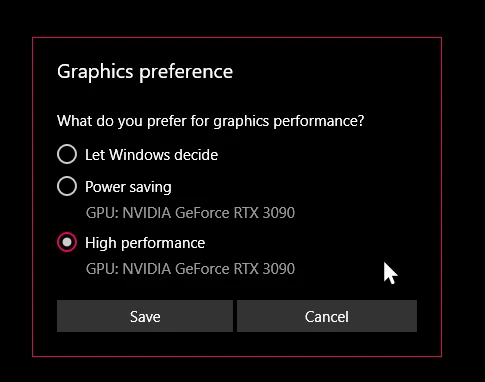
- Setting Photoshop and sniffer.exe to use my, uh, 'high performance 3090' as opposed to my 'power saving' 3090 (excellent work, Windows)  
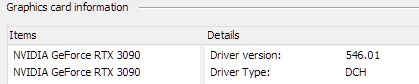
- Updated to the latest Nvidia studio drivers and installed all Windows 10 updates
 

- Removed 'sniffer.exe' from the Photoshop folder as suggested, causes Photoshop to not boot. 

- Enabled "Older GPU Mode" in the Technology Previews, get same error so I disabled it again. 

-  Tried setting the GPU in Nvidia Control Panel, but I don't have a "Preferred GPU" setting like a laptop or PC with integrated graphics. 

- Disabled SLI

- Uninstalled and reinstalled Photoshop 2024

- Manually ran sniffer.exe, it sees the video cards just fine
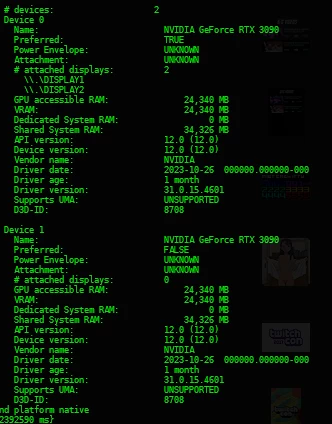
 

Thanks for the update Adobe, it works really well

179 replies

Pete.Green
Community Manager
Community Manager
November 14, 2023

Updating status

RealXanathon
Known Participant
November 14, 2023

I just noticed that all neural filters (but one, Color Transfer) are inactive and have an exclamation mark top left in their panel. Since they worked flawlessly in PS23 or PS24 I guess this is related to this bug and despite the fact that the older sniffer.exe lets me start Photoshop25 without the GPU error, there is still something wrong. Since PS performance is way worse than in 23 or 24, I guess there are more problems than just sniffer.exe.


I think I go back to PS24 unless I need the new AI-based features like AI fill or AI expand, since PS25 does not seem to be production ready.

RealXanathon
Known Participant
November 14, 2023

@Mark.Dahm yes, removing sniffer.exe was the first thing I tried and then Photoshop no longer starts up. Then I had the idea to drop in an older version andd that worked. 


All this clearly points to a problem with sniffer.exe in my opinion, based on years of experience with faulty software.

Participating Frequently
November 14, 2023

@Mark.Dahm Mark, I don't think this is related to plugins/hardware and etc. Mostly this is related on some changes inside new sniffer, that cause 2 issues here. 

1 - not recognising multi GPU's

2 - not closing and getting MANY instances in Memory left

and 3 - When point 2 is active - then you CAN'T even do UPDATES of Photoshop, till you kill sniffer.exe in Task Manager.


So, for me all clues are going just inside sniffer.exe. Compare what is changed between those 2 versions and you will get it 🙂


Best!

Nik

Participating Frequently
November 14, 2023

Just in case - latest sniffer.exe in 2025 and BETA have smaller file size, compared to 2024 version.

Probably something is missing in latest version of sniffer or disabled inside it, before compiling exe.

Mark.Dahm
Community Manager
Community Manager
November 14, 2023

This issue is perplexing; swapping out the version of sniffer seems to help, so that may be the right move in the short term.


One thing we did discover is that removing sniffer entirely doesn't work (Photoshop doesn't like to startup on Windows), so that is yet another thing we'll attend to.


We are putting together a multiple GPU system to see whether that might be a trigger of some sort, but to be honest, the system infos all shared around this issue so far indicate a large number of variables; many plugins, drivers, hardware, etc. Getting a dual GPU system of any stripe up and running may not be sufficient. But we're digging into it. 


Expectations-wise, we will have a release coming up soon that will not address this issue because the timing just isn't in our favor, but it the issue is not being ignored.

Participating Frequently
November 14, 2023

Update:

I copied sniffer.exe from 24.7.2 to 25 and BETA - and IT's WORKING.


Sniffer.exe is BROKEN in latest versions.

How QA did manage to not find this???

Participating Frequently
November 14, 2023

Just installed 24.7.2 version and guess what - it is working just fine with GPU's.

So, Adobe, please fix a bug in sniffer.exe.

Actualy 2 bugs - one is not recognising GPU's in multi GPU config and second - not closing sniffer.exe.

Thanks!


We need this fix ASAP.

Participating Frequently
November 14, 2023

I agree. As I already mentioned sniffer is not closing and prevent any photshop update, until I kill it in Task Manager. Plus, it creates many instances in task manager, sometimes 10 copies.

RealXanathon
Known Participant
November 14, 2023

@Nik Nastev since this works flawlessly in PS23 and PS24 and since if I copy the PS23 sniffer.exe to the PS25 program folder it also works, this definitely is not a driver or Windows problem, but a bug that Adobe created in PS25. Most probably in sniffer.exe.