


Participant
November 7, 2023

P: Photoshop 25.0 Graphics Processor Compatibility Check fails: Unknown GPU

  • November 7, 2023
  • 179 replies
  • 26359 views

Hello, I just updated to Photoshop 2024 but I cannot get it to work with GPU acceleration. When I start Photoshop, I get this error: 


I am running a Windows 10 PC with two Nvidia RTX 3090 video cards and a 5950x CPU. 


So far, I have tried:

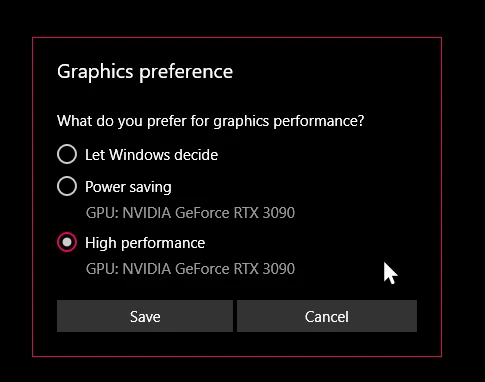
- Setting Photoshop and sniffer.exe to use my, uh, 'high performance 3090' as opposed to my 'power saving' 3090 (excellent work, Windows)  
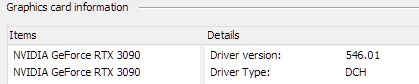
- Updated to the latest Nvidia studio drivers and installed all Windows 10 updates
 

- Removed 'sniffer.exe' from the Photoshop folder as suggested, causes Photoshop to not boot. 

- Enabled "Older GPU Mode" in the Technology Previews, get same error so I disabled it again. 

-  Tried setting the GPU in Nvidia Control Panel, but I don't have a "Preferred GPU" setting like a laptop or PC with integrated graphics. 

- Disabled SLI

- Uninstalled and reinstalled Photoshop 2024

- Manually ran sniffer.exe, it sees the video cards just fine
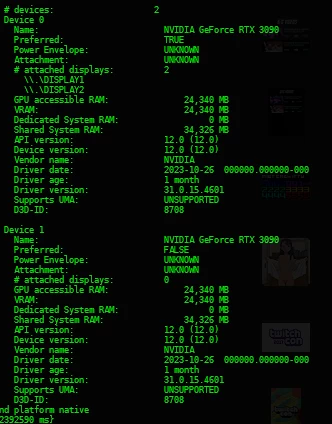
 

Thanks for the update Adobe, it works really well

179 replies

becomingcharly
Participating Frequently
November 21, 2023

Tried your fix to mine, and it still does not work. So that may have solved your issue, but that's not a global remedy.

Participant
November 20, 2023

everything worked fine last time I used it 7 days ago.

Participant
November 20, 2023

In effort to report to the main thread here is my issue:

3 month old ASUS Proart studiobook, 13th gen i9, RTX 4070: proper laptop


Photoshop: Driver update recommended (they are up to date) + openCL unavailable. But gpu detected correctly.

Indesign: no problem

Illustrator: no problem
Premiere Pro: crashes before opening.

My 3d softwares (Blender/Rhino) runs flawlessly with both i9 CPU and GPU

D Fosse
Community Expert
Community Expert
November 20, 2023

Thanks, Jane 🙂


Let's try to keep this the primary reference thread. Complaints will obviously come in from all directions, but its good to have a direction to point.

KennethMelvin
Participant
November 19, 2023

Can someone help me with this?
I have RTX 4050, latest 546.01 Studio Driver updated.
But it is still showing the same...


Warning: Driver update recommended Fail: OpenCL unavailable Pass: OpenGL available Pass: DirectX available Pass: Direct X feature level 12.2 available, feature level 12.0 required Pass: Above required VRAM (5936 MB of 1500 MB required) GPU Detected: NVIDIA GeForce RTX 4050 Laptop GPU (NVIDIA)

Participant
November 19, 2023

Does anyone know how to fix this? My driver is up to date and I use Photoshop 25.1. I didnt have this problem a few days ago. In the Nvidia control panel under 3D Settings, my preferred processor for Photoshop is set to my Nvidia card and that doesnt seem to fix the problem. 

D Fosse
Community Expert
Community Expert
November 19, 2023

I'm bumping this thread because we now have a virtual avalanche of GPU-related threads, most of them affecting current RTX 30- and 40-series. It's gone from one a month to five or ten a day, seemingly overnight. Clearly, something just happened.


I'm not a moderator, but someone should consider if those other threads should be merged into this one. 

Participating Frequently
November 19, 2023

Hello friends
I have an I7 12700H laptop
RTX 3070 Ti
Until two days ago everything was fine and the software works fine
Now when I open Photoshop a warning message pops up saying that the video card drivers are not up to date and OPENCL is not available
All the drivers are updated, also updated for the STUDIO
I don't understand how everything was fine until two days ago and now this message pops up every time

Thanx...

jane-e
Community Expert
Community Expert
November 19, 2023

@cosmic30923787o35b 


I've moved your post from Creative Cloud Desktop to the Photoshop forum where you will get better help with this issue.


Jane


Participating Frequently
November 19, 2023

thanx

Participant
November 18, 2023

In my photoshop 2024, after updating windows, when I open it, a message appears saying that "your graphics processor is incompatible" and it also says that "driver update recommended" and that "OpenCL is unavailable", but the video card driver is Updated to the latest version and Windows too. But the video card is being recognized normally by photoshop in the preferences/performance tab. the only problem is the message that appears when I open photoshop.

My notebook configurations are an i7 13 generation processor, 32 GB of RAM and an RTX 4050 graphics card.

Derek Cross
Community Expert
Community Expert
November 18, 2023

Duplicate post.

Participating Frequently
November 17, 2023

In today's 25.3 Beta update sniffer is not fixed still!

We need FIX!