


Participant
November 7, 2023

P: Photoshop 25.0 Graphics Processor Compatibility Check fails: Unknown GPU

  • November 7, 2023
  • 179 replies
  • 26354 views

Hello, I just updated to Photoshop 2024 but I cannot get it to work with GPU acceleration. When I start Photoshop, I get this error: 


I am running a Windows 10 PC with two Nvidia RTX 3090 video cards and a 5950x CPU. 


So far, I have tried:

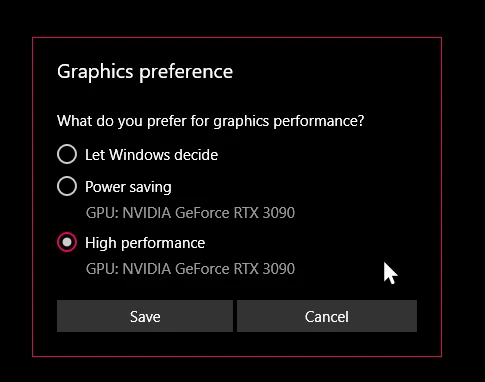
- Setting Photoshop and sniffer.exe to use my, uh, 'high performance 3090' as opposed to my 'power saving' 3090 (excellent work, Windows)  
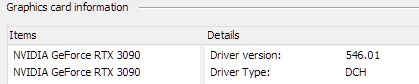
- Updated to the latest Nvidia studio drivers and installed all Windows 10 updates
 

- Removed 'sniffer.exe' from the Photoshop folder as suggested, causes Photoshop to not boot. 

- Enabled "Older GPU Mode" in the Technology Previews, get same error so I disabled it again. 

-  Tried setting the GPU in Nvidia Control Panel, but I don't have a "Preferred GPU" setting like a laptop or PC with integrated graphics. 

- Disabled SLI

- Uninstalled and reinstalled Photoshop 2024

- Manually ran sniffer.exe, it sees the video cards just fine
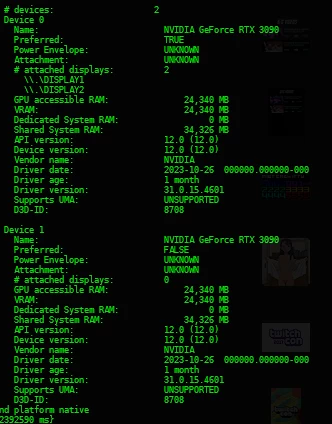
 

Thanks for the update Adobe, it works really well

179 replies

RealXanathon
Known Participant
December 1, 2023

I really don't care at all if there are "problems downstream". All I care about is that I can use the software I pay a horrendous amount of money for every month. And for weeks this is not the case.

Mark.Dahm
Community Manager
Community Manager
December 1, 2023

@becomingcharly We are tracking down multiple leads; there is no single 'smoking gun', so to speak. Sniffer is not the cause for the issue, but if you alter it's behavior (like loading an older version), then it functions differently (namely, it could allow Photoshop to load by permitting instable GPU resources, which only leads to downstream complications).


Glad it worked for you, we are still tracking down other leads, @Nik Nastev 

Participating Frequently
December 1, 2023

Sniffer is broken still! In latest updates in Phothoshop and in BETA - sniffer is the same and not worked.

WHEN we will get a FIX, Adobe?

This is really ... not good.


Thanks!

Participant
November 29, 2023

Lifesaver! It's sniffer.exe for me as well. Implementing the version 25 sniffer.exe also works in PS 25.2 for me.

RealXanathon
Known Participant
November 27, 2023

Is this really still not fixed after all this time?

Participating Frequently
November 21, 2023

I didn't do anything special just run the software

Mark.Dahm
Community Manager
Community Manager
November 21, 2023

Hi @cosmic30923787o35b 


Did you recently receive a Windows update, either for Windows 11 23/H2 or a Microsoft OCL compatibility pack?

becomingcharly
Participating Frequently
November 21, 2023

EDIT 2.  @Nik Nastev  It worked!!! For whatever reason it took a hot second to process, but after about the 13th time I opened Photoshop, it worked! I know it's a temporary fix, but thank you so much!!

Participating Frequently
November 21, 2023

Rani wants to update that I just turned on the computer, I started Photoshop and the message that popped up yesterday that the drivers for the screen card and that OPENCL is not available suddenly did not appear and everything seems to be fine

becomingcharly
Participating Frequently
November 21, 2023

EDIT (could not delete original post)


@Nik Nastev Tried your fix (replacing sniffer with previous version), and it still does not work. Glad it solved your issue, but that's not a global remedy...unfortunately.