


Participant
November 7, 2023

P: Photoshop 25.0 Graphics Processor Compatibility Check fails: Unknown GPU

  • November 7, 2023
  • 179 replies
  • 26680 views

Hello, I just updated to Photoshop 2024 but I cannot get it to work with GPU acceleration. When I start Photoshop, I get this error: 


I am running a Windows 10 PC with two Nvidia RTX 3090 video cards and a 5950x CPU. 


So far, I have tried:

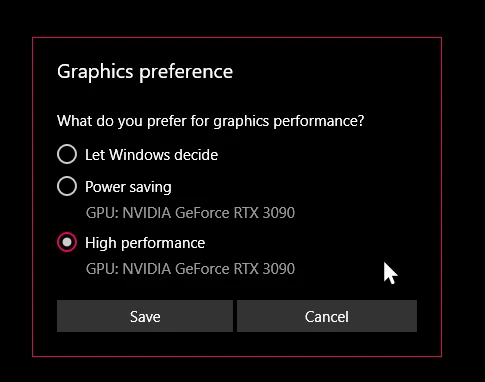
- Setting Photoshop and sniffer.exe to use my, uh, 'high performance 3090' as opposed to my 'power saving' 3090 (excellent work, Windows)  
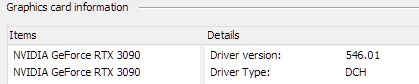
- Updated to the latest Nvidia studio drivers and installed all Windows 10 updates
 

- Removed 'sniffer.exe' from the Photoshop folder as suggested, causes Photoshop to not boot. 

- Enabled "Older GPU Mode" in the Technology Previews, get same error so I disabled it again. 

-  Tried setting the GPU in Nvidia Control Panel, but I don't have a "Preferred GPU" setting like a laptop or PC with integrated graphics. 

- Disabled SLI

- Uninstalled and reinstalled Photoshop 2024

- Manually ran sniffer.exe, it sees the video cards just fine
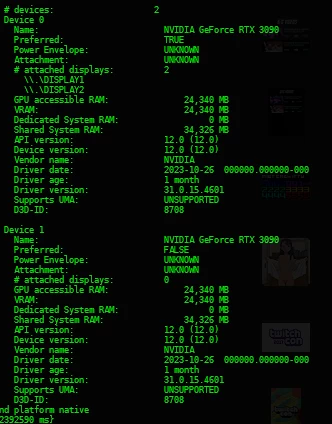
 

Thanks for the update Adobe, it works really well

179 replies

D Fosse
Community Expert
Community Expert
April 20, 2024

FWIW, just to keep perspective, most of us don't have these problems. It has always worked flawlessly here, on two systems running the latest PS (RTX 3060 and 4060 respectively).


Considering the millions of PS subscriptions out there, the few problem reports seen here are clearly a very small minority.


Not to say that's an excuse. If you pay for it, it should obviously work. No argument. But unfortunately, this is the software reality. Sometimes it just doesn't play nice. Usually it can be fixed with a few simple precautions.


As for the dual GPU problem I can easily accept the underlying premise: you cannot send data to one GPU and get it back from the other. I don't know how you'd get around that. For an application that sends data one way downstream, that's not an issue. But in Photoshop, it's two-way traffic.


For two identical GPUs, you should get identical data fed to the same driver. So that should work. But different GPUs will clog up that pipeline.


Just to keep perspective.

RealXanathon
Known Participant
April 20, 2024

@Mark.Dahm 

@Mark29332349j631 


PS25 stil has multiple GPU problems. On another computer with a single RTX2060 super PS25 constantily tells me I have to activate GPU acceleration to use Camera Raw. On PS23 everything works fine.


I would say you new GPU routines are extremely buggy and flawed.


To all others: keep older versions, it is crucial if you want to work professinally with this software.


What is EXTREMELY annoying is the fact tha PS23 CONTANTLY bugs me to update to use "AI functions". "AI functions" are of no use, if other standard function stop to work. Just because you jump on the AI hype train crucial functions are neglected. I would expect different from a company that claims to sell "professional" software.

mrBeep
Known Participant
April 19, 2024

@RealXanathon they should talk to Nvidia and Microsoft as is is obvious Adobe needs help with this issue.

RealXanathon
Known Participant
April 19, 2024

@PanBeep Why should I talk to Nvidia or Microsoft? It has long been established in this thread that this is an Adobe problem, caused by the major code changes in Photoshop due to so-called "AI-functions" (and those are unusable anyway, it looks like they use an older version of Stable Diffusion).


@Mark.Dahm 
@Mark29332349j631 


I now have two new video cards that are way better then old old ones and still the Photoshop performance is far worse than before. Whatever you do GPU-wise, you do it badly.

mrBeep
Known Participant
April 15, 2024

Have you talk to Microsoft and NVIDIA? 

RealXanathon
Known Participant
April 15, 2024

There are still problems with 25, PS24 works fine:


RealXanathon
Known Participant
April 12, 2024

@Mark29332349j631 

@Mark.Dahm 


I just bought and installed two identical Nvidia video cards and I can confirm that the error is gone.


This is really unbelievable: Every other company is able to handle two different video cards from the same vendor (Nvidia) and the same architecture, only Adobe devs are not able to code their software in a way this works. This shines a very bad light on Adobe and I will make sure I will spread the word about this. And since I not only work in coding and artistically, but also journalistically, I will make sure a lot of people will learn about this and how Adobe handles their customers: by taking heaps of money every months and then not being able to adress simple and totally normal system configurations. Plus Adobe thinks it is acceptable behavior to "deprioritize" this problem and stop working on it, despite all the feedback in this thread.


It may work here now, but rest assured, Adobe, that this is not the end of this! You frustrated me more than enough on this so I am motivated to get you some bad press.


What will you say to all those who cannot afford to just buy TWO new video cards? Bad luck?

mrBeep
Known Participant
April 11, 2024

Adobe please stop embarassing yourself, please!

RealXanathon
Known Participant
April 11, 2024

@Mark29332349j631 If I do buy two identical video cards, do you guarantee me it will work?

RealXanathon
Known Participant
April 11, 2024

@Mark29332349j631 

@Mark.Dahm 


this goes on for months. I cannot use the Photoshop functions I am paying for.


I am not using any displays connected via USB, I am simply using two Nvidia GPUs with multiple monitors attached to them, that is a common solution in graphics work and in coding. So if you imply I am a minority to get rid of me, this is another insult added to the already bad support I (and others) receive from Adobe. I canceled an appointment with my lawyer about this problem because I was promised in this thread and in personal messages this will be resolved soon. I even was given free subscription time to compensate for the time this will be resolved, from that I gathered it will be resolved within this extension time.


And now you have the audacity to tell me I'm a minority and this will not be fixed? Because "we have not given up on this scenario" is obviously a hollow phrase to get rid of me and so I wait some more months, which I will not do. This is a clear warranty case under european laws and if you want to force me to take legal action, please be sure that I will after getting no resolution whatsoever from Adobe after all this time.


Do I sound angry? You bet!

Edit: my two video cards are nearly identical, or at least very close together when it comes to GPU architecture and they are same genration, so this cannot be the problem in my case. Adobe botched this in an update because before later 24 versions and 25 versions this worked without any problem. I can still use earlier 24 versions without the bug, but those lack the AI functions I am promised and that I want. So PLEASE stop stalling and fix this instead of implying I'm a minority.