


Participant
November 7, 2023

P: Photoshop 25.0 Graphics Processor Compatibility Check fails: Unknown GPU

  • November 7, 2023
  • 179 replies
  • 26377 views

Hello, I just updated to Photoshop 2024 but I cannot get it to work with GPU acceleration. When I start Photoshop, I get this error: 


I am running a Windows 10 PC with two Nvidia RTX 3090 video cards and a 5950x CPU. 


So far, I have tried:

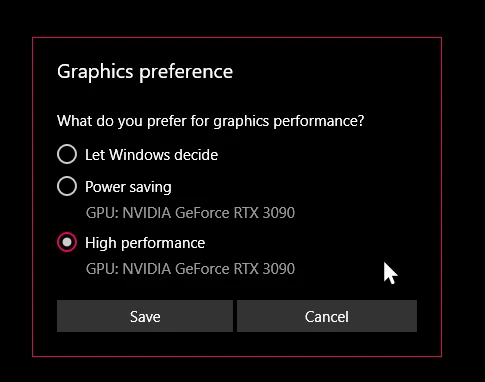
- Setting Photoshop and sniffer.exe to use my, uh, 'high performance 3090' as opposed to my 'power saving' 3090 (excellent work, Windows)  
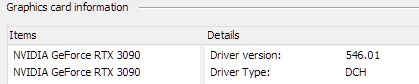
- Updated to the latest Nvidia studio drivers and installed all Windows 10 updates
 

- Removed 'sniffer.exe' from the Photoshop folder as suggested, causes Photoshop to not boot. 

- Enabled "Older GPU Mode" in the Technology Previews, get same error so I disabled it again. 

-  Tried setting the GPU in Nvidia Control Panel, but I don't have a "Preferred GPU" setting like a laptop or PC with integrated graphics. 

- Disabled SLI

- Uninstalled and reinstalled Photoshop 2024

- Manually ran sniffer.exe, it sees the video cards just fine
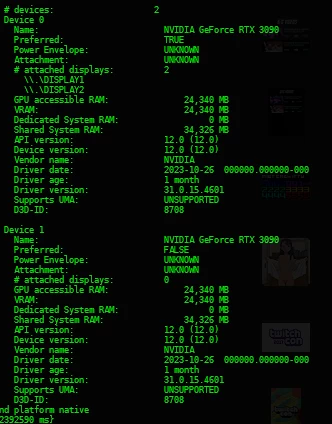
 

Thanks for the update Adobe, it works really well

179 replies

Adobe Employee
April 9, 2024

We are investigating different APIs for discovering GPU devices, as we have noticed inconsistencies between our crash reports and they way Photoshop detects hardware on startup.


Our focus is on finding marginal hardware (like USB displays) and turning off GPU capabilities because we still see a lot of crashing on those systems, which are not capable of supporting the latest features. But this may also help Ps correctly find a valid GPU resource in dual discrete GPU scenarios, which I believe is the outstanding issue in this thread.


We've seen some customers recover from this issue since it was initially supported, but the dual card situation where the model of the cards are different remains admittedly problematic. The heavy use of GPU computing that has been reported from affected customers might be creating unique operating environments that we have not been able to replicate. We are having to prioritize based on improving the broadest affected customer set, but we have not given up on this scenario.

RealXanathon
Known Participant
April 8, 2024

@Mark.Dahm Now what? It's weeks since the last update and nothing. This still does not work. I am running out of patience. I was told that if I buy Creative Cloud I can always use the latest version with the latest features and you bombard me with advertising for the AI-functions on Facebook. But this blatant bug still is not fixed, despite what was told here.

Quite contrary, now this problem also appears in After Effects.

Participating Frequently
March 25, 2024

This is bad 😕😕 

RealXanathon
Known Participant
March 22, 2024

This problem now seems to creep into other Adobe applications. After Effects suddenly after the last update tells me that the GPU cannot be used for 3D acceleration. Until last version this worked flawlessly.

RealXanathon
Known Participant
March 19, 2024

Any news on this? The latest PS25 version still does not work, still the same GPU error.

Mark.Dahm
Community Manager
Community Manager
February 28, 2024

@usagi35416700n13b ,


Can you share with us your Photoshop System Info (from under the Help menu in Ps)?


Looks like you are using an eGPU via dock?

Mark.Dahm
Community Manager
Community Manager
February 22, 2024

Photoshop is relatively late to the D3D game, and we've selected D3D feature level 12 as the minimum supported version for Ps (it was released in 2015, which has given customers plenty of time to adopt newer hardware to keep up with the times; we've deprecated support for DX11 in our APIs). One of the reasons for this is that DX11 support could likley degrade over time, manifesting in driver updates that are unstable. We have already seen this with OpenGL and OpenCL, and the technical debt from investing in these APIs is widespread and deep.


Photoshop's largest investment in GL was its 3D features, which are now being fully deprecated from the application. We expect this to improve stability. We have not been able to replicate the behavior described in this thread, so we've been unable to target the right set of updates to address it, but we have been trying successive patches in the hopes that, paired with the right driver, we might stabilize. I think we are seeing here is simply that drivers supporting DX12 apps might conceivably rarely work equally well for DX11 apps. But if/when they do, that's a combination worthy of hanging on to that driver for longer than the next version up.

Participating Frequently
February 22, 2024

Yeah, rolling back to 546* - everything is rock solid, except Photoshop Beta/24

RealXanathon
Known Participant
February 22, 2024

I always use the nvidia Studio drivers and I can confirm that 551 has multiple problems with 3D software such as C4D with external render engines. Rolling back to 546 solves those problems. I have not yet tested the latest PS beta, but I cannot use Nvidia driver 551.

Participating Frequently
February 20, 2024

Ok, new update here.

With latest Nvidia drivers - 551.23 studio and latest beta of Photoshop - all good. No errors.

But then my other 3d software start crashing (3ds max) with access violation error in d3d11.dll module.


I returned to previous Nvidia driver - 546.33 (studio) and my 3d software is good again. But guess what's happen with Photoshop beta - error is back again!


Something is wrong still! It is like one of previous Photoshop beta updates, when After Effects stoped to work.


I'm tired of all this. We need to work ...