


Participant
November 7, 2023

P: Photoshop 25.0 Graphics Processor Compatibility Check fails: Unknown GPU

  • November 7, 2023
  • 179 replies
  • 26377 views

Hello, I just updated to Photoshop 2024 but I cannot get it to work with GPU acceleration. When I start Photoshop, I get this error: 


I am running a Windows 10 PC with two Nvidia RTX 3090 video cards and a 5950x CPU. 


So far, I have tried:

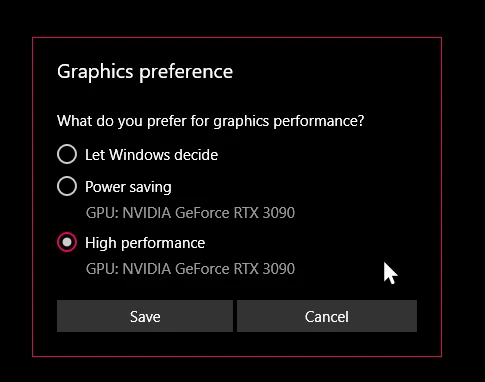
- Setting Photoshop and sniffer.exe to use my, uh, 'high performance 3090' as opposed to my 'power saving' 3090 (excellent work, Windows)  
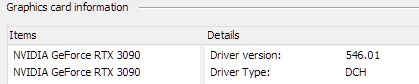
- Updated to the latest Nvidia studio drivers and installed all Windows 10 updates
 

- Removed 'sniffer.exe' from the Photoshop folder as suggested, causes Photoshop to not boot. 

- Enabled "Older GPU Mode" in the Technology Previews, get same error so I disabled it again. 

-  Tried setting the GPU in Nvidia Control Panel, but I don't have a "Preferred GPU" setting like a laptop or PC with integrated graphics. 

- Disabled SLI

- Uninstalled and reinstalled Photoshop 2024

- Manually ran sniffer.exe, it sees the video cards just fine
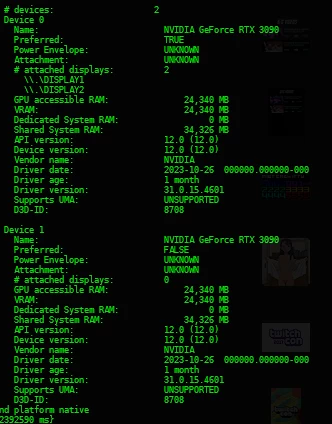
 

Thanks for the update Adobe, it works really well

179 replies

Participating Frequently
February 20, 2024

new beta - and I can't believe! 

Finally, no errors!


Thank You!

Participating Frequently
February 13, 2024

It's a normal to have bugs in development stage. But this is ridicoulus now, as this is not only in Beta, but in retail version. And not fixed still.

Plus I don't understood how we get sniffer.exe packed in this Beta release, that is NOT compatible with 64bit Windows? This is pure ... how this is posisble? What devs are looking and QA team? Really?


Thanks!

D Fosse
Community Expert
Community Expert
February 13, 2024

Just for perspective on "all new code", here's an internet classic; as true now as it was when it was written 24 years ago. Well worth a read regardless of this current issue.


https://www.joelonsoftware.com/2000/04/06/things-you-should-never-do-part-i/ 


With that said, the current situation is not good. Something happened last autumn/fall. This worked flawlessly for so many years, and then suddenly, kaboom. It pains me to see the forum flooded with GPU issues that seem impossible to figure out. It stopped being a simple case of "your driver is old, update it" or "your GPU is hopelessly outdated". Now, I just don't know what to tell these poor people.


Yes, dual GPUs is a problem. Laptops with vendor-modified drivers is a problem. But there's more now.


It all seems to center on OpenCL. Will the final solution be to finish the whole migration from OpenGL/OpenCL into DirectX?


I do appreciate the complexities involved, and Mark Dahm is obviously eager to get this resolved. So no complaint, just a sigh.

mrBeep
Known Participant
February 13, 2024

@Mark.Dahm working with photoshop does not feel like it is using modern frameworks (except AI) or hardware. Take a look at text tools, they are the same since I remember and I worked with photoshop over 20 years.
Lets have a look at Figma web based free tool where working with text is super smoth and fast and fun. Comparing the same experience with Photoshop makes me feel like it is stuck 20 year back with same tech behind. You haven't even made all tools available when working in 32 bit mode which is a mystery for me why it hasn't beed done fo so many years. Another example, flick panning, this is completly jerky and its lagging behind the mouse movement.

I have a feeling PS has been slow in improvement of regular tools and the only development you see now are the AI tools which are great and PS has the best tech behind this. 

Participating Frequently
February 13, 2024

Beta 25.6 -(with latest Nvidia Studio driver) - No luck. AND NEW error - sniffer.exe cannot start or run due to incompatibity with 64-bit versions of Windows!!!!

REALLY????


WHEN - WHEN We will get working SOLUTION?

We ARE PAYING for THIS?


Thank You!

Participant
February 13, 2024

Issue: When only laptop built-in 2070super GPU is enabled, Photoshop uses GPU as usual. But when 2080Ti GPU connected and enabled, compability check shows that GPU is UNKNOWN.

My 2 mainly used external monitors are connected on that docked 2080Ti, and this bug made me only able to use Photoshop with GPU when only laptop built-in monitor is able to use.

Steps to reproduce:

  1. Turn on a gaming laptop (mine is OMEN 6 plus)
  2. Connect a 2080Ti GPU using Thunderbolt 3 dock
  3. Boot Photoshop and compability check window shows the error

  • Additional Info: It might not be a problem of win11's "hardware accelerated gpu scheduling" option, I tried turn it on and off and error still exists.
Participant
February 9, 2024

@nobu nakata 

Ugg. It is unfortunate if that is the solution but worth a try. This recent bugginess has me looking into upgrading my PC. It still has plenty of power for my use case but these driver isses are getting annoying. 

i7-8700k

32gbRAM

1080ti

900 series Titan 

nobu nakata
Participant
February 9, 2024

I just installed "NVIDIA Studio driver" (instead GeForce Game ready driver) and Photoshop v25.4 works with it. Give "Studio driver" a try!


RealXanathon
Known Participant
February 6, 2024

Nice find, so it's not only multi Nvidia GPU setups, but also single Nvidia GPU setups.

nobu nakata
Participant
February 5, 2024

PS v24 works well with GeForce 3070 but v25 doesn't.


Photoshop v24.7.2


Photoshop v25.4