


Participant
November 7, 2023

P: Photoshop 25.0 Graphics Processor Compatibility Check fails: Unknown GPU

  • November 7, 2023
  • 179 replies
  • 26377 views

Hello, I just updated to Photoshop 2024 but I cannot get it to work with GPU acceleration. When I start Photoshop, I get this error: 


I am running a Windows 10 PC with two Nvidia RTX 3090 video cards and a 5950x CPU. 


So far, I have tried:

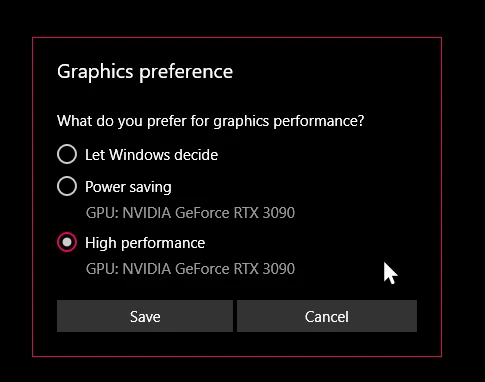
- Setting Photoshop and sniffer.exe to use my, uh, 'high performance 3090' as opposed to my 'power saving' 3090 (excellent work, Windows)  
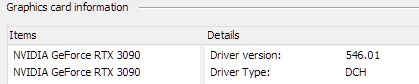
- Updated to the latest Nvidia studio drivers and installed all Windows 10 updates
 

- Removed 'sniffer.exe' from the Photoshop folder as suggested, causes Photoshop to not boot. 

- Enabled "Older GPU Mode" in the Technology Previews, get same error so I disabled it again. 

-  Tried setting the GPU in Nvidia Control Panel, but I don't have a "Preferred GPU" setting like a laptop or PC with integrated graphics. 

- Disabled SLI

- Uninstalled and reinstalled Photoshop 2024

- Manually ran sniffer.exe, it sees the video cards just fine
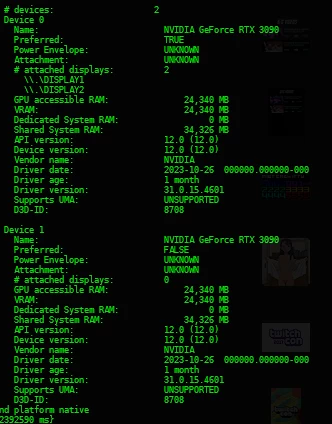
 

Thanks for the update Adobe, it works really well

179 replies

RealXanathon
Known Participant
January 10, 2024

@Mark.Dahm Nothing new on this? Was the problem abandoned?

mrBeep
Known Participant
December 29, 2023

@Mark.Dahm  If you didn't break sniffer app why my GPU is usable again when I copy it from Photoshop 2023 to Photoshop 2024?

RealXanathon
Known Participant
December 29, 2023

Only OpenCL missing is another problem and not related to this post, where the GPU is not detected at all.

Participant
December 27, 2023

In my case, with an AMD Radeon RX 6650 XT, I saw the OpenCL error not only in Photoshop but also when I tried to run a PassMark benchmark tool.  So in my case, at least, the problem is not with Photoshop.


Searching around some more, I found this website that talks about the AMD drivers for Windows 11 not configuring OpenCL correctly even though the binaries are installed.  I followed the instructions there and created the registry keys (there is a link in the comments to a BAT file that does it automatically) and it seems to have worked.  I no longer see the OpenCL error when I open Photoshop.


https://bastibe.de/2021-12-04-fixing-amd-opencl-on-windows.html


GuanoLad
Participant
December 27, 2023

I also have only a single GPU, and getting this problem. I've tried all the fixes, and so far the only one that has helped is to find an older version of Sniffer and replace the new one. There's a filesize differfence between them, so there's definitely something different. May I suggest you ask someone to send copies of their vesion of Sniffer to compare against the ones that work.


Something else that may help figure this out, when the broken Sniffer runs, it doesn't close in the Task Manager, and I end up with multiple copies, which has also slowed down my Image Browsing app (an old version of ACDSee). So something that it does to display an image was being interrupted while it was running.

Participant
December 26, 2023

Hi @Mark.Dahm,


I noticed you're looking into this problem and it looks like you suspect dual GPUs, but in my case I have this same problem with just a single GPU.  My desktop has a AMD Radeon RX 6650 XT and I have the same issue where it says my graphics processor is incompatible.


I've done all of the troubleshooting I've found in this thread and other places, including:


  • Ensure in Device Manager that there is only the Radeon under Display Adaptors (and no additional integrated display adaptor)
  • Adding a "custom options" in the Graphics settings of Windows 11 to tell the Photoshop executable and also sniffer.exe to use High Performance (specifically the Radeon)
  • Installed Photoshop 24.7.2 and observed that the same problem happens there


Photoshop seems to detect the presence of the Radeon, but if I look in the Performance preferences it has OpenCL greyed out.


I also noticed that the error screen appears quite quickly after Photoshop loads, so there doesn't seem to be the sniffer.exe lag others are observing.  I also do not see multiple copies of sniffer.exe running in Task Manager.


If there is anything else you can think of for me to try, please let me know.


Thanks!


Adam

RealXanathon
Known Participant
December 22, 2023

@Mark.Dahm I ran Sniffer without PS and the results it gave me were completely wrong, so I do not believe everything is right with it.


RealXanathon
Known Participant
December 22, 2023

@Mark.Dahm I have no idea what "gestalts" are.


I do not use the Substance plugin unless you installed it without my knowledge with PS25.

Participating Frequently
December 21, 2023

Thanks @Mark.Dahm .

Just for info - this problem is not only in BETA, but in v.24. So, probably Substance material plugin is not doing breaking here.

From my POV (outside of actual code and etc.) what I see is - we have sniffer.exe changed somehow and something in Photoshop 24 and Beta in comunication code/pipe between both. And may be sniffer is a bit slow to respond and because of that Ps terminate connection. This is a pure specualtion, just to give you some fresh ideas, outside the team. Sometimes this helps to find bugs.

Thanks!

Mark.Dahm
Community Manager
Community Manager
December 20, 2023

@Nik Nastev , We also noticed that running sniffer out of process is working while inside Ps it's being hung up. We don't believe we've made breaking changes to sniffer, and that it's a canary in the coal mine that is signalling something else in the stack that is choking it out.


We've identified issues with the Substance materials plugin (which we put out via Beta, but didn't work), and we found a place where we needed to more gracefully drop back out GPU mode into CPU mode to avoid a crash, but we still haven't found the smoking gun for this case. We suspected some GL contention with 3D, which was behind our recent request to try those PSUserConfig tags, but that also hit a dead end.


We have not found a place to just revert a simple change; there is a systemic issue, seemingly only affecting dual GPU systems, and so far nVidia cards only, and we're still looking for the needle in the haystack. We are seeing a few but reports crashing in drivers, so we are looking for nVidia's advice, but most of those systems are older cards and outside our usual support window. Thanks for your details along the way.