


Participant
November 7, 2023

P: Photoshop 25.0 Graphics Processor Compatibility Check fails: Unknown GPU

  • November 7, 2023
  • 179 replies
  • 26352 views

Hello, I just updated to Photoshop 2024 but I cannot get it to work with GPU acceleration. When I start Photoshop, I get this error: 


I am running a Windows 10 PC with two Nvidia RTX 3090 video cards and a 5950x CPU. 


So far, I have tried:

- Setting Photoshop and sniffer.exe to use my, uh, 'high performance 3090' as opposed to my 'power saving' 3090 (excellent work, Windows)  
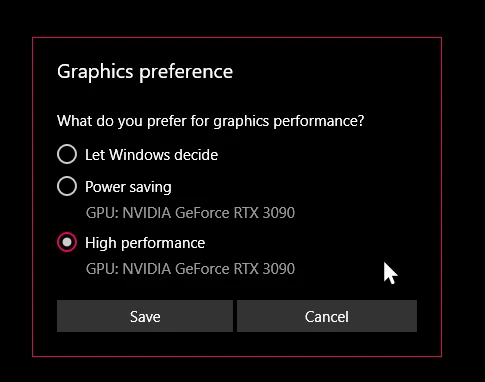
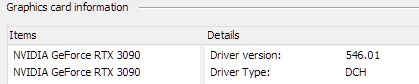
- Updated to the latest Nvidia studio drivers and installed all Windows 10 updates
 

- Removed 'sniffer.exe' from the Photoshop folder as suggested, causes Photoshop to not boot. 

- Enabled "Older GPU Mode" in the Technology Previews, get same error so I disabled it again. 

-  Tried setting the GPU in Nvidia Control Panel, but I don't have a "Preferred GPU" setting like a laptop or PC with integrated graphics. 

- Disabled SLI

- Uninstalled and reinstalled Photoshop 2024

- Manually ran sniffer.exe, it sees the video cards just fine
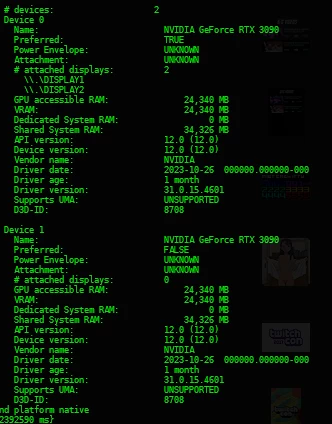
 

Thanks for the update Adobe, it works really well

179 replies

Participating Frequently
December 20, 2023

@Mark.Dahm  There is definitely something wrong between comunication from Photoshop to sniffer and backward.

From sniffer-out.txt I can see that we get RunAllApis and GetSnifferResult are timeout. So, somewhere connection breaks and because of that Photoshop can't get info about GPU's.

In Phtoshop 23 in snifferout.txt all is good and there is an info about all GPU's in system.


Participating Frequently
December 20, 2023

Beta crashed and report is sent.

Mark.Dahm
Community Manager
Community Manager
December 19, 2023

@RealXanathon , thought of something else; don't use gestalts, get by the bogus GPU warning, go into Preferences > Performance, click the Advanced button and uncheck GPU Compositing. Also, uncheck multithreading if the first thing doesn't work.


Sorry again for the inconvenience.

Mark.Dahm
Community Manager
Community Manager
December 19, 2023

@RealXanathon , can you please be sure to submit the crash report? We'll take a look at it on this side.

Mark.Dahm
Community Manager
Community Manager
December 19, 2023

yeah, sorry; that was for Mac; you got it right on Windows. Thanks for the information; will take this back to the team.

RealXanathon
Known Participant
December 19, 2023

@Mark.Dahm If I copy that txt file into the folder I mentioned PS25.4 Beta crashes on startup.


"Adobe Photoshop has encountered a problem and needs to close"

If I remove PSUserConfig.txt, it starts again and shows the usual GPU error.


RealXanathon
Known Participant
December 19, 2023

@Mark.Dahm The folder you named above seems to be for Mac OS.

I assume the correct folder on Windows 10 is

C:\Users\[user]\AppData\Roaming\Adobe\Adobe Photoshop (Beta)\Adobe Photoshop (Beta) Settings


Correct?

RealXanathon
Known Participant
December 19, 2023

@Mark.Dahm That folder does not exist on my system. Is it supposed to be there or do I have to create it?

Mark.Dahm
Community Manager
Community Manager
December 19, 2023

Discussed again this AM; can anybody try the following:


  1. Pull down the latest beta build and delete preferences.
  2. Create a txt file called PsUserConfig.txt, and put the following text in it, separate lines for each item


GPUForce 1
GPUSnifferOpenGLUnstable 1
GPUAllow3D 0


3. Move the file to here: Photoshop Beta: /Users/[username]/Library/Preferences/Adobe Photoshop (Beta) Settings.


4. Launch PS beta and see if the GPU remains ON without crashing.

Participating Frequently
December 18, 2023

In latest BETA and v24 updates this BUG is not fixed yet. Just for info.

Old sniffer continue to work.