


Inspiring
February 23, 2026

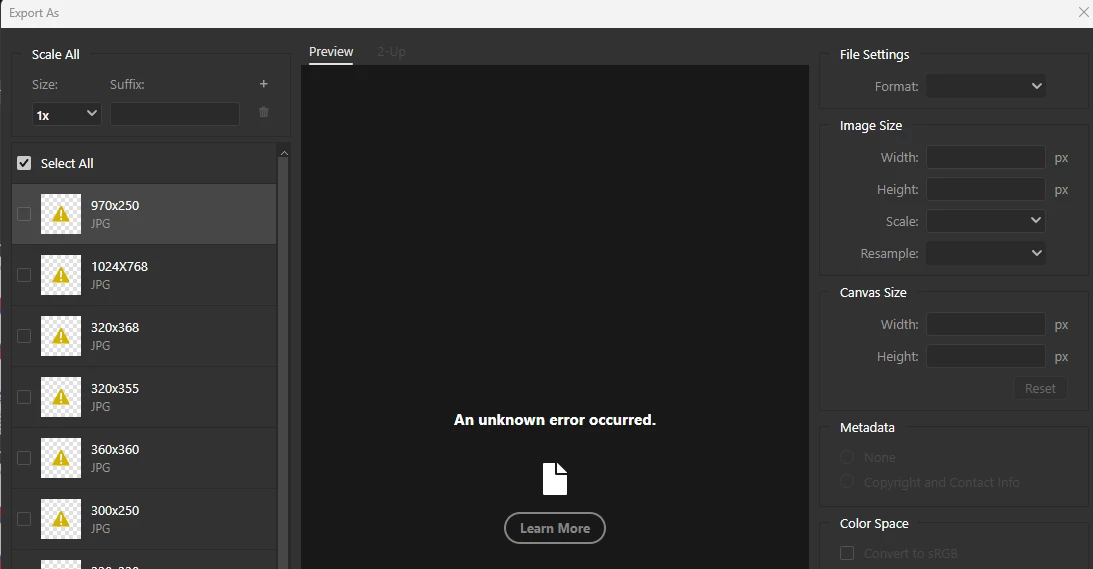
P: Photoshop 27.4 (GA) Export As says "An unknown error occurred."

  • February 23, 2026
  • 35 replies
  • 1021 views

New realease 27.4 - Can't Exports Artboards as JPG and others formats (ctrl+alt+shift+W) 

Whenever you try to export artboards with 'Exports As' and choose JPG, it shows unknown error in all of them. Doesn't matter which way you try to do this or format - the window export is freezed (grey) - not JPG or PNG or others.
*it's also happen in the beta version.
 
Photoshop Ver: 27.4.0
Beta Ver: 27.5.0
 
We'll be glad for a quick reply asap.


    35 replies

    D Fosse
    Community Expert
    Community Expert
    February 22, 2026

    If it were an isolated thing that affected only one or two people that would be different


    Well, it sort of is, I haven’t heard of this happening more than perhaps a couple of times in later years.


    It sounds to me like corrupt preferences. Moving the whole Adobe Photoshop 2026 Settings folder to your desktop is the safest and most effective ways to do a complete reset. This will return the application to clean out-of-the-box factory state. Make sure to save out all your custom actions, brushes etc first; they will be wiped.


    Corrupt preferences can cause inexplicable behavior that usually looks like application bugs. Preferences contain a lot more than your own user settings, it’s the whole application configuration. They are vulnerable to corruption because they are rewritten on every application exit, so small errors accumulate, especially if you migrate from previous versions, and irregular shutdowns can corrupt them.


    The path to the settings folder is (system) > users > your name > appdata > roaming > Adobe > Adobe Photoshop 2026.

    joeh87907460
    Inspiring
    February 23, 2026

    No, it’s not corrupt preferences. And it’s been happening a lot for this current “update”. This is the response I got from adobe’s own AI generated search results, specifically stating “Well it looks like you’re not alone~”:


    It’s not only the current version of Photoshop, it’s also the latest update for Photoshop Beta also. Thanks for the tip on the preferences. I haven’t ever had very good luck resetting them before. 


    I keep a couple of older versions just in case this happens so I just went back to 26.11.3. I hope they fix this soon.

    joeh87907460
    Inspiring
    February 22, 2026

    I updated photoshop to 27.4.0 last night before going to bed. This morning I attempted to use photoshop. I need to export a file as a jpg. I click on quick export as jpg, it opens the save dialog like usual, and everything seems normal, EXCEPT, there is no jpg exported. I try it again and again and get the same result. So I try export as, the dialog comes up and it defaults to png, I change it to jpg in the dropdown menu, the little busy icon shows briefly and then the dialog options all go blank and an error message pops up. I try it again, same results. I close photoshop and open it again and the same results. 


    My question(s) are: When is this going to be fixed? And how do I get a refund for the time that this program is not usable because of the sloppy work by adobe’s so called “engineers”???


    Why can’t these people test this stuff out and ensure that everything works? If it were an isolated thing that affected only one or two people that would be different, but every time it’s always the same, the BUGS affect virtually every user. Adobe should be forced by law to have to pay for it, then they would stop putting out half baked junk that doesn’t work correctly. 
     

    KR Seals
    Community Expert
    Community Expert
    February 22, 2026

    I tried this in PS 27.4 and I worked ok. In your screen capture, it appears that there is no image/data in the Source panel on the Left. The error message agrees with that: “No Valid Asset...” In other words, blank.

    Ken Seals - Nikon Z 9, Z 8, 14mm-800mm. Computer Win 11 Pro, I7-14700K, 64GB, RTX3070TI. Travel machine: 2021 MacBook Pro M1 MAX 64GB. All Adobe apps.
    Joe_Man
    Participant
    February 21, 2026

    I’m currently experiencing issues with exporting photos in that latest download of Photoshop (v27.4).  When I use the “Export As...” function  the screenshot is what I see and I’m not able to use any of the drop downs.

    Is anyone else experiencing similar issues?  


    joeh87907460
    Inspiring
    February 23, 2026

    That’s the same trouble I’m having with it. When I use the “quick export as jpg”, it brings up the save dialog box just like usual when exporting a jpg, and then I click “Save” and it appears to be exporting it, then the dialog closes. I look at the folder in Explorer and find that no jpg has been exported. 

    Then when I use the Save As, I get the exact same thing as in your screenshot. They need to fix this now, and prorate the next month’s charge so that we are paying for a useless, broken product.

    Joe_Man
    Participant
    February 23, 2026

    @joeh87907460 that’s good you can at least see something.  I’m not even able to access the drop down boxes, and I don’t see a preview of the image I’m trying to export.

    Joe_Man
    Participant
    February 21, 2026

    Is anybody else experiencing issues with exporting when using v27.4?

    Every time I try to export it gives a message stating, “an unknown error occurred.”

    Norberto Gonzi
    Participant
    February 26, 2026

    A mi, estuve editando los ultimos 6 dias y solo desde que actualice aparecio el error con mismos archivos base a exportar as como jpg. Hay espacio, no cambie preferencias...etc ufff


    Norberto Gonzi
    Participant
    February 26, 2026

    Listo. Instale la 27.3 y funciona todo de vuelta!!!!