


Minus Front
Known Participant
May 20, 2022

P: Photoshop consuming INSANE amounts of RAM when using Perspective Warp as Smart Filter

  • May 20, 2022
  • 19 replies
  • 3137 views

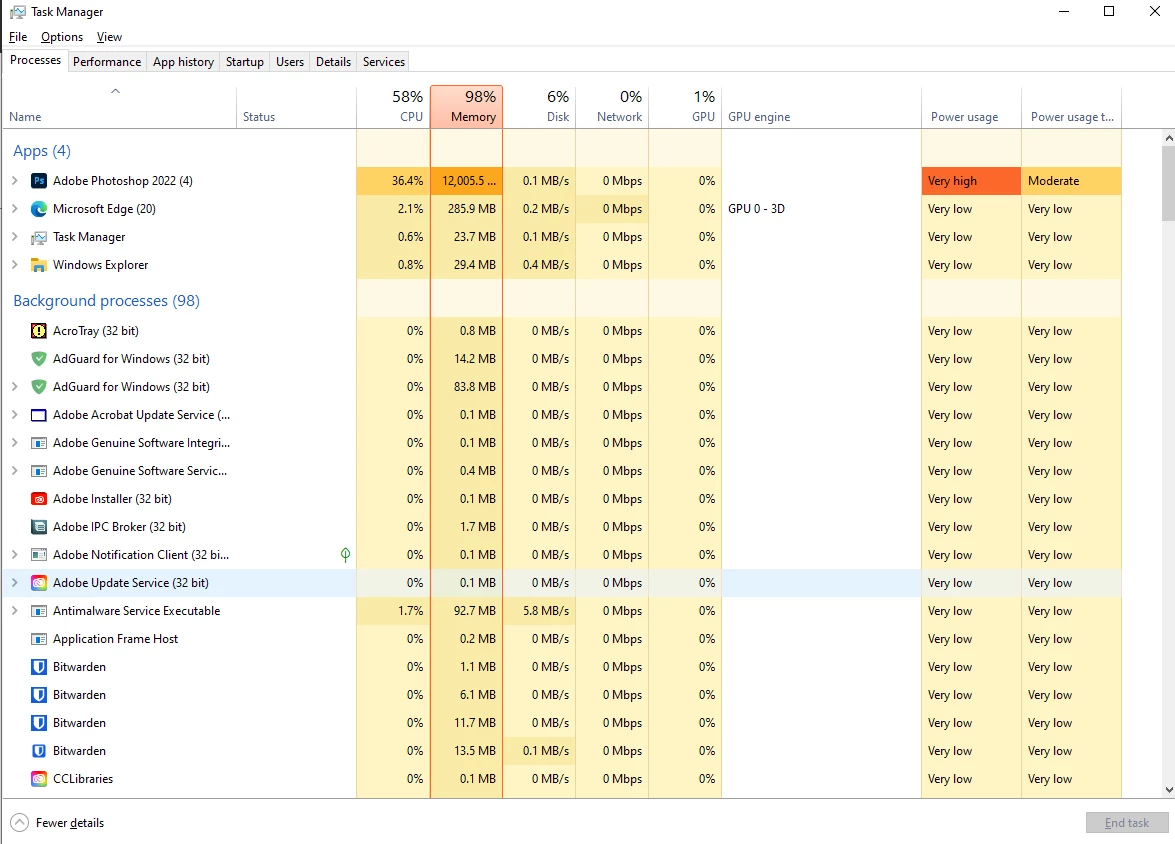
i have 16GB RAM on my PC + 8GB of GPU. Adobe is set to use 70% of that ~8.5GB. 


I have gone through their support page Optimize performance Photoshop (adobe.com) but nothing helps!


Photoshop used to work great until recently but I came back to it this week and using simple tools such as the Perspective Warp and others makes it use 12GB of RAM (see below) and freeze. My documents arent really all that big.


I have tried re-installing photoshop but it is not helping! I have the latest version 23.3.2


Help please I cannot use this programme as it is!


Thank you
 

This topic has been closed for replies.

19 replies

D Fosse
Community Expert
Community Expert
July 3, 2024

@RoastedHead 

There is no such thing as "enough RAM". It is normal and expected for Photoshop to saturate RAM right up to the limit you have set in Preferences.


The heavy load is carried by the scratch disk, with RAM acting as a fast access cache. So all of the available amount is used, and this happens very quickly.


That RAM is not released as you work, it is reused and recycled. Batch processing would be much slower if it was released with every image.


In short - this all sounds normal, but that's impossible to determine until you tell us how much RAM you have, what Photoshop reports as available and what the allocation is set to.

Participant
July 3, 2024

it's either problem with the warp or smart object issue.

Participant
July 3, 2024

definitely not an issue of the scratch disk.
perspective warps just eats up a lot of RAM.
i had to end all background process to let the warps process.
roughly 20gb of RAM used.....


Participant
July 3, 2024

any fix updates on this yet?


trying to use perspective warp on a blank solid colour smart object to create a mockup template for my design.
and the software started to freeze. cant even cancel the process.


D Fosse
Community Expert
Community Expert
June 6, 2024

@taraj26291221 

Not what you want to hear, but 16 GB RAM is simply insufficient. The reason is shared system memory (or as Apple calls it, "unified" memory). The GPU will quickly eat up half of that or more, leaving only 6-10 GB for Photoshop. And that's not enough. Most of that will be used simply by opening the application.


With a GPU having dedicated onboard VRAM, 16 GB should work, although 32 is a bit more comfortable. With shared system memory (like Apple silicon), you should double the amount you would normally need.

Participant
June 6, 2024

I just bought a new Mac book pro M3 16gb ram, after owning my last MacBook Pro for 9 years. Was so exited to finally work at a fast pace - and straight away my photoshop starts using 13gb RAM for me to edit one poster with a few layers. It's so bad I cant do anything, takes about 5 mins just to save a file. I was almost about to return the computer when I realised it's photoshop that is the issue. Does anyone have any solotions?

I have so much work to do but I can't use this program. 

Participating Frequently
April 14, 2024

Did this ever got sorted out? I have exactly the same issue now with 25.6.0 version.

Minus Front
Known Participant
May 23, 2022
quote
Photoshop doesn't "run out of RAM"


Correct. My computer does.


quote
Point being - if this brings your whole system to a halt, you need to increase your free disk space.


Ya. Except I don't. 

D Fosse
Community Expert
Community Expert
May 23, 2022
quote

makes it use 12GB of RAM (see below) and freeze.


By @Minus Front


I'm not saying there isn't a problem in this case, it does seem a lot - but Photoshop should never freeze because it runs out of RAM. Photoshop doesn't "run out of RAM" - it uses the scratch disk. There is no such thing as enough RAM, and that's why you have the scratch disk.


Point being - if this brings your whole system to a halt, you need to increase your free disk space.

Minus Front
Known Participant
May 21, 2022

we can only hope the engineer is up to the challenge.