


Inspiring
January 2, 2013

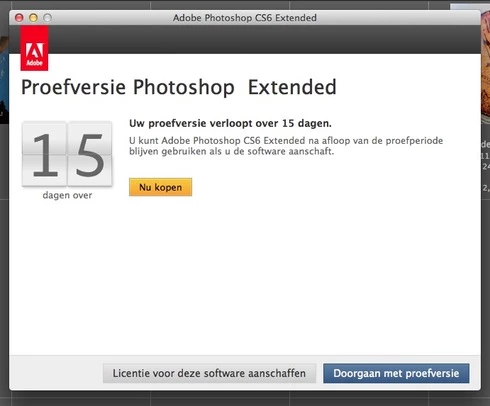
P: Photoshop CS6 extended suddenly reverted to an Extended version trial

  • January 2, 2013
  • 69 replies
  • 1557 views

now I get that message for the purchases of Adobe Photoshop CS 6 Extended. I have already purchased this license since last year. At the previous update is missed. Thought it would be resolved with the update of 13.0.3, apparently not.
This topic has been closed for replies.

69 replies

Inspiring
September 4, 2013
I'm having this problem on Windows x64 v13.0.1 -- all the solutions I've seen seem to involve Mac. FWIW, this is on a laptop that's sometimes used on my home WiFi (or other WiFi networks), and sometimes used at work, behind a corporate firewall.

First, I started getting the Creative Cloud nag screens while at work, and CS6 couldn't find its way to the internet (proxy settings were entered correctly in IE, why doesn't CS6 read those or provide a manual proxy entry option?). So I had to wait to try again at home, and it accepted my license... from that point on I got the standard Photoshop splash screen, instead of Extended. Now, about a week or so later, it has suddenly happened again (launching at work).

Any help for a Windows user? I'm editing multiple Lightroom photos in Photoshop, and it's getting REALLY annoying to have to "continue trial" every time I switch to a new image.

FWIW, I never installed Photoshop Extended, or any CS6 trial, for that matter... I simply installed CS6, entered my key, and had normal operation for about 3 months before this cropped up.
Legend
March 19, 2013
Install the update, and activate once, and it should stick from that point.
icu109
Participating Frequently
March 19, 2013
it's a bug because it is bugging me. I had a trial with extended CS6 on top of a subscription I already had, I actually hit the wrong button and ended up with extended erroneously. Now the "trial" for cs6 extended is over and I can't get my normal PS CS6 subscription version to come up, I only get the splash box wanting me to register, buy, go up from approx 20USD a month which I can afford on Soc Security, to like 50USD a month which I can't afford and don't need till I get a tablet and Touch in the future. Maybe, hopefully. BUT how can I get cs6 to come up and get rid of the nag screen? kfboulier@gmail.com Kathy Boulier 92 Mission Cove, Fort Gratiot, Michigan 48059 810.479.1330 please hurry, burning moonlight.

Inspiring
February 17, 2013
Hi Jeffrey, I'm on a Mac.

It's not important.- Like I said, you can remove the previous post and this one.
I just thought the problem vanished, as I decided to check in PS5, and the problem wasn't there. I then went to PS6, and all was OK for 5 minutes, and then the problem happened.

I'll try to replicate what I did. In this case, it's something that's very small such as pressing an enlargement of a file or something without even noticing that.

In another example, I realized that one can't add small-sized type to a photo and expect sharp excellent results. That took me 6 months to figure out.
I was finve the answer by someone with more experience. However hardly anywhere does one read about type and PS. You can't expect excellent results with small-sized fonts, small DPI, complicated font types, Italic, small images,and so forth. Even with " rasterization"

So thanks again, and as I said feel free to remove this comment and the last one, and you needn't reply. Save the real work for more important questions.

Have a nice evening,

Stacey
Legend
February 17, 2013
Hi Stacey,

Are you on Mac or Windows? If on Mac, is the problem that the application background obscures other floating windows when it's in front? If so, select Window>Application Frame... that should help. If it doesn't or you're on Windows, start a new topic so we can sort out what you're seeing separate to this thread on activation.
Inspiring
February 17, 2013
Hi Jeffrey,

I sent you an e-mail elsewhere about being removed 2 times by another replier.
I sent it via someone else's commentary removal (or maybe it was mine form 1 month ago).

As far as the reply below goes YOU CAN REMOVE IT with my OK, and that's fine.have a, since it is just a mild reply to PS. Rather than "gripe",what I will do is present what I feel are problems in PS to a PRO PS expert independent of Adobe.

I'm sure they'll know if what I perceive as "glitches" in PS are either my inexperience (please read further below), limitations to a specific PS function in a sub-sub menu, or something else.

_______________________________________________________________

Thanks for the answer. My question elsewhere had to do with my files disappearing behind the main PS window, when I move them after they have been nicely sorted with Window >>Arrange>>Float all in Windows. The answers given were attributed to my OS. I still have that problem.

I left it at that, and because I can work around it, I'm not going to belabour the point. There are many other PS small "glitches" or my fault/not being at the level of a Pro Retoucher that I also work around, and leave it at that.

I'm sure there are many other like me. Most people don't bother writing e-mails
to large companies, so a certain percentage "let sleeping dogs lie".

I've used PS since it began, and it's hard to navigate away from it. It is excellent, but I could use other programs for my needs. But it's there, when I taught, I was able to purchase the program and others at educational rates.
I am loyal to Adobe, because of that, even though I may have "small issues".

Thanks again,

Stacey Bindman
Montreal,Quebec,Canada
Legend
February 17, 2013
Hi Stacey, if Photoshop causing file corruption were a widespread problem we'd see thousands of customers screaming at us. In cases where customers have seen file corruptions, it's been hardware related.
Inspiring
February 17, 2013
Jeffrey. Many times the CS employees or staff seem to suggest that the problem lies elsewhere. I just noticed it above, and I was offered this advise to a problem that I mentioned. If you remove this comment, would you please them tell me why it's "off-topic"
Legend
February 17, 2013
Samantha, if there are holes in the preview of the image, it may be a graphics card issue. If the file is actually damaged in some way, it's more likely a low level failure such as bad RAM or a hard disk failure. I would suggest running some hardware diagnostics to try and track down the failure.
Inspiring
February 17, 2013
Samantha, I have plenty of problems with CS6 and am disappointed with Adobe, but as someone that also develops applications I can assure you that the Trial Version bug and the unfortunate file glitches you've experienced are 99% unrelated and purely coincidental. It's like that asteroid that passed earth and the meteor that hit Russia -- they both came from space, but from very different places.

You should probably open a separate bug for your other issue. It's possible that you're having graphics card issues -- try exporting from that file and see if the final image has the 'holes'. If not, it's most likely a graphics card issue. Good luck.