Turning off native canvas has solved it for me. Thabk you so much! I have hundreds of images to get through this week. SORT THIS OUT, ADOBE. You're jacking with my productivity now!
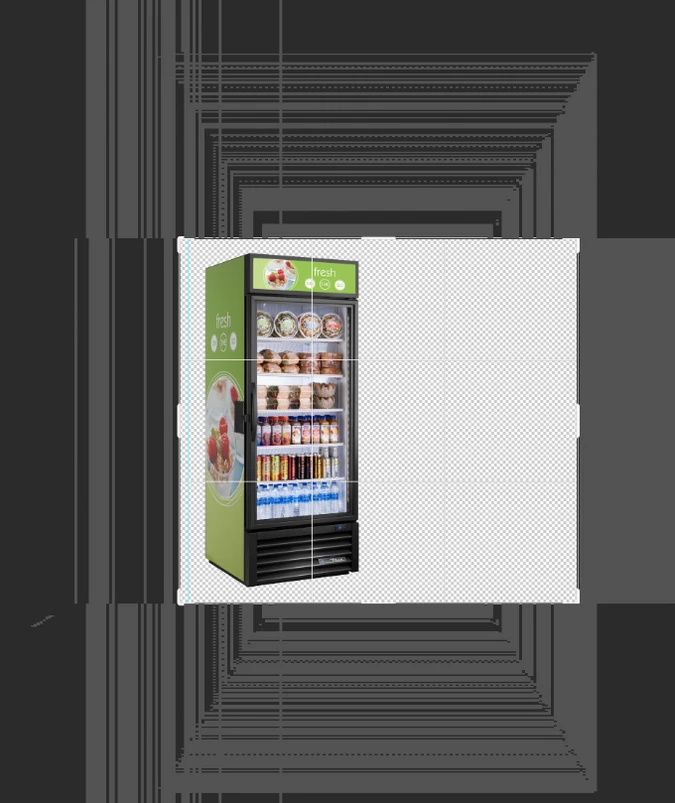
I use the PS22.5. 1It's only been a few weeks now, whenever I open a new project, the canvas appears in the form of diagonal stripes, and I can't see anything. Even opening an image, the same error happens.
First, try disabling GPU in the preferences (Preformance tab). Any better?
Maybe try this : Go to Preferences >Technology Previews and check Deactivate Native Canvas. Then quit and restart Photoshop; any better? If not, recalibrate and build a new ICC display profile, the old one might be corrupted. If you are using software/hardware for this task, be sure the software is set to build a matrix not LUT profile, Version 2 not Version 4 profile. If turning OFF GPU works, it's a GPU bug and you need to contact the manufacturer or find out if there's an updated driver for it. Also see: Adobe Camera Raw graphics processor (GPU) FAQ and troubleshooting
Author “Color Management for Photographers" & "Photoshop CC Color Management/pluralsight"
I treied searching for Negative Image Build Up, I have several screen shots the negative image changes as I open different pictures. The negative image also pulses, flashes, etc if you use any tools, forgot to call tech support during the week. Tried shutting it down, the online thing, but they must have been watching TV on the other side seemed excessive in the response time? Maybe not. really need it to go away. I"m not sure what started it? Didnt see an image size they are small.
Yep! I did exactly the same and went back to 22.4.3. But my workspace won't show in the dropdown menu. I imported it from my saved location and I can see it in the Library folders but can't see it in the dropdown menu within PS. Do you have any idea how I can restore my original workspace?
Unfortunately the 22.5.1 fix created more issues. First launch caused a kernel panic. After rebooting the second launch worked and the canvas artefacting is gone. However, the program freezes on quit reliably. I have rolled back to 22.4.3 until I have time for more extensive testing.



 AdChoices