Inspiring
Aug 17, 2021 5:01 PM UTC
Released

P: Photoshop Ghosting Background

PSD 22.5.0

MAC OS Catalina 10.15.7

This topic is closed to new replies. Start a new post to keep the conversation going.

337 replies

Inspiring
Sep 14, 2021 8:45 AM UTC

There's no update that I can see in the Creative Cloud app. Maybe it will be pushed to customers later? 

Translate
Participating Frequently
Sep 14, 2021 8:40 AM UTC

Thanks Mohit.

That was a quick response and a bug fix.
There is a issue regarding images opening in a cropped view still remaining
with this update.
See below for the example
[image: Screenshot 2021-09-14 at 09.18.08.png]

[image: Screenshot 2021-09-13 at 13.07.47.png]

I would like the images to open at full view/fit to screen mode when
opening as it's always been until the last 2 updates.

Please help to resolve this issue.

Thanks,

Kiran

[Personal info removed by moderator]

Translate
Participating Frequently
Sep 14, 2021 8:18 AM UTC

Dear Mohit,


Many, many thanks for this: it works for me (MacPro 2010, 12x3.46 GHz, AMD 5700XT 8GB, 10.15.7).


Guy.

Translate
Mohit Goyal
Community Manager
Community Manager
Sep 14, 2021 4:33 AM UTC

Hi all,


We're happy to announce the release of Photoshop 22.5.1 which includes the fix for this issue. Check the list of other fixed issues here


To update Photoshop to 22.5.1, click "Update" in the Creative Cloud desktop app next to Photoshop. More detailed instructions for updating


Please feel free to share your feedback with us.

Thanks,

Mohit

Translate
Known Participant
Sep 13, 2021 6:12 PM UTC

Quick note to Jeff Tranberry and the Adobe tech team trying to solve this particular problem.


While there are a number of different Mac configurations that are seeing this particular error, there is a statistically significant portion of them that are happening on iMacs equipped with Radeon Pro 5500 XT series graphics cards.

Along with my own machine, I have seen this in close to a dozen other similarly configured iMacs as well as the numerous reports in this conversation. Perhaps this is a clue as to what is going on with the GPU based glitches? Just thought I'd offer that data point to the conversation.

Like most, I have rolled back to the previous version as the "disable native canvas" trick only offered partial relief from the issue.

Translate
Participating Frequently
Sep 13, 2021 2:30 PM UTC

Hi there, 


I have auto-update on and it's been fairly seemless process barring a few issues in the past.  🙂 
Today, it's been a pain with several issues since the update to PS 22.05. 

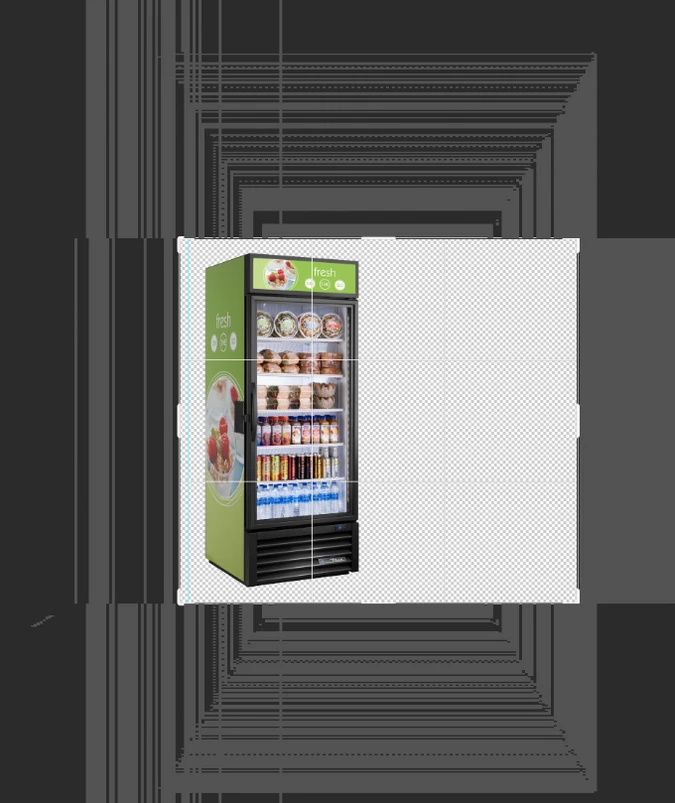
1.  There is this ghosing that appears on the medium and dark grey bg. 


2.  Although no ghosting like #1 appears on light grey bg but when I move the image, it leaves this pixelated trail behind. 


3.  All the images are opening in a reduced window than showing the full image.  I looked through the forum/discussions and Adobe said they've fixed this bug in PS 19 but seems it's reappreared. 


I look forward to getting your help in resolving these issues swiftly. 


Thanks,


K

Translate
Participant
Sep 9, 2021 10:42 AM UTC

Simply downgrade to earlier version and it will be solved. Update in future when this issue is taken care of. Enabling the option Deactivate Native Canvas is making the scroll wheel zoom very snappy.


Translate
Participant
Sep 9, 2021 8:42 AM UTC

hello, ive got some isseus with my photoshop, everytime i click on something the background glitches, does anybody knows how to fix it?

Translate
Ged_Traynor
Community Expert
Community Expert
Sep 9, 2021 9:00 AM UTC

Hi

Try enabling this option in preferences and restarting Photoshop to see if it helps

Translate
Participant
Sep 9, 2021 6:42 AM UTC


포토샵에서 확대축소 기능을 이용하는데 작업화면이 지글거리고 이런 현상은 왜그런건가요?

제 맥사양이 낮은편도 아닌데 말이죠. 이상합니다. 제 PC의 문제입니까? 프로그램의 버그 입니까? 

Translate
Ged_Traynor
Community Expert
Community Expert
Sep 9, 2021 7:15 AM UTC

Hi

Try enabling this option in preferences and restarting Photoshop to see if it helps

Translate
dennisg52183607
Participant
Sep 9, 2021 6:32 AM UTC

Hi,

After updating Photoshop CC to 22.5.0 I'm facing the problem you see in the attached jpg whenever I resize an image.

Clearing preferences, uninstalling and re-installing photoshop didn't do the trick...

Any ideas?

Thanks!

Translate
Ged_Traynor
Community Expert
Community Expert
Sep 9, 2021 7:17 AM UTC

Hi

Try enabling this option in preferences and restarting Photoshop to see if it helps


Translate