


Inspiring
January 28, 2018

P: PNG Images Opens with Distortion

  • January 28, 2018
  • 204 replies
  • 3727 views

From time to time, when I open a png image, it will appear as bright, distorted lines.

I have deleted all Photoshop preference files, uninstalled the app, reinstalled it and restarted the computer. Does not prevent it from happening.

When it happens, I can quit Photoshop and reopen it and the png appears correctly. But then it will happen again later that day or the next. Rinse/Repeat.
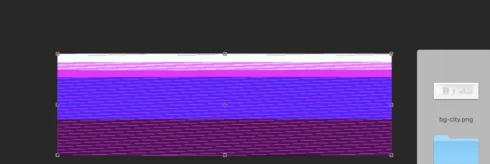


Very annoying. Please get better quality control Photoshop. CC seems to get progressively worse in terms of bugs.

Photoshop 19.1
Mac osX 10.13.2
5k iMac

This topic has been closed for replies.

204 replies

Hannah Nicollet
Community Manager
Community Manager
February 20, 2018
Hi Everyone,

Thank you for the screenshots and files that helped us reproduce this issue. This problem will be resolved in the next update of Photoshop. I will post to this thread when that update becomes available.

Thank you,
Hannah
Hannah Nicollet
Community Manager
Community Manager
February 20, 2018
Hi Ryan,

I'm not sure if anyone was aware of that, but I appreciate the information. I'll see if there's an InDesign case related to this also.

Thanks,
Hannah
Participating Frequently
February 20, 2018


Whenever I am opening an image file like .png, .jpg, .gif etc.. Photoshop corrupting the image. Please check attached image. Currently, I'm using macOS high sierra.

& Please try to resolve this issue asap.


Inspiring
February 19, 2018
Hi Hannah,
Unchecking the Allow Extensions and Load Extension Panels worked fro me but doing that has stopped the dialogue box appearing when I try to use Export As.  I found a post from last year that said ticking these boxes was the way to get the Export As dialogue to appear!  So we have a conflict here if like me we want to do both.  I want to open a png, change hue and saturation with an adjustment layer and then Export As a jpg.
Inspiring
February 16, 2018
This bug is also affecting InDesign!
Inspiring
February 16, 2018
Hi Hannah,

Not sure if you're aware, but this bug is also in InDesign!
Inspiring
February 15, 2018
> This issue is turning out to be more complicated. We are actively working on it. Our hope is that it will be resolved in the next release.>

I can see why this is more complicated that anyone would guess. It just happened again to me—with weeks of not happening at all. I would have thought running a filter would affect it more often, since I run one of two 3rd party filters almost every day. Extensions? They're always plugged in and ready to run, whether I use them or not, and today I didn't use any of them except Doco, which I use daily. Nothing at all unusual was involved. 3 layers, no Background layer, and all I did was drag a PNG file into the document and got the messed up preview. That occurred with any PNG file I dragged in until I quit and relaunched, which is what fixed it the only time it occurred before.

Oh, both times it's occurred, the file was unsaved. But that's normal when I start out, too. And the document was Adobe RGB, but some of the elements being dragged into it were sRGB. Again, nothing uncommon. If there are other steps to take with something this random and infrequent, let me know.
Cosmotl
Participating Frequently
February 14, 2018


Mac OS Screenshots appear glitched when opened in Photoshop CC 2018
Participating Frequently
February 13, 2018
OK, Thanks it sounded like you guys were having issues re-creating the issue and tracking it down.
Hannah Nicollet
Community Manager
Community Manager
February 13, 2018
You are correct that the PNG distortion issue is not resolved in today's release, Matt.

This issue is turning out to be more complicated. We are actively working on it. Our hope is that it will be resolved in the next release.

Thanks,
Hannah