


Inspiring
January 28, 2018

P: PNG Images Opens with Distortion

  • January 28, 2018
  • 204 replies
  • 3728 views

From time to time, when I open a png image, it will appear as bright, distorted lines.

I have deleted all Photoshop preference files, uninstalled the app, reinstalled it and restarted the computer. Does not prevent it from happening.

When it happens, I can quit Photoshop and reopen it and the png appears correctly. But then it will happen again later that day or the next. Rinse/Repeat.
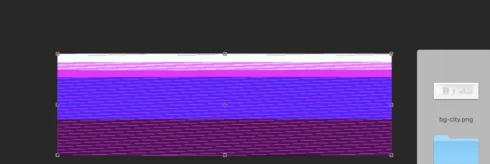


Very annoying. Please get better quality control Photoshop. CC seems to get progressively worse in terms of bugs.

Photoshop 19.1
Mac osX 10.13.2
5k iMac

This topic has been closed for replies.

204 replies

Inspiring
February 6, 2018
Same issue with every PNG file I try and open. This is a horrible bug that needs to be fixed ASAP. Im running High Sierra 10.13.3 with Photoshop CC 19.1.0.
Inspiring
February 6, 2018
I also have this problem, have tried the above suggestions, and still random .pngs open with a glitch distortion. Any news yet on a fix? I have found the new version of CC to have a great many bugs...
Participating Frequently
February 6, 2018
Aha! Having had a good run over the last couple of days I'm back into PNG problems!


I've just tried clicking Application Frame and opening the PNGs up again and it still does it...


I don't know if it's relevant but the glitching/degradation changes radically when cycling through things like 'Change Screen Mode (F)' and zooming in. Here is me cycling through screen modes...


and even getting back to the original screen mode and cycling through again it is different...


and zooming...


J!
mathews47130492
Participating Frequently
February 5, 2018
I'm having this issue as well, though I hadn't quite pinpointed it to PNGs previously, but this makes sense:

https://feedback.photoshop.com/photoshop_family/topics/photoshop-cc-19-1-memory-issue
Participant
February 5, 2018
Exactly the same issue here:

Photoshop 19.1.0
Mac High Sierra version 10.13.3

MacBook Pro 15"
2.8 GHz Intel Core i7
16 GB 2133 MHz LPDDR3
Radeon Pro 560 4 GB
Intel HD Graphics 630 1536 MB

Having tried disabling GPU option in Performance prefs you mentioned. PNG opens fine in Preview/Quick Look.

Strangely enough, when I was trying to screen grab the effect with command+shift+4, repeatedly pressing the command key refreshed the screen with a new/different corrupted version with each keystroke
Participating Frequently
February 5, 2018
I also have had this problem. I didn't have time to trouble shoot this issue and provide the system report. I have since reverted back to 19.0.1 because I had to get things done and also had the issue with the lasso tool with the precise cursor crashing the app. Two things of note otherwise I wouldn't have chimed in: 1. I am a version behind on my Mac OS   
2. I opened a file that had png's that were placed as links, these linked files looked fine at first but soon as I did anything to the file they all got messed up.
Don't know if this will help.
Matt
Hannah Nicollet
Community Manager
Community Manager
February 5, 2018
Thanks for letting us know, Trevor.
Inspiring
February 5, 2018
It works for me, even after having checked again.
Thank you, Piotr
Known Participant
February 5, 2018
Issue happens the same regardless.
Known Participant
February 5, 2018
Issue happens the same regardless.