


Inspiring
January 28, 2018

P: PNG Images Opens with Distortion

  • January 28, 2018
  • 204 replies
  • 3728 views

From time to time, when I open a png image, it will appear as bright, distorted lines.

I have deleted all Photoshop preference files, uninstalled the app, reinstalled it and restarted the computer. Does not prevent it from happening.

When it happens, I can quit Photoshop and reopen it and the png appears correctly. But then it will happen again later that day or the next. Rinse/Repeat.
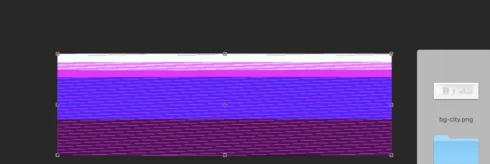


Very annoying. Please get better quality control Photoshop. CC seems to get progressively worse in terms of bugs.

Photoshop 19.1
Mac osX 10.13.2
5k iMac

This topic has been closed for replies.

204 replies

Hannah Nicollet
Community Manager
Community Manager
February 5, 2018
Hi Everyone,

Can you check something for me? Go to Window > Application Frame and see if that is checked. If it is checked, uncheck it (or vice versa) and then attempt to open your PNG again and let me know if it still appears corrupt.

Thank you,
Hannah
Known Participant
February 5, 2018
Dont upgrade to 19.1.
Inspiring
February 5, 2018
Happens to me as well!
It must be a bug between PNG screenshots and photoshop, because it's fine with other apps.

However I found a solution.
If you open your screenshooted file with Preview and save it again to JPEG, it opens okay with Photoshop.
Inspiring
February 4, 2018
Same problem..   It opens all distorted or photoshop crashes. keep sending in reports.  this is a big problem 😞
Photoshop 19.1.0Mac High Sierra version 10.13.3
Inspiring
February 3, 2018
Im following this thread as I have exactly the same problem. So so annoying 
Inspiring
February 2, 2018
Here too. Software is also extremely slow to open and layers lag, even in a very small project. I'm running the latest software. 
Participating Frequently
February 2, 2018
Regardless of these issues I also wanted to second @9764330 thank you to everyone (Hannah esp) for working hard to resolve this!
Inspiring
February 2, 2018
I've noticed a few other strange behaviors that all seem to occur with PNG files.

I do a lot of screenshots for mockups and I am often simply using macOS's built-in screenshot tools to create PNGs of running applications.  This started very recently, but when I open those PNG screenshots in PS (19.1.0) I am presented with the following dialog...


In addition, PNGs are often blank when opening with the image only appearing when I move the window.  Then, toggling layers in these file on-off these files (PNGs) has no effect.  Watch this screen capture video of my trying to open the PNG image of the dialog above and be prepared to be puzzled.

EDIT:  Sorry, CloudApp wasn't cooperating, so here it is on YouTube...


The toggling on-off of layers issue has even occured with PSD files, but a restart of PS seems to fix those.

I've never seen behavior like this before in prior PS versions. 
Inspiring
February 2, 2018
I reverted back to the 2017 version right away as well since everything was working fine on that release. Unfortunately I didn't have the time to work around the fault or record anything, I had to get working again pretty quick. But I was having the exact same issues outlined by everyone else here. Whenever I saved to PNG from my PSD doc I got a scrambled mess. Restarting solved temporarily on a single file but not across all files.

I did check to see if this distortion was only viewable on the affected computer / software, or if it was in fact a corrupted file - and the distortion carried over to every other program on every other computer.

Thank you to everyone working hard to resolve this!
Hannah Nicollet
Community Manager
Community Manager
February 2, 2018
haha I'm sorry Jim. Way to find a silver lining. I submitted the case on this one and I'm adding more details to it as they come in about what's working and what's not. The hardest thing about this issue is that as of yet no one here has seen the same behavior. But thanks for adding more files and info!

Hannah