


Inspiring
January 28, 2018

P: PNG Images Opens with Distortion

  • January 28, 2018
  • 204 replies
  • 3728 views

From time to time, when I open a png image, it will appear as bright, distorted lines.

I have deleted all Photoshop preference files, uninstalled the app, reinstalled it and restarted the computer. Does not prevent it from happening.

When it happens, I can quit Photoshop and reopen it and the png appears correctly. But then it will happen again later that day or the next. Rinse/Repeat.
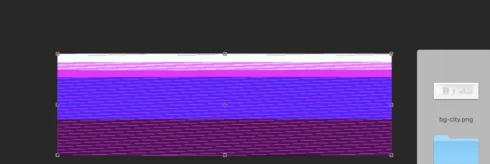


Very annoying. Please get better quality control Photoshop. CC seems to get progressively worse in terms of bugs.

Photoshop 19.1
Mac osX 10.13.2
5k iMac

This topic has been closed for replies.

204 replies

Participating Frequently
February 2, 2018
done (already)!
Hannah Nicollet
Community Manager
Community Manager
February 2, 2018
Can I ask that everyone in this thread who is seeing this problem please click "Me Too" on this issue? The issues we track get ranked by that number and it sounds to me like there are more people seeing this than the vote would seem to indicate.
Inspiring
February 2, 2018
i have the same problem and had to revert back to the 2017 photoshop version. EVERY png i use loads with the colors scrambled and corrupt. 
Participating Frequently
February 2, 2018
Aha!!! 

Hooray, or rather 'booo' but my PNG issue is back. 

Hooray - in that it means I can have a proper look at Hannah's suggestions and see how they work.

Booo - in that I'm right in the middle of a job again and really don't have time to do this!


Opened up a string of PNGs I've literally just generated from a psd and I got this...


(all of 14 them were screwy)

Here is one of them dropped into the post...


looks fine here.

So I turned off the 'Use Graphics Processor' option and then re-opened them and again...


NB the same file has a different glitch look.

I've got the same System's Info as the one I posted but I can re-copy/paste if that's helpful?
Inspiring
February 2, 2018
working perfect at my side...version 19.0.1
Inspiring
February 2, 2018
Hi,
I am commercially using Photoshop here in Finland with hundreds of PNGs each day. I am having the same problem, but I can add that the colour effect I am getting is a mixture of previously worked on files. Adobe took over my Mac yesterday and did a whole load of resetting of everything, and it worked briefly OK - but now bad again.
I would love a solution to this...
Inspiring
February 2, 2018


I'm experiecing this problem when importing or transforming a PNG , my drivers are updated. I'm running Photoshop CC2018 in OSX Sierra 10.13.3 with a Radeon Pro 575 (iMac 18.3)

Inspiring
February 1, 2018
Same here... Almost all PNGs are scrambled in PS 19.1.0.

I've unchecked "Use Graphics Processor" in preferences and this seems to help, but this isn't a good long-term solution.

I am using a 2017 MacBook Pro with Intel Iris Graphics 650.
Hannah Nicollet
Community Manager
Community Manager
February 1, 2018
Okay thanks for running the test Caitlyn. That's helpful to know!

Hannah
Hannah Nicollet
Community Manager
Community Manager
February 1, 2018
Thanks Cristen. So you also saw it on 19.1?