


Inspiring
January 28, 2018

P: PNG Images Opens with Distortion

  • January 28, 2018
  • 204 replies
  • 3726 views

From time to time, when I open a png image, it will appear as bright, distorted lines.

I have deleted all Photoshop preference files, uninstalled the app, reinstalled it and restarted the computer. Does not prevent it from happening.

When it happens, I can quit Photoshop and reopen it and the png appears correctly. But then it will happen again later that day or the next. Rinse/Repeat.
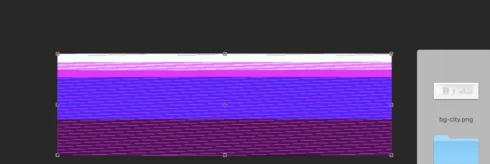


Very annoying. Please get better quality control Photoshop. CC seems to get progressively worse in terms of bugs.

Photoshop 19.1
Mac osX 10.13.2
5k iMac

This topic has been closed for replies.

204 replies

Inspiring
March 23, 2018
Hi. I have been having the same problem for at least 6 months with PNG files corrupting upon import. It takes lot of time to use work-arounds. 

When will a fix be released?  I can hold my clients off a bit longer, but am running out of time. Does Adobe ever offer partial refunds for the many bugs released with updates to help offset the time loss & frustration? Between InDesign, Illustrator, Photoshop, there have been many glitches. 
Inspiring
March 23, 2018
Hi. I have been having the same problem for at least 6 months and it's costing me a lot of time to find work-arounds. As with InDesign, if there were competition, Adobe wouldn't be able to get away with this backsliding and slow response to their many bugs. We pay monthly; our jobs depend upon it, and we don't ever get a refund of subscription dollars for the glitches that are released with updates in AI, ID, PS, et al. 

When is the fix going to be released? Can we get an ETA? I can hold my clients off a bit longer, but am running out of time. 
Hannah Nicollet
Community Manager
Community Manager
March 21, 2018
Sure - wetransfer would be good. Thank you.

Hannah
Participant
March 21, 2018
The file is around 500 MB. Should I send via https://wetransfer.com/ or another platform? 
I opened today around 6:30 pm.
Hannah Nicollet
Community Manager
Community Manager
March 21, 2018
Hi Andra,

When was the last time you opened this file? This thread concerns png files, not psds. I'd like to take a look at it though. Would you please email the psd to me? I'll attach my email below.

Thanks,
Hannah

Participant
March 21, 2018
It is a PSD file. I opened in Illustrator and in Preview. All programs showed same distorted lines.
Hannah Nicollet
Community Manager
Community Manager
March 21, 2018
Hi Andra,

Thanks for sharing that screenshot. Is that a png that you were attempting to open? Have you tried to open this image in preview or any other programs?

Thanks,
Hannah
Participant
March 21, 2018

Hello All,

I have updated to the latest version of Photoshop 19.1.2., but when I open my PSD file it has the same problem like many people here. 
I use macOS High Sierra Version 10.13.3

Please help!

Inspiring
March 21, 2018
Wow, thank you!! Sure enough there is an update there today! Hopefully this fixes the issue which has been absolutely awful to work around. Thank you again.
Inspiring
March 21, 2018
It came out last week, if I remember correctly.  If The AdobeCC did not offer the update, you sometimes need to log out and back in to have it force itself to find out about updates. (I wish Adobe would fix that to be more reliable and quick to pick up on updates)