


Inspiring
January 28, 2018

P: PNG Images Opens with Distortion

  • January 28, 2018
  • 204 replies
  • 3726 views

From time to time, when I open a png image, it will appear as bright, distorted lines.

I have deleted all Photoshop preference files, uninstalled the app, reinstalled it and restarted the computer. Does not prevent it from happening.

When it happens, I can quit Photoshop and reopen it and the png appears correctly. But then it will happen again later that day or the next. Rinse/Repeat.
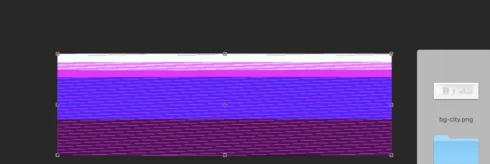


Very annoying. Please get better quality control Photoshop. CC seems to get progressively worse in terms of bugs.

Photoshop 19.1
Mac osX 10.13.2
5k iMac

This topic has been closed for replies.

204 replies

Inspiring
March 21, 2018
The question is.....when is that coming out???????
Legend
March 13, 2018
Update Photoshop to 19.1.2. It will fix this issue.
Participating Frequently
March 13, 2018


After updating to Photoshop 19.1.0 on OS X 10.12.6 this morning I discovered that opening screenshots results in a corrupted image.

Example:

Original screenshot:


How it looks in Photoshop:


This happens consistently with every screenshot, but other files seemed to be fine. If I drag the screenshot into a document as a smart object, it displays fine—until I open the smart object, at which point it corrupts.

I suspected it was something to do with the colour profile as PNGs set to sRBG were opening fine. I made a new document with the colour profile set to Display (the default for screenshots on OS X), put some stuff into it and saved it as a PNG.

Opening that PNG up resulted in the same sort of corruption show above.

So it seems to be limited to PNGs with a colour profile set to Display. Seems small, but it's very frustrating at the moment as I use a lot of screenshots in my work. Hope it gets fixed soon!
Inspiring
March 13, 2018
Fixed for me too.
Peter
Pete.Green
Community Manager
March 13, 2018
Thank you for confirming it's fixed for you Amarneethi!
Participant
March 13, 2018
Yes it got fixed. Will post an update if it happens again. Thanks much!
Pete.Green
Community Manager
March 13, 2018
This PNG distortion issue should be fixed with the Photoshop CC 2018 (19.1.2) update which is now available. 
Please install the update and let us know if you still see this issue.

To update, click Update next to Photoshop CC in the Creative Cloud desktop application.
If you don't see the update right away, click the 3 dots in the upper right and choose Check for App Updates.

Regards
Pete
Participant
March 12, 2018


Whenever I try to open an image saved from the web or saved from a different app (both Adobe's and 3rd party's) it shows a color bands like this. You can see the actual file's screenshot taken from Adobe XD below this image.


You can check the original image in this link incase you wanna test.

https://drive.google.com/file/d/1JaXbJaTQhD81zmvxnt9-G9veKXTsCiD1/view?usp=sharing

This is so annoying as I cannot open any images that is modified or created outside Photoshop!

I tried different color settings, but the image only keeps changing into different color bands.


Thanks in advance.
Inspiring
March 12, 2018
Shawnna, it would be one thing if this was a standalone product that you purchase once and then never pay for again... but guess what - Adobe is taking money out of our pockets every month for more and more bugs each time.... and they just INCREASED THE FEE! Pretty unacceptable.
Colorola
Participating Frequently
March 12, 2018
I here you, but you know what? Adobe now charges 50 bucks a month for the privilege of not whining...