


Inspiring
January 28, 2018

P: PNG Images Opens with Distortion

  • January 28, 2018
  • 204 replies
  • 3726 views

From time to time, when I open a png image, it will appear as bright, distorted lines.

I have deleted all Photoshop preference files, uninstalled the app, reinstalled it and restarted the computer. Does not prevent it from happening.

When it happens, I can quit Photoshop and reopen it and the png appears correctly. But then it will happen again later that day or the next. Rinse/Repeat.
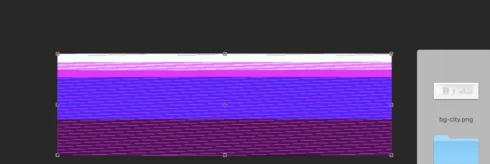


Very annoying. Please get better quality control Photoshop. CC seems to get progressively worse in terms of bugs.

Photoshop 19.1
Mac osX 10.13.2
5k iMac

This topic has been closed for replies.

204 replies

Inspiring
March 12, 2018
Wow, getting really tired of all the whining in my inbox every day. Put your big boy pants on and do a roll back already. Isn't that what it's there for? I dealt with this issue a full 30 min before rolling back to a previous version. I spent one hour re-setting my preferences and plugins and it's been smooth sailing the past month. I can now (quietly) wait for the update to come through without stressing. There's nothing in the current buggy version I'm missing out on, I have a perfect product that does what I want and my work flow continues without interruptions. If you're not prepared for the speed bumps life throws at you, you're not going to get very far very fast. 
JohanElzenga
Community Expert
Community Expert
March 12, 2018
I understand your frustration, but some things are easier to solve than others. And every solution has to be tested, to make sure that it doesn't introduce new bugs. It can be hard to have patience, but one thing you cam be sure about is that 'these guys' are not playing cards while you are waiting for a solution.
-- Johan W. Elzenga
Participating Frequently
March 12, 2018
Hello Hanna!!

This is an almost 1-month-old issue... What are you doing guys??
Every half an hour I'm doing restart Photoshop to open every PNG files. When will this one be resolved in the next release?
Inspiring
March 10, 2018
Hi,

I am having the same problems.  Un-ticking those two boxes did not make any difference.

I am having to open the .pngs in Ai, save as .jpg, re-open in PS and then remove the white spaces.

Seeing as we are largely people using this software professionally, we're not making printable cards in Publisher to save money here, perhaps we should invoice Adobe for the extra time it is taking us to complete things 😉
Inspiring
March 10, 2018
> Anyone know how to unfollow this officially? >

It says Unfollow at the top of the page. That doesn't work? My problem is the opposite. They stopped sending me emails for anything and I wish they'd resume.<G>
Inspiring
March 9, 2018
Same. Really annoying.

**Add that to your list of bugs to fix Adobe. lol
Participant
March 9, 2018
I've clicked "Stop receiving notifications about this problem" on the email notification for the problem every time but still I get emailed replies. Anyone know how to unfollow this officially? Nothing seems to be working and this thread gets a lot of posts.
Inspiring
March 9, 2018
I work with PNG files all day so this is a major disturbance! I have to export the files first to prevent this from happening which adds up fast time wise...  
Inspiring
March 9, 2018


Hi,
sometimes when I open a png or jpg files this is the outcome.
Sometimes it happens as well when I resize an image with a smart object which "explodes"  
in a multicolor image. It's not so smart.
Quit PS, reopen image and it's all right

Thanks

cathyling
Participant
March 8, 2018
Hi Carol - do you mean the boxes that say "Allow Extensions to Connect to the Internet" and  "Load Extension Panels" ?