


Inspiring
January 28, 2018

P: PNG Images Opens with Distortion

  • January 28, 2018
  • 204 replies
  • 3726 views

From time to time, when I open a png image, it will appear as bright, distorted lines.

I have deleted all Photoshop preference files, uninstalled the app, reinstalled it and restarted the computer. Does not prevent it from happening.

When it happens, I can quit Photoshop and reopen it and the png appears correctly. But then it will happen again later that day or the next. Rinse/Repeat.
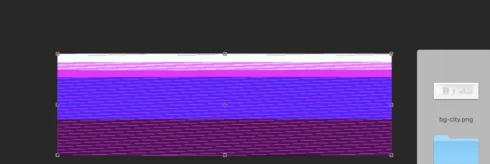


Very annoying. Please get better quality control Photoshop. CC seems to get progressively worse in terms of bugs.

Photoshop 19.1
Mac osX 10.13.2
5k iMac

This topic has been closed for replies.

204 replies

Inspiring
March 8, 2018
Bekki-your comment helped me.

This fixed my problem too: go to photoshop preferences -> plugins -> uncheck 2 extensions at bottom of window.

Thank you!
Beaker77
Participating Frequently
March 8, 2018
Yes I have the issue on 19.1.1 and only happened with this update. 19.1 was fine. Not impressed
animol
Participant
March 8, 2018
Ok thanks, that's exactly what I've done. I changed the png file to another one and it works fine now 🙂
Inspiring
March 8, 2018
It hasn't been fixed yet 🙂 try to restart photoshop - it helps for a while. Also, avoid PNG files if you can. good luck
animol
Participant
March 8, 2018
Hey everyone, I am just wondering if this issue has been resolved yet as I am having the same issue. I have a school assignment due next week so a reply would be appreciated. 
Hannah Nicollet
Community Manager
Community Manager
March 8, 2018
Hi Stuart,

This will actually be resolved in 19.1.2, so if you're running 19.1.1 you may still run into this. However I'm not surprised that you aren't necessarily seeing it since this is an intermittent issue. 

That said, I will post to this thread when 19.1.2 becomes available. 

Thanks,
Hannah 
Colorola
Participating Frequently
March 8, 2018
Hi, I'm just chiming in here to say that the latest update seems to have resolved the issue for me. I'm now able to open .png files with no problem. 19.1.1 Thanks Hannah for taking all the heat.
Inspiring
March 8, 2018
Any idea how long until the next update? I hate having to quit PS and restart it all day long!
Hannah Nicollet
Community Manager
Community Manager
March 7, 2018
Hi Alex,

The png distortion is a known issue and will be resolved in the next update to Photoshop. But you're seeing the same distortion with jpgs? Your video only includes a png - do you have a screen capture showing that distortion with a jpg?

Thanks,
Hannah
Inspiring
March 7, 2018


I open up any jpeg or png image in photoshop and the only way I can describe it is that it glitches out/ distorts itself and it won't bring up my image to work with. It comes up as different colored bars and I can see different images I've worked with before inside of those colored bars