


Inspiring
January 28, 2018

P: PNG Images Opens with Distortion

  • January 28, 2018
  • 204 replies
  • 3726 views

From time to time, when I open a png image, it will appear as bright, distorted lines.

I have deleted all Photoshop preference files, uninstalled the app, reinstalled it and restarted the computer. Does not prevent it from happening.

When it happens, I can quit Photoshop and reopen it and the png appears correctly. But then it will happen again later that day or the next. Rinse/Repeat.
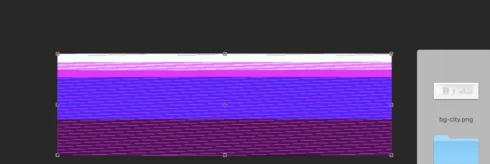


Very annoying. Please get better quality control Photoshop. CC seems to get progressively worse in terms of bugs.

Photoshop 19.1
Mac osX 10.13.2
5k iMac

This topic has been closed for replies.

204 replies

Inspiring
March 7, 2018


There is a major glitch where when opening images in PS or opening smart objects or dragging and dropping graphics, the layer starts glitching in random colors, shapes, and lines. It happens randomly. You must restart PS every time it happens to clear it and it’s happening more and more. Not sure if this is an Apple Issue or a Photoshop issue.

See screenshots: 
https://product-images.ibotta.com/admin/2018-03-07/7f3cece9994c2cfescreenshot_1.png
https://product-images.ibotta.com/admin/2018-03-07/9dc5680b9abc40bbscreenshot_2.png
https://product-images.ibotta.com/admin/2018-03-07/bd94cad7a9552f38screenshot_3.png
Inspiring
March 7, 2018
At least - having finally worked out it was PNG only (changed screen grabs in terminal to be saved as JPG and cured issue) I can stop worrying about my MBP GPU being fried!
Inspiring
March 7, 2018
I bet everyone here has this on a mac. Me and a colleague are replicating this with JPGS.  Its mental. My money is on this been a mac graphics graphics processor bug. I noticed a similar issue 3 years ago when "quick-looking" very long / tall spreads (large pixel dimensions) via the  "preview" native mac os  app, once they touch preview app's render engine they get corrupted. Try CC PS graphics setting to normal / basic turn of processor computation blah blah blah and optimize your cache tile size) oh and reset your SMC  + PRAM.. I think you can also hold a some combo of btn's and reset your prefs in CC on opening. It's a massive massive drag  but it is the only way I could fix it myself. I efen hate CC for UI design. CS6 was the last bastion of reliable robustness. Seriously only use this crud-family of software because im trapped in my company Cloud plan. All those useless features, all those bugs. Not to mention library sync, F off. Open source software like Sketch Ruby is way more reliable lately.
Inspiring
March 7, 2018
ow about a "Pause Subscription Payment until Adobe Fix Serious BUG" in the Creative Cloud Application ?

Adobe, you cannot keep taking people's money for incomplete and workflow-stopping software. One thing is to have major bugs in your software which are obviously incapable of fixing, that could/can be understood but when such is the case you should have the decency and professionalism to also compensate people for that in that you charge them 50% less on their subscription until you fix a show-stopping and proved bug.

I wonder why we all keep taking this subscription up the rear and monthly pay a super-premium only to be beta testers. How many of us go to BestBUY and haul a TiVo for $1k home, have it not work and go - "Oh Well, hopefully they'll fix it in a month or two"..,.. No way, anyone experiencing such would immediately return the device, get another or their money back...

If Creative Cloud Subscribers don't pay - Adobe kills the license immediately and does not wait 6 months.

But we can't do that with Subscription-based software. Which is why Subscription-Based software is as bad as Piracy, at least in the case of Adobe. Speedgrade for instance suffers from bugs dated back to 2014. In 2018 Adobe just kills the software and all the folks who subscribed to SG in all those years are left with a software that has NOT gotten any of the serious bugs fixes and is now dead...

If the bible is true then such behaviour is not what is getting you a ticket to heaven !
Inspiring
March 6, 2018
Thanks for pointing that out Bekki!! Don't know how I missed that before. Maybe something to do with merged comments? (I thought I read all of the comments last week, but do not remember seeing that one for turning off the extensions options.)
Anyway, that fixes my problem as well.  
Inspiring
March 6, 2018
Hi, I have ended up reading through this thread after having the same problem with png files on my new MacBook running Ps 19.1.1 but have resolved it by unchecking the 2 extensions boxes in the plugins preferences as advised. (bizarrely they are both checked but working fine on my iMac also running Ps 19.1.1) 

I just thought I'd jump in to confirm that worked for me so hopefully that will work as a temporary fix until the next update.
Inspiring
March 6, 2018
You know AMPhoto I was worried about this same issue when it comes to rolling back to a prior release. I think I'm going to stay in the present and use this crazy method to work around it with illustrator. This just takes extra time. I don't have a problem importing/embedding psd files so as long as I turn all of my images into psd I can import them. 

Lets hope they are quick on the repair! 
Inspiring
March 6, 2018
How about Adobe get off their ____ and put out a patch for a show-stopping problem like this?  Adobe should not be making its customers wait until a full release to fix a problem that has absolutely no workaround. 
AND ROLLING BACK TO A PRIOR RELEASE?? ARE YOU KIDDING?What am I supposed to do, roll back to the release to open my file. Then upgrade to use the features I need. Then roll back again to open another file, then update again to edit that?
Do you actually understand what you are requesting your customers to do?
This is stupid!  
It is absolutely unforgivable, the way Adobe is treating its customers on matters such as these.
Hannah Nicollet
Community Manager
Community Manager
March 6, 2018
Sorry for the frustration, Carol. As it's impacting your work on a daily basis, you might want to consider rolling back to a different version until the update comes out. That work around sounds kind of tedious.

If it helps, here's a quick guide for installing previous versions: https://helpx.adobe.com/download-install/using/install-previous-version.html

Regards,
Hannah
Inspiring
March 6, 2018
Hi Hannah,

It was a hair-pulling day over this photoshop glitch. Glad to hear it will be fixed.

For now, the only work around I found is: I have to import everything into adobe illustrator then export the image as a psd to the desktop then embed place it into photoshop document and edit it as a smart object.

It's really adding extra time onto my schedule so I will be very happy when this issue is repaired.

Thanks for getting back to me. Appreciate your quick response. 
Carol