


Inspiring
January 28, 2018

P: PNG Images Opens with Distortion

  • January 28, 2018
  • 204 replies
  • 3726 views

From time to time, when I open a png image, it will appear as bright, distorted lines.

I have deleted all Photoshop preference files, uninstalled the app, reinstalled it and restarted the computer. Does not prevent it from happening.

When it happens, I can quit Photoshop and reopen it and the png appears correctly. But then it will happen again later that day or the next. Rinse/Repeat.
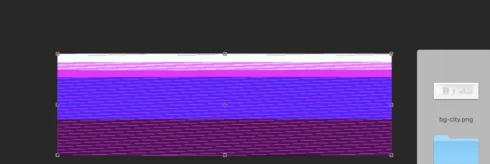


Very annoying. Please get better quality control Photoshop. CC seems to get progressively worse in terms of bugs.

Photoshop 19.1
Mac osX 10.13.2
5k iMac

This topic has been closed for replies.

204 replies

Hannah Nicollet
Community Manager
Community Manager
March 6, 2018
Hi Carol,

Perhaps you've seen that this is the official response by now, but the png issue will be resolved in the next update of Photoshop.

Thanks,
Hannah
Inspiring
March 6, 2018
Patrick did anyone ever get this resolved? I'm having the same issue. Will not accept png/screenshots. I was able to import screenshot into AI and export as a psd, then import into photoshop as a psd. What a headache this is.
Inspiring
March 6, 2018
Please fix soon!
Inspiring
March 5, 2018

Sadly, not until Adobe's marketing feels their customers have suffered enough to make it worth their while.Adobe doesn't care about its customers.  This sort of bug requires an immediate fix! Not waiting until the next quarterly or annual patch or release!

Beaker77
Participating Frequently
March 5, 2018
It does this with all png's. I have just reverted back to a previous version of Photoshop to get around it. Defeats the object of paying for software that includes updates that are not fit for purpose.
Known Participant
March 5, 2018


All of the sudden I can't open any screen shots in Photoshop!? I don't know why...Any screen shot I take with the grab app or the Logitech mouse button isn't opening and looks like below:


What's happening? And is there anyway to fix this?

TIA 🙂
Inspiring
March 4, 2018
You can also open in Preview and hit select all and copy paste to Photoshop.

That will be the new standard I guess... You need another application to open a file and copy paste to Photoshop. That way adobe does not have to deal with File Systems when loading only when saving. But come another year or two one will probably need another app or plug for PS to achieve that too !!!
Inspiring
March 4, 2018
Dito - They (adobe) has totally stopped caring about their customer's wishes - all they care about are their customers' Money.

Photoshop adheres to one LAW only. Murphey's Law. Every that can go wrong WILL go wrong.
Inspiring
March 4, 2018
Hi Hanna,

why is that the general quality of adobe products has become so bad ?
Your subscription service should have provided you with more cash thus upping your Quality Assurance Department. But it is quite the contrary. People have never been more unhappy with your software which in return has never been more buggy !

The competition is literally running circles around you when it comes to build quality. It is not quite there yet, feature wise but in another year or two it will be.

Photoshop paved the way for adobe but at the rate at which you continue to degrade it, it could also become the software which destroyed you ! 

I really don't want to switch but I spend a lot of hours in PS every day and 80% of that time I am getting frustrated due to all the bugs you have piled up the past 8 years. I used to have less features in photoshop back in the days but when I was working with the software I might have gotten frustrated due to not being able to make a deadline or nail a design but this day and that in the year of Lord 2018 the bugs in PS are unbearable and causing 100% of frustration. Heck, I don't even get to be frustrated over not meeting a deadline I am already so frustrated over Photoshop's BUGs at that point that it doesn't matter . Don't you have beta testers anymore ?
Inspiring
March 3, 2018
Having the same problem. And not just that but a lot of others. Since I've upgraded to 2018 version nothing is working properly and it's such a waste of time and my money. I'm so disappointed by Photoshop cc 2018!!!