


Inspiring
January 28, 2018

P: PNG Images Opens with Distortion

  • January 28, 2018
  • 204 replies
  • 3726 views

From time to time, when I open a png image, it will appear as bright, distorted lines.

I have deleted all Photoshop preference files, uninstalled the app, reinstalled it and restarted the computer. Does not prevent it from happening.

When it happens, I can quit Photoshop and reopen it and the png appears correctly. But then it will happen again later that day or the next. Rinse/Repeat.
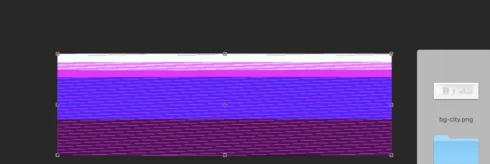


Very annoying. Please get better quality control Photoshop. CC seems to get progressively worse in terms of bugs.

Photoshop 19.1
Mac osX 10.13.2
5k iMac

This topic has been closed for replies.

204 replies

Inspiring
March 2, 2018
OP Here.....

Came across a new problem with Photoshop & pngs....

I had cut this woman out in Photoshop and saved it as a png. The new png file that was created added some odd little bits and pieces beside her face that were not in the actual working document. They were random parts of the image that were duplicated and pulled there.

I even put that resulting png file in After Effects and the odd glitched elements showed up in AE as well.

When I quit Photoshop to restart it, it actually removed the glitched elements from the png file and therefore AE updated to not show them as well.

Very odd.

Hannah Nicollet
Community Manager
Community Manager
March 2, 2018
Being a publicly traded company I can't share timelines, but releases come out at fairly reliable intervals, so looking at those should give you a general idea. Here are the last few:

19.0         Oct 19
19.0.1     Nov 13
19.1         Jan 23
19.1.1     Feb 12

This one will be resolved in the next release, which is 19.1.2. Hope that helps.

Thanks,
Hannah
Inspiring
March 2, 2018
me too
Hannah Nicollet
Community Manager
Community Manager
March 2, 2018
separate issue

Please reference the new conversation here: PS 2018: Why are my files opening as "Indexed color" instead of RGB
Inspiring
March 1, 2018
Glad to hear this is already fixed. Any timing on pushing out the update?Can a minor update be sent with just this issue? I'm really stuck on why current job with no way to edit my files at the moment....  Well, I guess I could use another product, but that defats the purpose of spending $120 a year, doesn't it?
neo_adobe
Participating Frequently
March 1, 2018
Hi, solved the opening issue by disabling in preferences plug-ins "allow extensions to connect to the internet" as suggested by Hannah.
BTW didn't have the problem with Lightroom CC
However why are the files opening as "Indexed color" and not RGB?
My export setting:
PNG-8
Perceptual
Diffusion
Transparency
No transparency ditter
Embed color profile (it's Adobe RGB (1998)

Looking forward to your reply, thanks
Beaker77
Participating Frequently
March 1, 2018
Me too, ridiculous. What's happening with adobe at the moment. Endless problems since updating. Have to use Preview to open a png. It's a good job I'm not spending nearly £50 a month for CC. Oh hang on
Inspiring
February 28, 2018
Hi Hannah,

I've been having the same issue with PNG files. When you say an update to fix this is coming, are you talking days, weeks, or months? Ballpark estimate is fine since it will help determine my interim solution.
Hannah Nicollet
Community Manager
Community Manager
February 28, 2018
Hi Ryan,

I didn't find a case for this filed with InDesign. Do you have any screenshots that you could share of this behavior happening in that app? Feel free to either post it here or email me anything that would help them see the problem and I'll include it in the case.

Thanks,
Hannah

Hannah Nicollet
Community Manager
Community Manager
February 27, 2018
Sorry to hear that but it will be resolved in the next update. If you post to this thread or click Me Too you'll be notified when that update becomes available.

Thanks,
Hannah