


Inspiring
January 28, 2018

P: PNG Images Opens with Distortion

  • January 28, 2018
  • 204 replies
  • 3853 views

From time to time, when I open a png image, it will appear as bright, distorted lines.

I have deleted all Photoshop preference files, uninstalled the app, reinstalled it and restarted the computer. Does not prevent it from happening.

When it happens, I can quit Photoshop and reopen it and the png appears correctly. But then it will happen again later that day or the next. Rinse/Repeat.
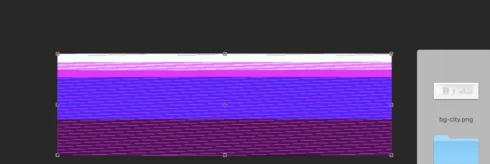


Very annoying. Please get better quality control Photoshop. CC seems to get progressively worse in terms of bugs.

Photoshop 19.1
Mac osX 10.13.2
5k iMac

This topic has been closed for replies.

204 replies

Hannah Nicollet
Community Manager
Community Manager
January 31, 2018
I'm sorry Michelle. So far no one in house is seeing this and we tried the one sample png that a user sent us who said he was seeing this and it looked fine on our machines.

Can you please go to Help > System Info and then copy and paste the contents of that window here? Also would you mind emailing me a png that won't open properly for you along with a screenshot of how it appears on your machine? I'm creating the case for this but it's easier when we are actually seeing it. 

Thanks,
Hannah

Inspiring
January 31, 2018
Any news? I'm sitting here at a standstill with my work because of this. 
Known Participant
January 31, 2018
I'm having the same problem as above! They (.png) open up fine using other programs.
Inspiring
January 30, 2018
I am having the same issue and I unchecked the box you requested. Still happening. 
Hannah Nicollet
Community Manager
Community Manager
January 30, 2018
Hi Liza,

Please reference my reply above - would love to hear the results of your test.

Thank you,
Hannah
Participant
January 30, 2018


Second issue in a couple days. For some reason, sometimes when I open images it comes up as just a fustercluck of colours. I can close the image and reopen it but it doesn't help. Closing photoshop doesn't help. 

I'm using PS CC 2018, fully updated, for Mac. 
Participating Frequently
January 30, 2018
My CC 2018 is now working fine with regards to the PNG importing/smart object/opening although I couldn't say why (I did have 2017 up and running at the same time earlier so maybe that nudged it back into action).

FYI I am running the 19.1.0 release and this is what my 'performance' window looks like...

Inspiring
January 30, 2018
for me it's working fine.....dragging n dropping perfectly + opening also fine..
 
Hannah Nicollet
Community Manager
Community Manager
January 30, 2018
Hi Patrick (and everyone else who is having this problem):

Thanks for letting us know and for giving sample files to test.

I'm not seeing these same issues with your files on my machine. Would any of you who are seeing this please try disabling your GPU and then see if how your PNGs look after that? Photoshop > Preferences > Performance and then uncheck "Use Graphics Processor."

Thank you,
Hannah

Participating Frequently
January 30, 2018
Aha... my post has been merged with this post (see above). Yes, in the same boat! 

It happened to me before opening png screenshots generated from my mac ('applekey' + 'shift' + '3'). Not sure if it's helpful but my PNGs (above) were taken from dropbox although saved locally with Smartsync?

I also realised I didn't post my platform etc...

iMac (Retina 4K, 21.5-inch, 2017)
Processor -   3.6 GHz Intel Core i7
Memory - 16 GB 2400 MHz DDR4
Graphics - Radeon Pro 560 4 GB