


Inspiring
January 28, 2018

P: PNG Images Opens with Distortion

  • January 28, 2018
  • 204 replies
  • 3853 views

From time to time, when I open a png image, it will appear as bright, distorted lines.

I have deleted all Photoshop preference files, uninstalled the app, reinstalled it and restarted the computer. Does not prevent it from happening.

When it happens, I can quit Photoshop and reopen it and the png appears correctly. But then it will happen again later that day or the next. Rinse/Repeat.
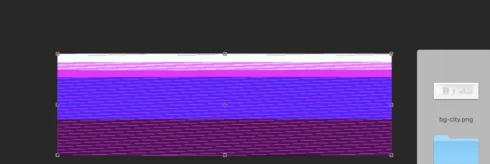


Very annoying. Please get better quality control Photoshop. CC seems to get progressively worse in terms of bugs.

Photoshop 19.1
Mac osX 10.13.2
5k iMac

This topic has been closed for replies.

204 replies

Inspiring
January 30, 2018


I am having the exact same issue.

I have not only rebooted, but I removed all Photoshop preferences, uninstalled the entire app and reinstalled.

Still happens with png files every now and then. If I quit Photoshop and reopen it then it works, but will randomly happen later that day or the next. Rinse/Repeat.

Very annoying.

Participating Frequently
January 30, 2018


PS CC 2018 is having huge problems with some PNGs. I use these regularly in a commercial role and it is becoming a problem.

It started this morning when I tried to drop a PNG into a psd and it came out entirely corrupted.


I then opened the PNG on its own and it was corrupted too...


This is disasterous for me and my deadline. I have limited space on my computer but I have spent the last 40 minutes downloading CC 2017.

Dragging and dropping the exact same PNG into the exact same PSD works...


Image is not available


...as does opening up the PNG on its own...


I suffer a lot of the teething problems of Adobe silently but this is currently the final straw.

The obvious comment is just to use CC2017 but that is inconsiderate of the effort I have taken in using a supposedly market-ready piece of software.

Does anyone know of these PNG problems?

Jim
Inspiring
January 29, 2018
I have the same problem.

Need to restart photoshop, but it's reappear
Inspiring
January 29, 2018
Same here. Very annoying.

Photoshop 19.1
macOS High Sierra 10.13.3