



Morfuud
Inspiring
March 1, 2023

P: Ps 24.2 toolbar submenu goes off screen to my laptop (secondary) screen

  • March 1, 2023
  • 44 replies
  • 10066 views

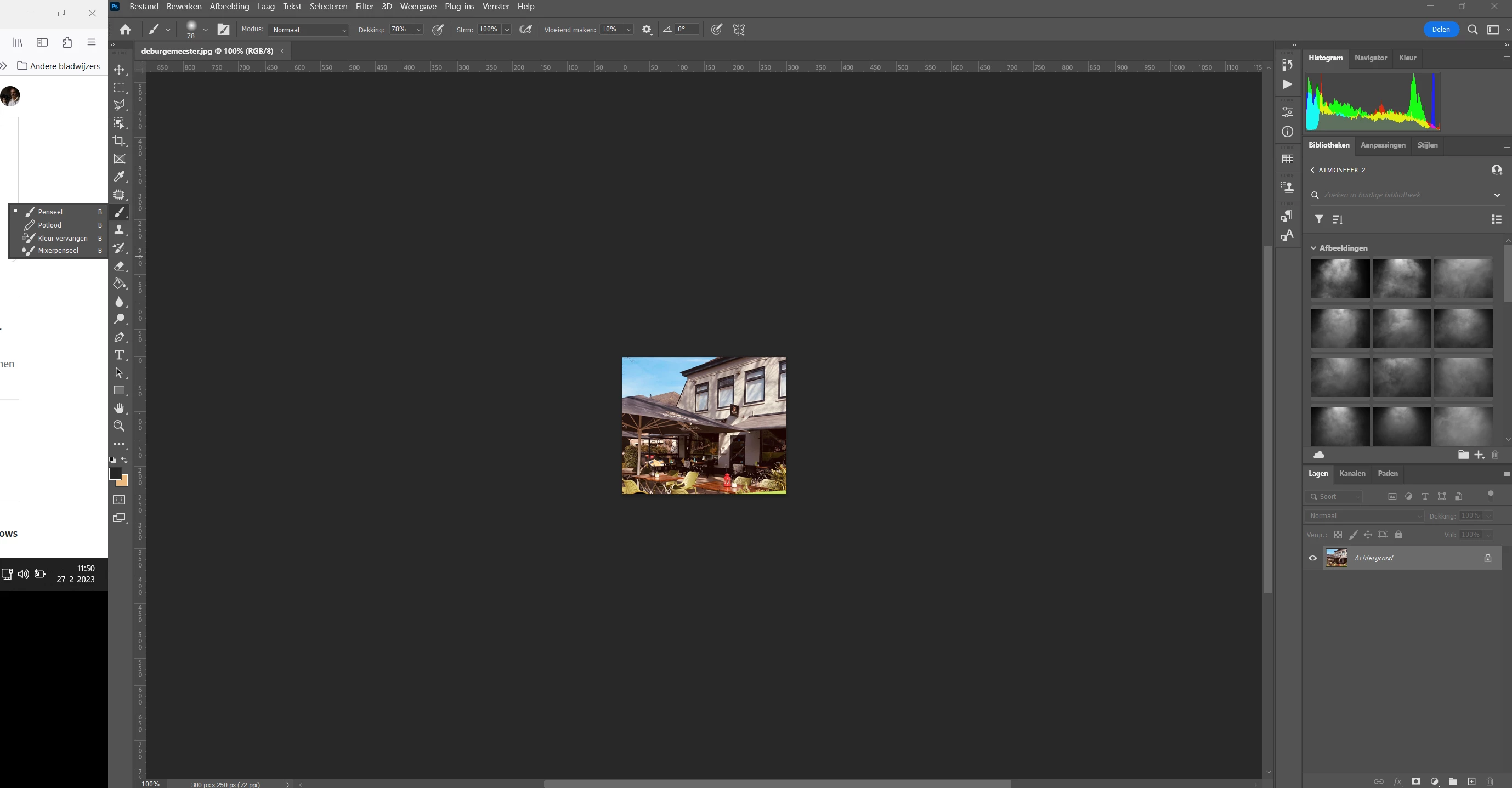
Hello, After update Photoshop to 24.2 and PhotoShop is in the maximize screen mode my toolbar submenu go to my laptop screen. See the screen dump of my 2 screens the big is secondary 24 inch on the left my laptop screen.
In update 24.1.1 works fine. See screen capture of my screen after update to 24.2

Thanks and regards,
This topic has been closed for replies.

44 replies

Daniel.br
Known Participant
April 7, 2023

Hello

After the Photoshop 24.3 update, all dialog boxes from the side menu (for example eraser tool) pop up on another monitor.


Photoshop 24.3

Windows 11

Ranjisha Sengupta
Legend
April 7, 2023

Hi @Daniel.br 


Thanks for reaching out. 

Did this start happening after the update? Have you tried resetting the preferences of the application recently?

Please Check Control Panel > Displays.

Where ever the menu bar is > that is where the pop-ups tend to go.


Let us know if this works.


Best,

Ranjisha


Mark.Dahm
Community Manager
Community Manager
March 22, 2023

@Morfuud ,


You're not the only one with the problem. We discovered this issue on March 1, and the 24.3 release that just went out was already nearly done, so we didn't have the chance to get the fix into this recent version.

Participating Frequently
March 22, 2023

The bug is still persistant for me after updating to PS v. 24.3. While running PS in a maximized window the tooltips and dropdowns will display outside of the monitor constraints PS is maximized to. All the old work arounds still work but PS's splash title window incorrectly displays on my main monitor and not the monitor my PS main window and popups do. I'm running the most updated version of PS and Win 11 Home, not going to bother listing my hardware since we know it's a PS + OS windows padding thing.

I'm eager for this to be solved because all the current older versions of PS available for legitimate download have some really severe issues ranging from more UI oddities like this bug or as severe as issues exporting. What is the point of having a dedicated bug tracking/submission section in a forum style if all that happens when we report bugs is nothing? I know it takes time to document/acknowledge a bug before you just dive into the code to fix it but I'm talking about the current attitude Adobe has been displaying on this forum. It took actual weeks for Adobe to acknowledge that this bug wasn't 'user error' or folks using 'unsupported hardware', and even then the attitude surrounding the export bug was the same for users who took the time to reproduce the bug and submit proof of it. 

If we are going to ignore significant bugs for weeks at a time and then pushout multiple updates that don't fix the bugs can we at least get some sort of PS version 'stability' tool that pulls or generates a text file of relevent specs, or at least make a simple flowchart or checklist for documenting and submitting bugs in app? The current system just feels very outdated and is literally unresponsive if we have to flood the forum with 'me too' posts until the team breaks down and acknowledges bugs.

(Just to clarify: I'd be fine with "We're working on it" or "The team is aware of that issue". I take issue with Adobe employees dismissing bug reports for weeks at a time, it just doesn't make sense in the context.)

Morfuud
MorfuudAuthor
Inspiring
March 22, 2023
Today's after the update to version 24.3 is still not working properly for me.
Adope doesn't seem to be able to fix this error?
Or do i just have this error?
r do i just have this error?
Mark.Dahm
Community Manager
Community Manager
March 22, 2023

We are currently working on an issue where the padding is off a bit (clipping some pixels) with auto hide option enabled for the taskbar. We don't think it's the same issue as the tool popups springing the wrong direction, but once we get a fix in, we'll see if that behavior changes, too.

Known Participant
March 21, 2023

yes, same problem with the latest update 24.2.1

benoit Kapture foto
Participant
March 20, 2023

As ferramentas aparecem no monitor ao lado, nas versões anteriores apareciam dentro do Phothosp mesmo, como faço para corrigir? (The tools appear on the side monitor, in previous versions they appeared inside Phothosp itself, how can I fix it?)
Photoshop Ver. 24.2.1

Participant
March 20, 2023

Obs.: A janela "ferramentas"está certa, o problema são as ferramentas que aparecem na lateral (The "tools" window is right, the problem is the tools that appear on the side)

Morfuud
MorfuudAuthor
Inspiring
March 20, 2023
Hello Kapture benoit ,
Do you also have this problem with the latest update version 24.2.1? 
I do, because Adobe still hasn't solved this. Greetings Henk
Known Participant
March 20, 2023

I have the same problem on my PC since the latest PS update 24.1.1 Windows 11pro (lates update).

The sub menu open on my left monitor. (I have 3 monitor)

benoit Kapture foto
Noel.Carboni
Adobe Employee
Adobe Employee
March 20, 2023

We're still working on a proper fix.

Another potential workaround is to "Restore" Photoshop, i.e., do NOT maximize it, but run it windowed.  Then drag the corners so they're close to, but not over, the edges of the monitor on which you want it to run.

Thanks for your patience.

-Noel