


Morfuud
Inspiring
March 1, 2023

P: Ps 24.2 toolbar submenu goes off screen to my laptop (secondary) screen

  • March 1, 2023
  • 44 replies
  • 10066 views

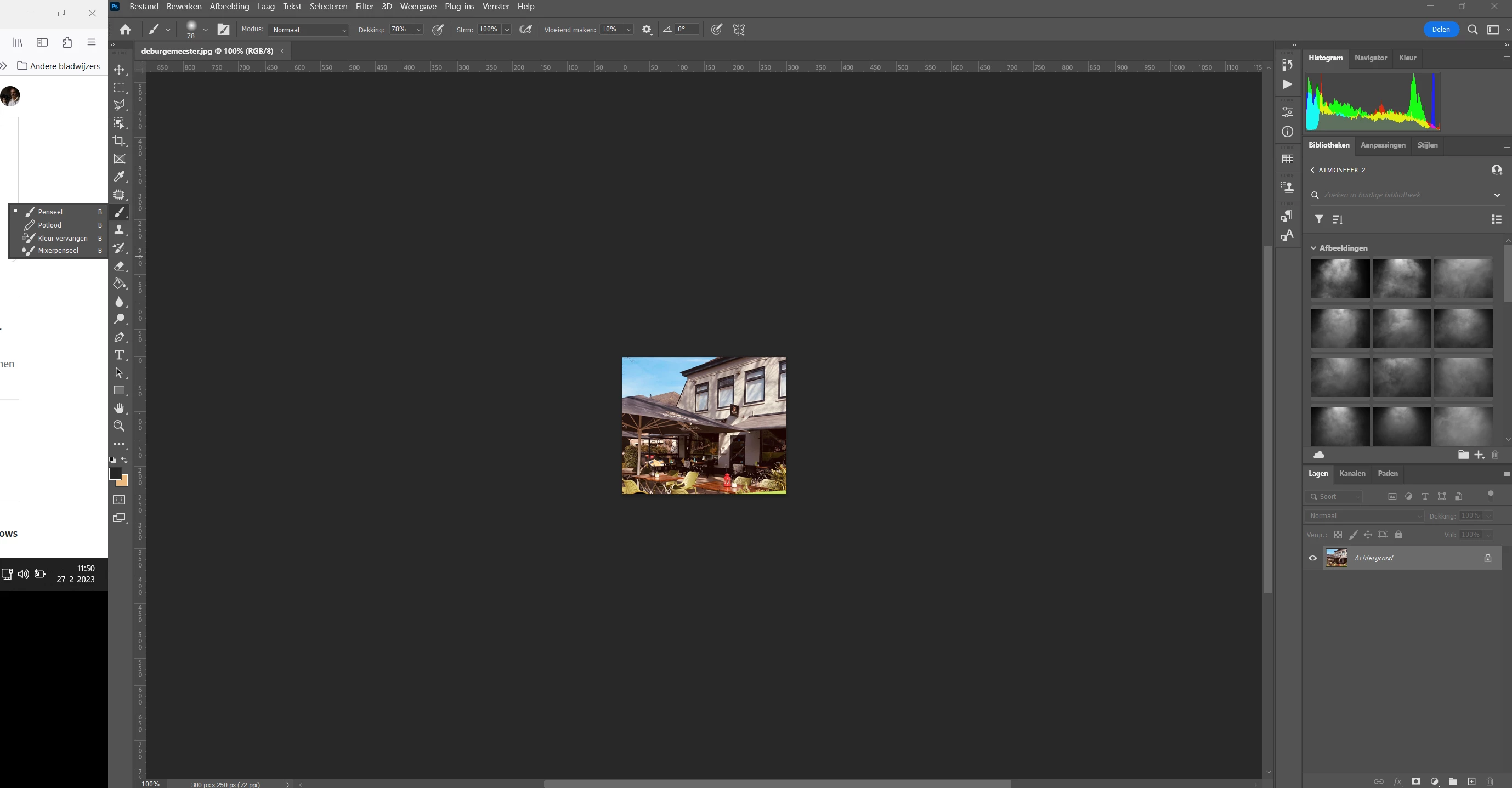
Hello, After update Photoshop to 24.2 and PhotoShop is in the maximize screen mode my toolbar submenu go to my laptop screen. See the screen dump of my 2 screens the big is secondary 24 inch on the left my laptop screen.
In update 24.1.1 works fine. See screen capture of my screen after update to 24.2

Thanks and regards,
This topic has been closed for replies.

44 replies

Participant
March 16, 2023

I have a regular monitor and a cintiq. My PS (2023) pops up automatically on my cintiq when I open it. But when I try to right click on a tool, like to choose the different lasso tools, the popup shows up on my main monitor instead of my cintiq. Any popup. Like if I try to go to blending options, new layer, etc. The popup window shows up on my main monitor, not my cintiq. I have looked but theres no fix. Most fixes are for Mac or they didnt work. Im on Windows 11.

Ged_Traynor
Community Expert
Community Expert
March 17, 2023
Participant
March 11, 2023

Hi all! After browsing all similar threads on the topic I have yet to find a solution to this issue. When i long-press the tools in the toolbar the drop down menus appear on the left monitor instead of my primary monitor on the right.
I've tried:
- resetting the workspace
- reinstalling photoshop

- setting the right display as the primary monitor

I'm on windows 11 and there was no issue up until about two weeks ago. I would be so grateful if someone knew what causes this. Thanks! 

Ged_Traynor
Community Expert
Community Expert
March 12, 2023
Jimerb
Inspiring
March 10, 2023

We'll they didn't fix this with 24.2.1 release today.  So i guess we have to wait like another month. 

Imagine how many people are struggling with this that haven't found this thread yet.

If you don't know what's going on with this, it stops you from using photoshop.

Morfuud
MorfuudAuthor
Inspiring
March 10, 2023
I thought it will be solved with the update to 24.2.1 but this is not the case. 
The tool menu still goes to my laptop in maximum screen mode. 
But the problem is not solved for me?
See screen capture:

Participating Frequently
March 10, 2023

Just a heads up for my fellow Win 11 multi-monitor users:
Bug is still persistant in 24.2.1 so don't worry about upgrading if that's the fix you are waiting on.. 

Bink58
Inspiring
March 9, 2023

Thanks for the reply. Much appreciated. I'm glad it's a known issue. Hopefully it will be fixed soon.

Morfuud
MorfuudAuthor
Inspiring
March 6, 2023
I'm not going to install any other software to fix the error in Photoshop update 24.2
Bink58
Inspiring
March 8, 2023

After updating to Photoshop latest version this week I can no longer use my Cintiq Stylus to use the Dodge/Burn tool options. This appears offscreen. This wasn't a problem before the update. Now I have to use a mouse just to select what I want.

Brilliant.

Ged_Traynor
Community Expert
Community Expert
March 9, 2023

@Bink58 assuming you're on Windows 11 and Photoshop version 24.2, it's a known issue

Participating Frequently
March 5, 2023

I'm also having this issue as of the latest PS update [v24.2]. It's simple enough to employ the suggested work around(s) but I've also noticed that UI elements on the bottom edge of the main window (zoom percentage, canvas dimensions, ect) are also not being properly constrained to the bounds of the monitor while PS's main window is maximized.

I've been using FancyZones from Microsoft's PowerToys utilities collection to make a custom 1920x1080 space for my PS window to snap into and it works like a charm. Undocking your tools panel or docking it anywhere except for that left edge lets you see the tool tips and drop downs while still being able to maximize the window.

Jeff Arola
Community Expert
Community Expert
March 2, 2023

Specific to Windows 11 22H2 and Photoshop 2023 (ps ver 24.2) the interface elements are too close to the screen edges and part of the bottom of the photoshop interface is cutoff.


Reset the photoshop 2023 preferences to no avail.


Compare photoshop 2022 with 2023 when the Photoshop Standard Screen Mode interface is maximized and note how close the Color Chips in the Tools panel are to the edge of the screen. On the right side of the screen note how close the the panel flyout menu buttons are to the edge of the screen. If one compares the bottom of the photoshop window you will see a bit of the screen is cut off.


Photoshop 2023 (ps ver 24.2)

screen resolution 1920 px x 1200 px


Photoshop 2022 (ps ver 23.5.4)


Participant
March 5, 2023

I have been having an issue for a while on Windows 10  where the bottom on my screen on my second monitor gets cut off.  I am using dual monitors, one monitor is for Photoshop and all the menu's,  the other is just to display my image full size. FWIW I run the Windows task bar on the bottom of my screen in Auto hide mode.


Steps to reproduce the problem:

1) Launch Photoshop on Secondary monitor

2) Open a file. On my machine it opens on the Secondary monitor.  Drag the window to the other monitor and make it full screen. (I double click on the top of the window bar). At this point everything looks good. I see my Zoom percentage, profile and scroll bar at the bottom of my screen.

3) Add a new layer.  As soon as the new layer is added, the bottom part of the screen moves down and now clips off the Zoom percentage, prfoile and scroll bar. i can temporarily fix it my un-maximizing the window and maximizing it by double clicking the top of the window.  Anytime I add a layer, dupe a layer or even zoom, the problem comes back.

4) FWIW if I move the window to the other display, it does the same thing.


What I have tried to fix the problem:

1) Reset all Photoshop preferences, rebooted, problem still exists.

2) Disabled Graphics processor in PS preferences, rebooted, problem still exists

3) Tried changing task bar to auto hide and not auto hide, rebooted, problem still exists

4) Tried changing all of the settings on the Preferences/Workspace, problem still exists.


My System Specs:

1) Windows 10 version 21H2 Build 19044.2604, 32 GB RAM

2) Photoshop Version 24.2.0

3) Nvidia GeForce GTX 1660 ti Version 528.49 (latest as of 3/5/2022)

4) Wacom Intuos Pro Driver version 6.3.46-1


Any help would be appreciated!

-Jim

Morfuud
MorfuudAuthor
Inspiring
March 4, 2023
I do the same as Jimberb,

@Jimerb I'm having the same issue. For me the workaround is not to run Photoshop maximized. If I Just size it to almost fit the screen it works fine. I lose a little screen space but i can work.

Morfuud
MorfuudAuthor
Inspiring
March 4, 2023
For me this is also the best solution at the moment. 
I have updated everything. 
No program has this problem for me.
PhotoShop Update 24.2 I think is really the problem