


Morfuud
Inspiring
March 1, 2023

P: Ps 24.2 toolbar submenu goes off screen to my laptop (secondary) screen

  • March 1, 2023
  • 44 replies
  • 10163 views

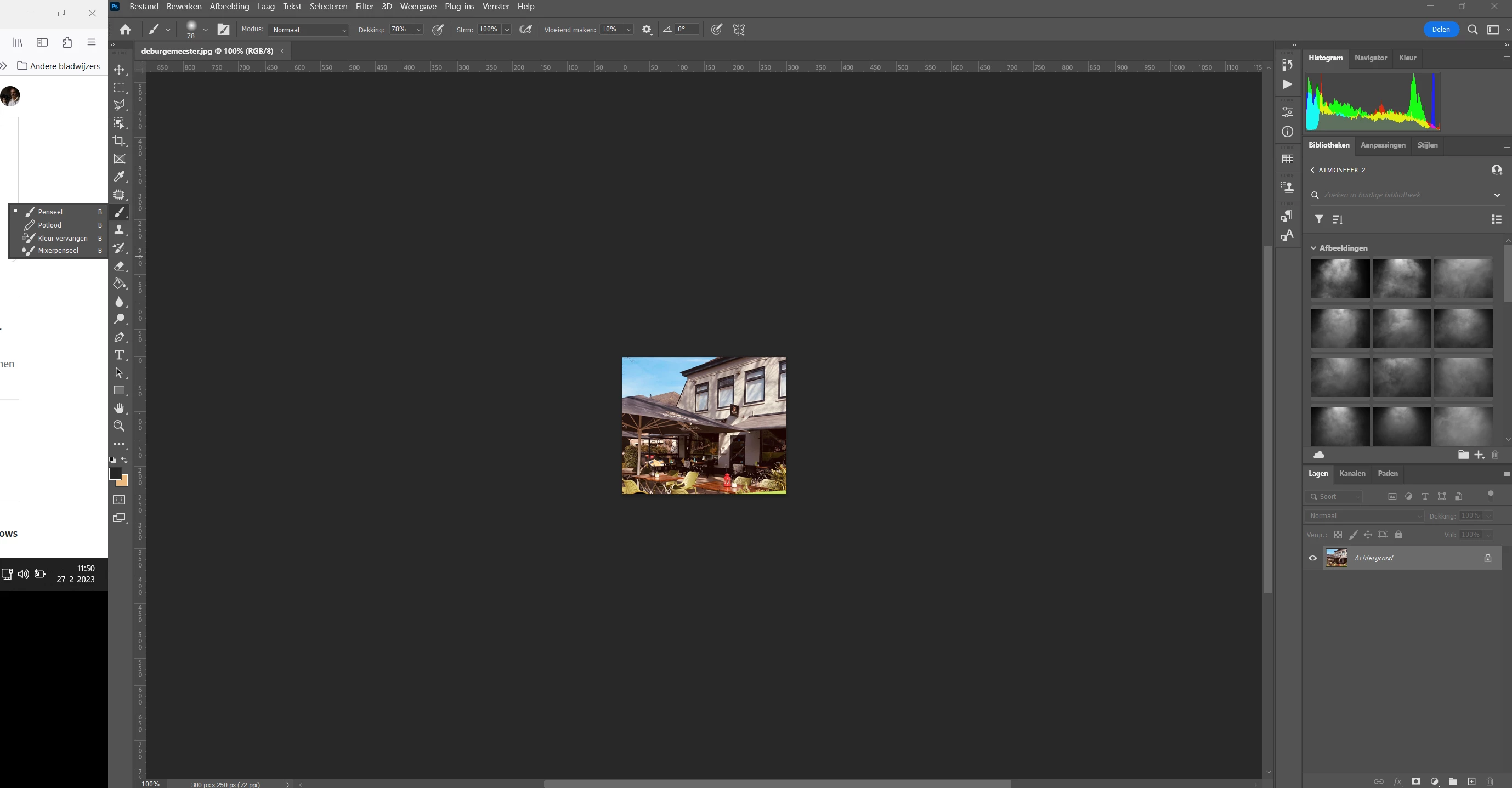
Hello, After update Photoshop to 24.2 and PhotoShop is in the maximize screen mode my toolbar submenu go to my laptop screen. See the screen dump of my 2 screens the big is secondary 24 inch on the left my laptop screen.
In update 24.1.1 works fine. See screen capture of my screen after update to 24.2

Thanks and regards,
This topic has been closed for replies.

44 replies

Jimerb
Inspiring
March 4, 2023

I'm having the same issue. For me the workaround is not to run Photoshop maximized.  If I Just size it to almost fit the screen it works fine.  I lose a little screen space but i can work.

Noel.Carboni
Adobe Employee
Adobe Employee
March 3, 2023

We have reproduced the issue and have a possible workaround for you to try, but it involves running 3rd party software that's not in Adobe's control (Winaero Tweaker) so please do this at your own risk.  Using the Winaero Tweaker application, if you configure the window Border size and Border padding settings to their lowest values, you should find Photoshop not truncating so much at the edges.

Meanwhile, we're working to find a proper solution to the problem.

Thanks again!


-Noel

Morfuud
MorfuudAuthor
Inspiring
March 3, 2023

In update 24.1.1 works fine. See screen capture of my screen after update to 24.2I don't have this problem with any other programs, not even lightroom, just PhotoShop Update 24.2, The screen resolution is set to recommended.
Also tested with my friend has the same problem. And it also works fine with 24.1.1

Thanks and regards,

Ged_Traynor
Community Expert
Community Expert
March 3, 2023

No worries Noel 👍

Noel.Carboni
Adobe Employee
Adobe Employee
March 3, 2023

Thanks, Ged.  Apologies for mixing you up with Morfuud before.
We're digging into it.

-Noel

Ged_Traynor
Community Expert
Community Expert
March 3, 2023

@Noel.Carboni I can confirm it's a Windows 11 issue, I re-imaged my home PC with a Windows 10 image that I had and everything works as expected with dual monitors.

Ged_Traynor
Community Expert
Community Expert
March 3, 2023

@Noel.Carboni the issue seems to be related to Windows 11, I have no issue on my work PC with Windows 10 using dual monitors.

I've seen other threads with the same issue and as far as I recall they are running Windows 11 too.

Noel.Carboni
Adobe Employee
Adobe Employee
March 3, 2023

Thanks for all your efforts to isolate what's causing the issue, Morfuud.

We've had some difficulty reproducing the issue but that may be due to system and monitor differences.  When I maximize Photoshop on my multi-monitor system it perfectly lines up left and right with the edges of the monitor.  Apparently that's not what is happening on your system - it appears it may be maximizing a little bit to the left of where it ought to be.


Do you have any atypical or non-standard settings in Windows for your desktop appearance that might affect, e.g. the hidden border sizes?  Possibly a desktop theme modifying package?

Do any other applications on your system maximize so that they appear squeezed at their left edges?

Thanks again for your input!

Ged_Traynor
Community Expert
Community Expert
March 2, 2023

@Sameer K the reason why I mentioned that is because if you pull the toolbar away when working with a dual monitors the issue doesn't happen, hence the toolbar seems to be to close to the screen edge and may be related to the post I linked.

As you can see, the toolbar works fine if it's not docked to the side with dual monitors.

This is the Photoshop interface with a maximised window

and minimised

There's a clear difference between the two, with a minimised window the toolbar works as it should with dual monitors, so in my opinion it is related.


Sameer K
Community Manager
Community Manager
March 2, 2023

@Ged_Traynor Nope, that's something we are looking at separately. This thread is about dual display & the other one is primarily extended UI elements on the first screen.