



Bgnak
Participant
February 21, 2026

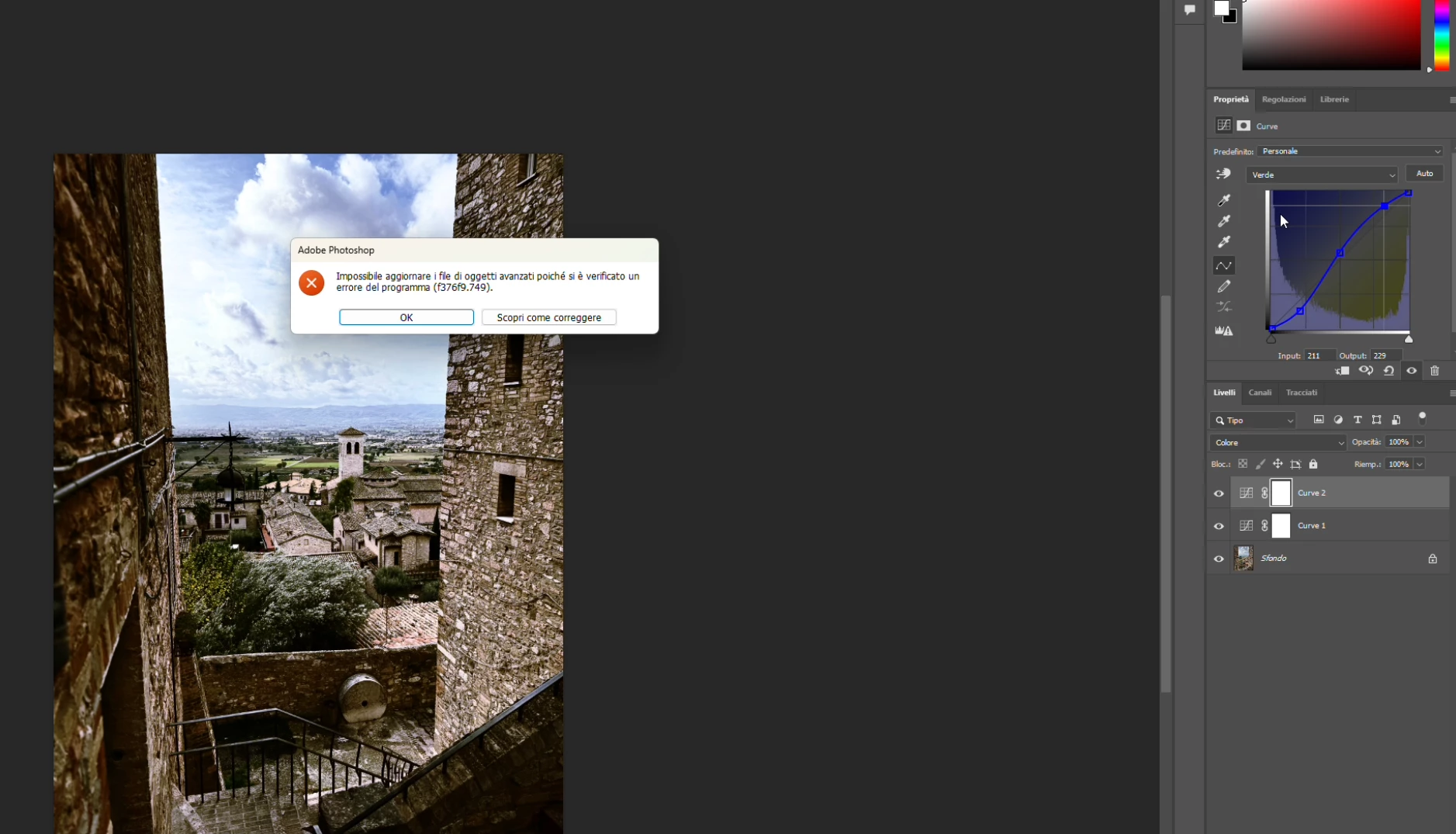
P: PS 27.4 & 27.5 (beta) Changing channels in Curves crashes PS with error: Could not update smart object files because of a program error (f376f9.749).

  • February 21, 2026
  • 12 replies
  • 297 views

Hi everyone,

Photoshop 2026 (v27.4) on Windows gives me this error constantly when work with curves (i didn't try other tools, so i hope this is the only one): "Impossible to update advanced objects because a program error has occurred (f376f9.749)".

Sorry, my Photoshop is in Italian.

Anyone else seeing f376f9.749 on Windows lately?

Thanks in advance!


    12 replies

    Participant
    March 3, 2026

    Hi everyone,

    Yes; I have the same bug in PS 27.4.0,  f376f9.749 when using curves. In my case, I can modify curves without a problem, but when I want to reset it to ‘default’, the error appears.

    In this case, the image is already 8bit and has a single background layer. For a new image, same behaviour, only when I click on ‘default’ to reset the curve.

    Inspiring
    March 3, 2026

    I get the same error on 27.4, Mac Sequoia, RGB images, when trying to adjust a color channel. This was not present in the previous version.

    tmyusuf
    Participant
    March 3, 2026

    Common question as well. You can reinstall your photoshop another way to rename your folder. old( new) . I will hope it’s helpful for you 
     

    Thanks

    GraphicXer
    Participant
    March 3, 2026

    Same error this morning, twice, while switching to the blue channel on curves (once on a smart layer and once through Image - Adjustments - Curves). Please, solve it. It’s umbelievable I’m paying an annual subriscption for this!!!

    photobuff1128
    Participant
    March 3, 2026

    The exact same problem occurred this afternoon. I am NOT working on a smart object, but a simple jpeg. Photoshop froze and the only way I could get out of the program was by going to “task Master”. I restarted my machine, etc but the same thing occurs. Help!!!!!

    Sameer K
    Community Manager
    Community Manager
    February 27, 2026

    Hi All! Thanks for reporting this issue, and ​@Ged_Traynor for helping speed this up. I can also reproduce it by following the detailed steps shared by ​@jan_1377. I’ve reported this to the team for review.


    Thanks!
    Sameer K

    Yamonov
    Legend
    February 27, 2026

    全く同じエラーが出ます。トーンカーブ調整レイヤーを操作しているときに出ると、トーンカーブUI中からカーブが消えます。他のレイヤーを選択してから再度選択すると操作できるようになったりします。

    こちらは、Mac(AppleSilicon / Tahoe 26.3)です。

    ※2026のトーンカーブUIはそもそも完成しているとは思えないので、2025までバージョンダウンしました。

    --Yamonov
    Inspiring
    February 27, 2026

    私もWindows 11 Pro 25H2のPhotoshop 27.4でトーンカーブでチャンネルを切り替えようとすると同じf376f9.749エラーが出ることがあります。

    エラーが出るタイミングはまちまちで出ないときもあります。

    一度アンインストール(設定削除にチェック)して再インストールしましたが改善されませんでした。

    アンインストールせずにバージョン27.3.1に落としたらエラーは出なくなりました。

    バージョン27.4の時に手動で設定を削除してみましたが改善されませんでした。

    今までに出たエラーウィンドウのキャプチャー画像を添付しておきます。

    Ged_Traynor
    Community Expert
    Community Expert
    February 26, 2026

    @jan_1377 just test on my system and i can reproduce the issue, using Photoshop version 27.4 on Windows 11

    Participant
    February 26, 2026

    PS Version: 27.4.0

    OS: Windows 11 (10.0.26200 Build 26200)

    Steps to reproduce:
    1. Open any image (tested with 16bit rgb image)
    2. Add “curves” adjustment layer
    3. Change curve randomly (eg. add some Contrast)
    4. Switch to R, G or B Channel of the Curve
    → Crash

    Note that the error message mentions smartobjects, yet it also occurs in images without any.
    The proposed link talks about saving and opening files, but during the above steps there is no saving or opening going on.

    When I don’t adjust the lightness curve but change to a Color Channel immediately, the behaviour is as expected. (no crash)
     

    https://helpx.adobe.com/de/photoshop/desktop/troubleshoot/file-format-issues/resolve-program-error-while-saving-files.html?trackingid=C12Y2WS7&mv=in-product&mv2=ps