

Bgnak
Participant
February 21, 2026

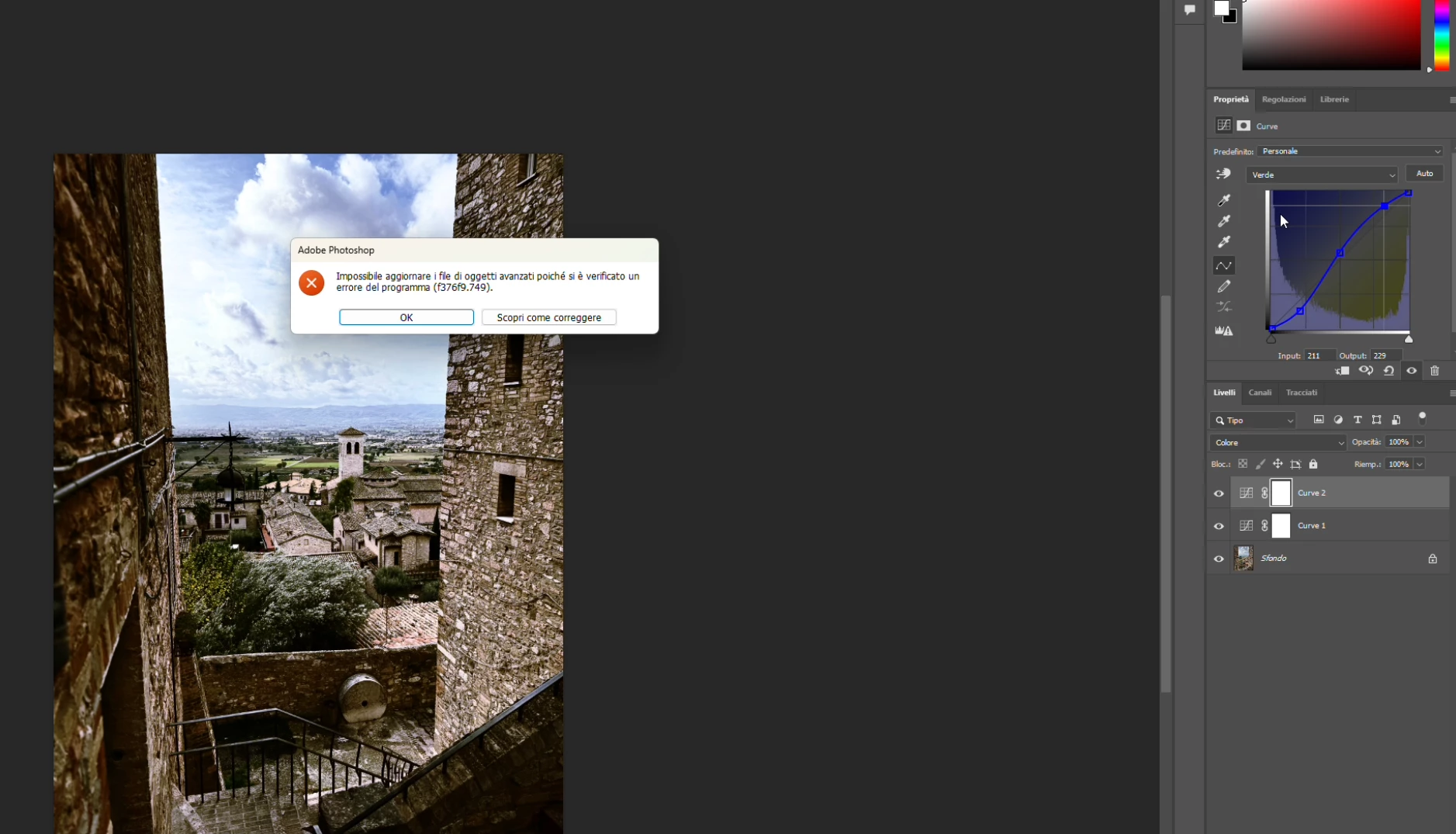
P: PS 27.4 & 27.5 (beta) Changing channels in Curves crashes PS with error: Could not update smart object files because of a program error (f376f9.749).

  • February 21, 2026
  • 37 replies
  • 1688 views

Hi everyone,

Photoshop 2026 (v27.4) on Windows gives me this error constantly when work with curves (i didn't try other tools, so i hope this is the only one): "Impossible to update advanced objects because a program error has occurred (f376f9.749)".

Sorry, my Photoshop is in Italian.

Anyone else seeing f376f9.749 on Windows lately?

Thanks in advance!


    37 replies

    Participant
    March 18, 2026

    The same issue i have been facing since I updated my ps to 27.4.0. What is the way forward? Shall I wait for the solution or downgrade it ? Please also suggest the stable downgrade version.


    Community Expert
    March 18, 2026

    @rahul_2025 Do you have try to disable the Modern UI?

     Goto the Photoshop preferences on the "Technology Previews" tba in the dialog.

    Uncheck the option "Enable Modern User interfaace".


    My System: Intel i7-8700K - 64GB RAM - NVidia Geforce RTX 3060 - Windows 11 Pro 25H2 -- LR-Classic 15 - Photoshop 27 - Nik Collection 9 - PureRAW 6 - Topaz Photo AI
    Community Expert
    March 17, 2026

    Try to disable the Modern UI. Goto the Photoshop preferences on the "Technology Previews" tba in the dialog.

    Uncheck the option "Enable Modern User interfaace".


    My System: Intel i7-8700K - 64GB RAM - NVidia Geforce RTX 3060 - Windows 11 Pro 25H2 -- LR-Classic 15 - Photoshop 27 - Nik Collection 9 - PureRAW 6 - Topaz Photo AI
    Participating Frequently
    March 18, 2026

    @AxelMatt tried that but doesn't work for me. Still getting the error.

    Community Expert
    March 18, 2026

    Ok. I can’t reproduce this on my machne and as far as I read here the Adobe couldn’t already reproduce this. But they’re working on it to find a solution.

    It seems an issue that depends on specific configurations.

    My System: Intel i7-8700K - 64GB RAM - NVidia Geforce RTX 3060 - Windows 11 Pro 25H2 -- LR-Classic 15 - Photoshop 27 - Nik Collection 9 - PureRAW 6 - Topaz Photo AI
    MassC
    Legend
    March 16, 2026

    Hey ​@Polacofede

    I’ve promoted your post to its own thread since your issue may be different from the one you originally commented on.
     

    I tried to locate a crash report using the email address associated with your community account, but I wasn’t able to find one. Were you able to submit a crash report? If so, please PM the email address you used to submit your crash report.
     

    If not, you can find instructions on how to submit one here:
    https://helpx.adobe.com/photoshop/kb/submit-crash-reports.html

    Best, 
    CMAss


    Participating Frequently
    March 17, 2026


    Hi!

    Ok thanks.

    PS does not crash, it just throws an error message and freezes or becomes irresponsive, even if i wait a lot of time, it does nothing. So you are forced to kill the process.

    the “how to solve it” button takes you to:

    https://helpx.adobe.com/en/photoshop/desktop/troubleshoot/file-format-issues/resolve-program-error-while-saving-files.html?trackingid=C12Y2WS7&mv=in-product&mv2=ps

    So the issue arises when for instance you modify a channel and then you attempt to modify other channel. And is not while saving the file, at least not intentionally. In fact i can do modifications and save the file without issues.

    Participating Frequently
    March 17, 2026

    I downgraded to PS27.3.1 from latest one PS27.4 and i dont see that issue now.

    Participating Frequently
    March 16, 2026

    im having this very same issue in windows since last PS update. 

    doesnt mind if im at 100% or 33% whatever. Also for instance it works when changing the green channel, then if i try to change the blue one, it crashes. But i would say the crash it quite random. Is a real pain. so it was never fixed?

    Photoshop 27.4

    Amila323654270b12
    Participant
    March 16, 2026

    I got same problem guys. This is so disappointing issue. Can we downgrade the photoshop version?

    Participating Frequently
    March 18, 2026

    @Amila323654270b12 yes you can. Go to apps in your creative cloud app. Click on the three dots below Photoshop. And then you can choose another (older) version.

    Participating Frequently
    March 12, 2026

    It happens to me as well. Everytime I try to change to channel to blue. Photshop froze, have to use taskmanager to shut down Photoshop. I see the original message is already 18 days old. I hope this gets fixed soon. Turning off modern preferences did not work for me.


    Inspired Kindergartens
    Known Participant
    March 12, 2026

    You can use the drop down menu Image > Adjustments > Curves - still throws an error but PS is still responsive and the tool works ok afterwards

    Inspired Kindergartens
    Known Participant
    March 12, 2026

    For me it is changing to another channel after making two adjustments and after selecting OK in the dialog window PS is unresponsive.


    1. Open image (png)
    2. Add curves adjustment layer
    3. Set two points on any channel
    4. Change channel and error
    5. Click “OK” 
    6. App is no longer interactive

    Curves Dialog throws error but PS is recoverable

    Vophi-Studio
    Participant
    March 11, 2026

    Hi everybody, i found a temporary solution.

    > Filter/Filter camera Raw/on the right panel you have Curve solution and there is no crash.

    not so powerfull than the original tool but it can help.

    Brgds
    Vophi


    Claire H.
    Community Manager
    Community Manager
    March 11, 2026

    @Vophi-Studio While the team continues to investigate this issue, we really appreciate your sharing your workaround. We will update this thread once we have published a fix. Thanks!

    Participating Frequently
    March 18, 2026

    @Claire H. is there any news as to when this problem can be solved? 

    Ged_Traynor
    Community Expert
    Community Expert
    March 9, 2026

    @davidtavcar a similar issue has been reported here


    Participating Frequently
    March 9, 2026

    While editing in Photoshop 27.4.0 I randomly receive Could not update smart object files because of a program error notifications where I can just force quit Photoshop. And there is no smart object involved - just single layer file with Curves adj. layer.

    Very annoying as I lost edits. Modern UI disabled as there are other features that are impacting my workflow. Mac OS Tahoe 26.3.

    Adobe please improve quality as lately there are just too many bugs - people dealing with reporting bugs, not creating work - thinking leaving your ecosystem! You can do better! You used to at least.