



Bgnak
Participant
February 21, 2026

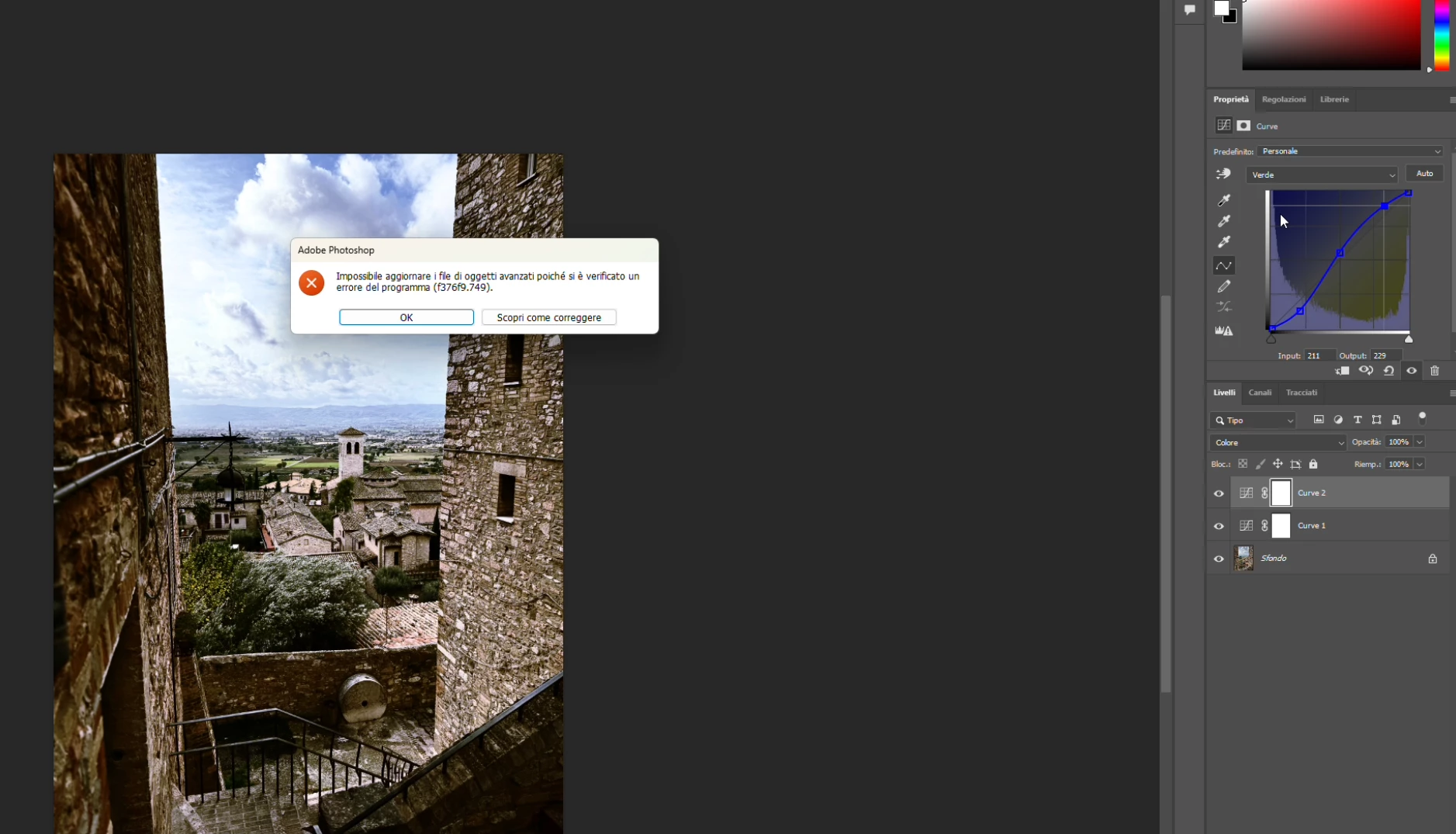
P: PS 27.4 & 27.5 (beta) Changing channels in Curves crashes PS with error: Could not update smart object files because of a program error (f376f9.749).

  • February 21, 2026
  • 37 replies
  • 1765 views

Hi everyone,

Photoshop 2026 (v27.4) on Windows gives me this error constantly when work with curves (i didn't try other tools, so i hope this is the only one): "Impossible to update advanced objects because a program error has occurred (f376f9.749)".

Sorry, my Photoshop is in Italian.

Anyone else seeing f376f9.749 on Windows lately?

Thanks in advance!


    37 replies

    Participating Frequently
    March 6, 2026

    Drives me nuts! I have crash every 20 min


    Semaphoric
    Community Expert
    Community Expert
    March 5, 2026

    This sounds like a similar thread, 

    For now, try disabling Modern Interface in  the preferences.

    Semaphoric
    Community Expert
    Community Expert
    March 9, 2026

    Even with the Modern UI disabled, I still get the error, with both adjustments layers and through the menu.

    Participant
    March 5, 2026

    Adobe Photoshop
    Could not build the Crop previous because of a program  error (f376f9.749).

    Seems to happen when I do two consecutive curve adjustments. How can I fix this?

    Could not build the Crop previous because of a program error (f376f9.749).

    LoJoBri
    Participant
    March 4, 2026

    I am having the same issues with curves. I updated photoshop and restarted the computer. I am working on jpgs from a Canon 5D Mark IV. It isn’t happening on all of the images, it seems selective, but I don’t know what the difference between the files would be.

    Known Participant
    March 4, 2026

    Same here.

    Participant
    March 3, 2026

    Hi everyone,

    Yes; I have the same bug in PS 27.4.0,  f376f9.749 when using curves. In my case, I can modify curves without a problem, but when I want to reset it to ‘default’, the error appears.

    In this case, the image is already 8bit and has a single background layer. For a new image, same behaviour, only when I click on ‘default’ to reset the curve.

    Inspiring
    March 3, 2026

    I get the same error on 27.4, Mac Sequoia, RGB images, when trying to adjust a color channel. This was not present in the previous version.

    tmyusuf
    Participant
    March 3, 2026

    Common question as well. You can reinstall your photoshop another way to rename your folder. old( new) . I will hope it’s helpful for you 
     

    Thanks

    GraphicXer
    Participant
    March 3, 2026

    Same error this morning, twice, while switching to the blue channel on curves (once on a smart layer and once through Image - Adjustments - Curves). Please, solve it. It’s umbelievable I’m paying an annual subriscption for this!!!

    photobuff1128
    Participant
    March 3, 2026

    The exact same problem occurred this afternoon. I am NOT working on a smart object, but a simple jpeg. Photoshop froze and the only way I could get out of the program was by going to “task Master”. I restarted my machine, etc but the same thing occurs. Help!!!!!