



Bgnak
Participant
February 21, 2026

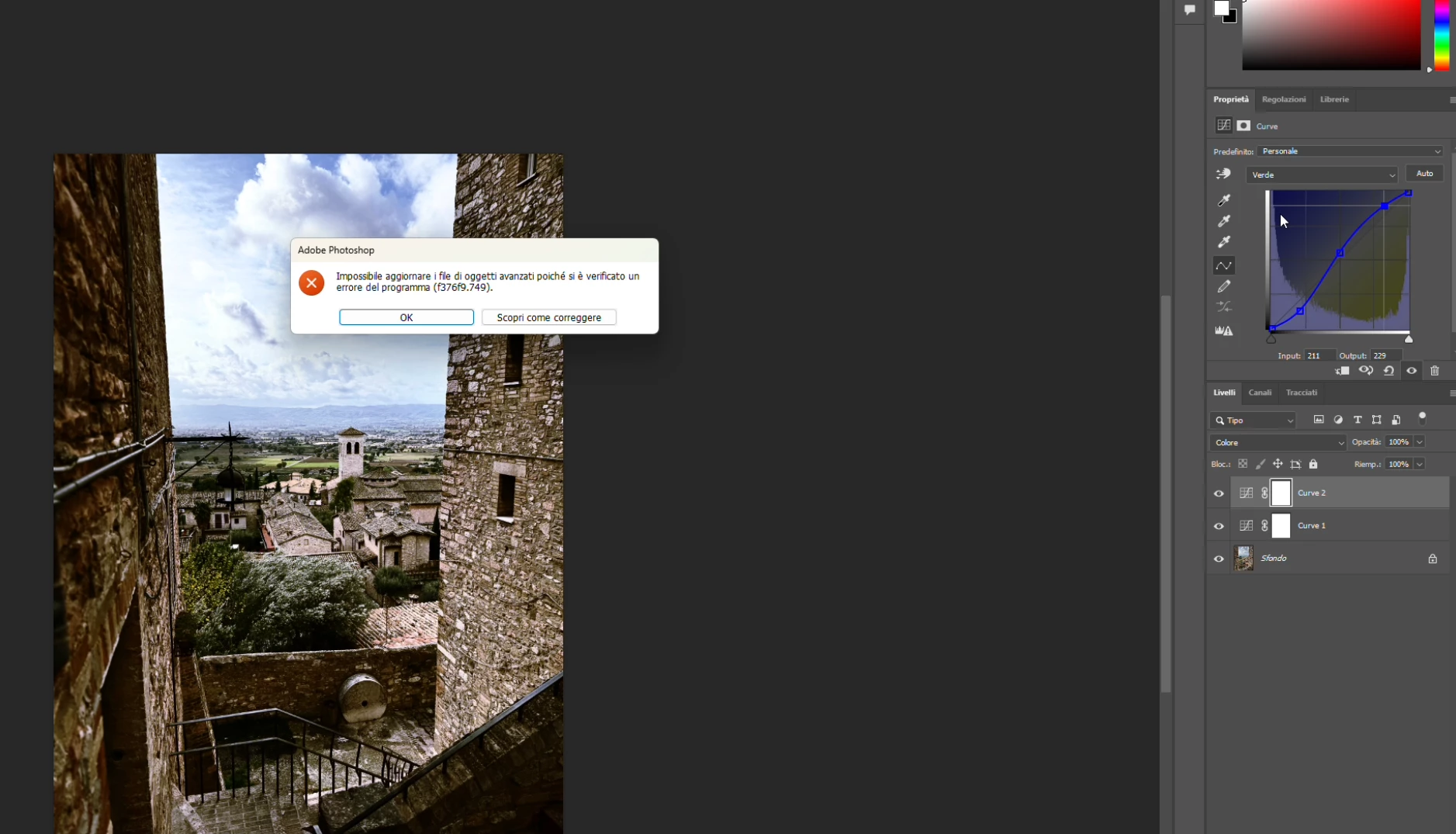
P: PS 27.4 & 27.5 (beta) Changing channels in Curves crashes PS with error: Could not update smart object files because of a program error (f376f9.749).

  • February 21, 2026
  • 37 replies
  • 1765 views

Hi everyone,

Photoshop 2026 (v27.4) on Windows gives me this error constantly when work with curves (i didn't try other tools, so i hope this is the only one): "Impossible to update advanced objects because a program error has occurred (f376f9.749)".

Sorry, my Photoshop is in Italian.

Anyone else seeing f376f9.749 on Windows lately?

Thanks in advance!


    37 replies

    Sameer K
    Community Manager
    Community Manager
    February 27, 2026

    Hi All! Thanks for reporting this issue, and ​@Ged_Traynor for helping speed this up. I can also reproduce it by following the detailed steps shared by ​@jan_1377. I’ve reported this to the team for review.


    Thanks!
    Sameer K

    Yamonov
    Legend
    February 27, 2026

    全く同じエラーが出ます。トーンカーブ調整レイヤーを操作しているときに出ると、トーンカーブUI中からカーブが消えます。他のレイヤーを選択してから再度選択すると操作できるようになったりします。

    こちらは、Mac(AppleSilicon / Tahoe 26.3)です。

    ※2026のトーンカーブUIはそもそも完成しているとは思えないので、2025までバージョンダウンしました。

    --Yamonov
    Inspiring
    February 27, 2026

    私もWindows 11 Pro 25H2のPhotoshop 27.4でトーンカーブでチャンネルを切り替えようとすると同じf376f9.749エラーが出ることがあります。

    エラーが出るタイミングはまちまちで出ないときもあります。

    一度アンインストール(設定削除にチェック)して再インストールしましたが改善されませんでした。

    アンインストールせずにバージョン27.3.1に落としたらエラーは出なくなりました。

    バージョン27.4の時に手動で設定を削除してみましたが改善されませんでした。

    今までに出たエラーウィンドウのキャプチャー画像を添付しておきます。

    Ged_Traynor
    Community Expert
    Community Expert
    February 26, 2026

    @jan_1377 just test on my system and i can reproduce the issue, using Photoshop version 27.4 on Windows 11

    Participant
    February 26, 2026

    PS Version: 27.4.0

    OS: Windows 11 (10.0.26200 Build 26200)

    Steps to reproduce:
    1. Open any image (tested with 16bit rgb image)
    2. Add “curves” adjustment layer
    3. Change curve randomly (eg. add some Contrast)
    4. Switch to R, G or B Channel of the Curve
    → Crash

    Note that the error message mentions smartobjects, yet it also occurs in images without any.
    The proposed link talks about saving and opening files, but during the above steps there is no saving or opening going on.

    When I don’t adjust the lightness curve but change to a Color Channel immediately, the behaviour is as expected. (no crash)
     

    https://helpx.adobe.com/de/photoshop/desktop/troubleshoot/file-format-issues/resolve-program-error-while-saving-files.html?trackingid=C12Y2WS7&mv=in-product&mv2=ps

    SRSundby
    Participant
    February 23, 2026

    Hello Bgnak, 

    Just today I encountered the same error. It happens specifically when adjusting the blue channel in a curves adjustment layer. I’ve on 27.4, Windows 11. I haven’t updated recently. Did you try the fix Sameer suggested?

    Thank you,

    S

    Sameer K
    Community Manager
    Community Manager
    February 24, 2026

    Hey, ​@SRSundby. Thanks for chiming in. I couldn’t recreate this with the Blue Channel in the Curves Adjustment either. Please share if you find a repeatable set of steps. 

    Thanks!

    Sameer K

    Sameer K
    Community Manager
    Community Manager
    February 23, 2026

    Hey, ​@Bgnak. Welcome to the Photoshop Community. Please share the system info from Photoshop Help > System info > Copy & paste into a text document > upload & attach here. 


    Please make sure there are no stale preferences in your Photoshop. Go to the location of the preference folder below and rename it to backup.

    • Windows 10/11: Users/[user name]/AppData/Roaming/Adobe/Adobe Photoshop [version]/Adobe Photoshop [version] Settings
    • You can press Press the Windows key > Enter 'Run' > Enter %APPDATA%\Adobe
    • Rename the Adobe Photoshop folder by adding a .old at the end. (Adobe Photoshop 2026 > Rename > Adobe Photoshop 2026. old), You can restore these preferences later if needed.(https://adobe.ly/4860qM9)
    • Restart the computer.

    These changes will provide a fresh start to Photoshop, much like a new installation.


    Let me know how it goes.

    Thanks!

    Sameer K

    (Type '@' and type my name to mention me when you reply)