


I Am Eddie
Known Participant
April 24, 2024

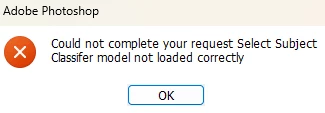
P: PS Error: Could not complete your request Select Subject Classifier model not loaded correctly
  • April 24, 2024
  • 84 replies
  • 47425 views

Hi,Is this a BUG?It happens after a new update. (2.57)

This topic has been closed for replies.

84 replies

Jqqerry
Inspiring
August 5, 2024

C:\Users\yourusername\AppData\Roaming\Adobe\Creative Cloud Libraries


The problems I was experiencing were reported before but rather unusual.
Not only the 2024 version but the Photoshop subversion I have (2023,2021 and 2020) all affected, and overall Photoshop was very slow as if GPU acceleration wasn't working properly (even in a small size Clone Stamp), and the reinstallation, reset wasn't effective.

And I deleted this folder and the problem was solved.
I don't know how on earth this is related to a performance issue like that, but it's been solved.
beyond comprehension....

Participant
August 4, 2024

Any updates on this issue? Photoshop is useless to me right now. Thanks.

jane-e
Community Expert
Community Expert
August 1, 2024

@zehava27254075aaue 


I've moved your post to the primary thread in the Photoshop forum. Adobe employee @Sameer K  has acknowledged this and will let us know when there is a fix.


Jane

Participant
July 31, 2024

I get a message every time I try to select an object... "Unable to complete your arc. Select subject. Classified model not loaded correctly". What to do???

kglad
Community Expert
Community Expert
July 31, 2024

what app?

Participant
July 30, 2024

Bonjour
j’utilise depuis toujours avec le même PC ( carte graphique Radeon ( TM) 530 (AMD) les outils de Photoshop : sélection d’un sujet et sélection d’objet , ou depuis quelques temps ces outils ne fonctionnent plus ; voici le message de rejet : '' impossible d’effectuer cette opération , select subjet classifer model not loaded correctement ''j’ai
désinstallé et réinstallé PS dans les 2 versions de mon abonnement , le bug persiste .
je serais reconnaissant de votre aide pour essayer de résoudre ce problème


Jqqerry
Inspiring
July 16, 2024

@Sameer K When will the improvements or FIX to this be announced? It was said that it will be released soon, and we are continuing to wait without promise.

laurentp90495257
Known Participant
July 15, 2024

Hi @Hannah Nicollet 


Unfortunatly the autoupdate change my Photoshop beta in the last version and it didn't work neither like before.
Under the same PC (didn't work both versions now):

  • NORMAL Version Adobe Photoshop : 25.9.1 20240610.r.626 e3aae35 x64
  • BETA Version Adobe Photoshop : 25.12.0 20240710.m.2694 9df0b92 x64

Under MAC (it's OK) :

  • only NORMAL : Version Adobe Photoshop : 25.9.1 20240610.r.626 e3aae35 arm64

I send you the machine PC configurationby mail as demanded.


Regards

Jqqerry
Inspiring
July 14, 2024

@laurentp90495257  You can use the previous version. I've reported this bug too (thread integrated), but I feel like it won't be fixed early, so I'm keeping my old Photoshop 24.0.1.

Hannah Nicollet
Community Manager
Community Manager
July 12, 2024

Hi Eugenie38551765nhqi

Thanks for letting us know about this! Good to know a reinstall didn't help. Can you please go to Help > System Info and then paste the top line as a comment here so I know which specific build you're using?

May I also get your machine information too?

  1. Press Windows Key + R.
  2. Type "MSINFO32" and press ok.
  3. File > Save.
  4. Attached the saved file to the email to me at nicollet@adobe.com

    Thanks so much!!!
    Hannah Nicollet
    QE, Photoshop
Hannah Nicollet
Community Manager
Community Manager
July 12, 2024

Hi Денис375667602sqg,


Thanks for your reply! Can you please go to Help > System Info and then paste the top line as a comment here? Also if you could please email me your machine information:

  1. Press Windows Key + R.
  2. Type "MSINFO32" and press ok.
  3. File > Save.
  4. Attached the saved file to the email you send to me at nicollet@adobe.com.


Thank you so much!!!
Hannah Nicollet
QE, Photoshop