



Carlos_Oliveras
Known Participant
February 20, 2020

P: Recessed layer thumbnails

  • February 20, 2020
  • 36 replies
  • 2691 views

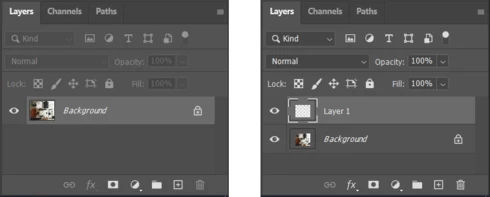
Since updating to 21.1.0, I've noticed something weird - when opening an image, the thumbnail for the Background layer is ok, but as soon as I create an empty layer, or duplicate the layer, or just turn the Background layer into a regular layer, then the layer thumbnails appear "contracted".

This image shows how the Layers palette (and more specifically, the layer thumbnails) looks like when opening a new document, and how it looks like just after clicking the "new layer" button:


Anyone else experiencing the same? I'm using Windows 10, by the way.

This topic has been closed for replies.

36 replies

kikogodeca
Participating Frequently
September 29, 2020

To tell you the truth, I can live with that, but it's annoying because I can't have a good look at what exactly is in my layer, cause the preview is so small

Mykyta Soloviov
Participant
September 29, 2020

@carlos_oliveras  @kristiyan_atanasov  Thank you guys for your replies. This bug is really annoying, I hope we will ll see it fixed someday...

Carlos_Oliveras
Known Participant
September 29, 2020

@Nikita Solovyov Yes, still weird thumbnails with 21.2.4... 😕😕

kikogodeca
Participating Frequently
September 29, 2020

I still have the problem. Just updated the app!

Mykyta Soloviov
Participant
September 29, 2020

Does anyone know if this bug still persists in Photoshop 21.2.4?


I use Photoshop 21.0.3 this is the last version before this bug appeared. I am afraid to update because I am tired to reinstall Photoshop 😞

Carlos_Oliveras
Known Participant
August 23, 2020
21.2.2 is out... and this issue is still there. It's getting incredibly annoying. Sometimes I use PS CC 2019 instead of CC 2020 because it's the only way I can clearly see my layer thumbnails and work normally - being able to see these thumbnails is more important to me than the fancy new features that I don't use (well, I do use them sometimes, but not near that often as looking at the layer thumbnails, which is a very basic feature now broken for many of us).
Anyway...
kikogodeca
Participating Frequently
June 20, 2020
Hoping for a fix soon!
Carlos_Oliveras
Known Participant
June 20, 2020
Yes, like Hamed says, nothing has changed with this update as far as this bug is concerned.
After installing the 21.2 update, I didn't check the new "Select Subject" algorithm, neither the new rotate pattern feature, or anything like that... I went straight to check if the normal layer thumbnails were finally back and... what a disappointement, they are still the same. So, we're in for at least another 3 months (best case scenario...) putting up with this annoying problem. 
Known Participant
June 20, 2020
still same issue in 21.2, sad but true
kikogodeca
Participating Frequently
June 15, 2020
Thanks my dude!