



Carlos_Oliveras
Known Participant
February 20, 2020

P: Recessed layer thumbnails

  • February 20, 2020
  • 36 replies
  • 2691 views

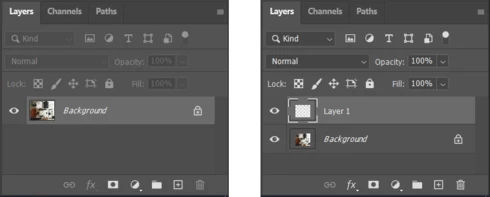
Since updating to 21.1.0, I've noticed something weird - when opening an image, the thumbnail for the Background layer is ok, but as soon as I create an empty layer, or duplicate the layer, or just turn the Background layer into a regular layer, then the layer thumbnails appear "contracted".

This image shows how the Layers palette (and more specifically, the layer thumbnails) looks like when opening a new document, and how it looks like just after clicking the "new layer" button:


Anyone else experiencing the same? I'm using Windows 10, by the way.

This topic has been closed for replies.

36 replies

Earth Oliver
Legend
June 15, 2020
Hey all, i've filed an official bug report for this, so hopefully it gets fixed soon!
Known Participant
May 20, 2020
unfortunately not solve in 21.1.3 , maybe next release.

Carlos_Oliveras
Known Participant
May 19, 2020
A new version is out (21.1.3), and the same issue is still there...
Inspiring
May 19, 2020
V.21.1.2 on Windows 10 is impossible to change the adjustment layer thumbnails, in the layer pannel, from small to large in order to preview the icon of the selected adjustment. No problem on the previous version but only in the latest v.21.1.2
Inspiring
May 19, 2020
V.21.1.2 on Windows 10 is impossible to change the adjustment layer thumbnails, in the layer pannel, from small to large in order to preview the icon of the selected adjustment. No problem on the previous version but only in the latest v.21.1.2
kikogodeca
Participating Frequently
April 15, 2020


Hello, I have this problem. Looks like the Layer thumbnail itself is smaller than it's respective border and the rest of the space is filled with gray. I also am inserting a screenshot. Resetingpreferences doesn't help! I managed to locate where the issue comes from. It's my Windows scaling. I have an 27 inch 1440p monitor and I scale my Windows to 125% because otherwise everything is very small. But the thumbnails in PS somehow have a problem with this and look normal (filling the whole rectangle) only if I set my Windows scaling to 100%. Which is super sad, because I don't want to use that scaling. Please try to fix this guys!

Carlos_Oliveras
Known Participant
April 15, 2020
As Hamed said, it's still the same in 21.1.2.

It's funny that, while this is more than annoying (it really makes working with PS harder, since you can barely tell what's in the thumbnail), I didn't downgrade at first because I thought that such a serious issue would be fixed very quickly. Unlike the Lightroom team (which very rarely fixes bugs, and even then, only after 7-8 years of them being reported), I find that the Photoshop team is usually very diligent when it comes to fixing the most pressing issues, and -naively- I thought this one would be amongst such.

By the way - some weeks ago I noticed that this thread had been marked as "In progress". Since there has been no official reply so far (something like "Yes, we can reproduce this and we will fix it"), I thought this issue/thread had gone unnoticed, but it looks like someone was able to check it and reproduce it. At least that's good news!

Anyway. It looks like we'll have to wait a bit more. I really miss being able to work with the regular layer thumbnails...
Known Participant
April 15, 2020
still broken in PS 21.1.2
nobody cares about this bug !!
Carlos_Oliveras
Known Participant
March 20, 2020
Still broken in Photoshop 21.1.1
Participating Frequently
March 7, 2020
I have the same problem and my display scaling is set to 110%. This problem did not occur in any previous release.