



Carlos_Oliveras
Known Participant
February 20, 2020

P: Recessed layer thumbnails

  • February 20, 2020
  • 36 replies
  • 2691 views

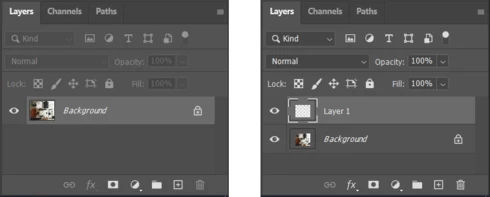
Since updating to 21.1.0, I've noticed something weird - when opening an image, the thumbnail for the Background layer is ok, but as soon as I create an empty layer, or duplicate the layer, or just turn the Background layer into a regular layer, then the layer thumbnails appear "contracted".

This image shows how the Layers palette (and more specifically, the layer thumbnails) looks like when opening a new document, and how it looks like just after clicking the "new layer" button:


Anyone else experiencing the same? I'm using Windows 10, by the way.

This topic has been closed for replies.

36 replies

Known Participant
February 23, 2020
same here. I'm using older version because this is a big deal
Carlos_Oliveras
Known Participant
February 21, 2020
Thank everybody for your replies.

Andrei, I think you are right - I also have my scale value set to 125%. If I set it to 100%, the issue goes away, but since my monitor is also high DPI, at 100% everything becomes too small (interface elements, text, etc.).

I hope Adobe is able to reproduce this and provide a fix as quickly as possible.
Participating Frequently
February 21, 2020
This seems related to the Windows interface scaling. I have a High DPI monitor and Windows is set to scale the interface to 125%. If I set it to 100% then the layer thumbnails problem is gone.  In Photoshop the UI Scaling is set to Auto.
Participating Frequently
February 21, 2020
I do have this issue, on Windows 10.
RosaPerry
Inspiring
February 21, 2020
No, I'm not having the issue and I have Windows 10
Rosa
OutDamnSpot
Known Participant
February 21, 2020

I double checked on my version: PS 21.1.0 on Windows 10.  I didn't experience this gremlin, but I have experienced weird behaviour once when trying to change the name of a layer.  Lots of the side panels disappeared and the cursor turned into the eye dropper, but drew random-ish straight lines.  Fortunately, enough of the top panel was available and I was able to reset my setup to Essentials and gradually put everything back the way it was.

My theory is that the various modules of the software aren't as separate as they should be and something is stomping on the memory space of some other module, but PS has so many modules that come and go as needed that it isn't easy for the bug fixers to discover what module is stomping on what.  With luck, when they find it, they'll solve quite a lot of problems all at once.

With luck.