


Inspiring
October 19, 2017

P: Resize Image During Place not working anymore

  • October 19, 2017
  • 12 replies
  • 1054 views

With this new release, this feature is not working anymore.
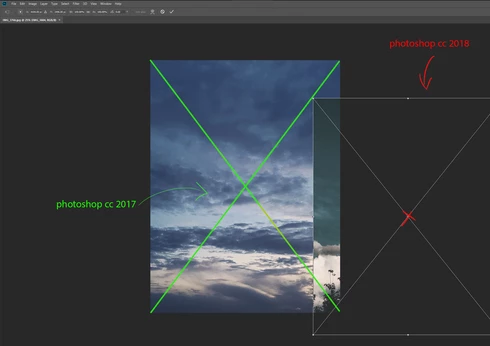
In Photoshop CC 2017 I was able to drag/drop a new image into Photoshop and it was scaled correctly over the same size of the document I was working on.
Now it places it randomly on the screen and I have to manually resize it to fit the respective document. 
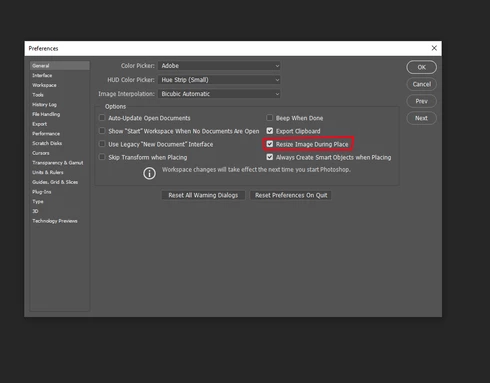
I've tried enabling/disabling this from the Preferences menu (General), restarting Photoshop, restarting computer, reinstalling Photoshop CC 2018. No luck.
Did anyone else encounter this bug?
This topic has been closed for replies.

12 replies

Inspiring
December 20, 2017
Is this feature supposed to do this (?): I have large photos that I need to shrink down to say 225px x 300px. I have a doc open at that size. When I drag the larger images, they drop full size (so very zoomed in). Is this feature not supposed to make the image fit in the canvas? If not, is there a feature that does that? 
Inspiring
November 14, 2017
The update worked wonders! It fixed the issue, thank you!
Inspiring
November 14, 2017
Pete,

I updated and can confirm that the update did fix the issue! YAY!

Thanks for letting us know the issue has been resolved in the latest update.
Pete.Green
Community Manager
November 14, 2017
This should be resolved in the 19.0.1 update released last night. Please update Photoshop using the Creative Cloud desktop app, and let us know if it's fixed for you!

Regards
Pete
Inspiring
November 7, 2017


In CC 2017, I can drag and drop images from Bridge into PS daily/hourly and they always drop dead center whether dropping into an open document or just dropping in. Others have indicated dragging from one doc to another causes same issue.

When I do the exact same thing on the same computer in CC 2018, they drop off to the middle right.

Is this an unintentional problem like the Alt key modifier issue in Windows or ? Please let me know how to get what works in 2017 to also work in 2018.
Inspiring
November 1, 2017
Same here, really annoying and crimping my workflow. Especially when I need to watermark one-offs (overkill to have an action for that) and frequently put multiple images inside the same outer frame design.
Inspiring
October 27, 2017
Yes, I have the same problem.  Pity it doesn't give preference options to fit to centre position, or fit to where mouse drops. I'm having heaps of other problems too with the new version of Photoshop CC 2018 - I think I'm going to have to revert to Photoshop CC 2017.
Inspiring
October 26, 2017
Is anyone having problems with image size, where random speckles are added to the photo when you enlarge it, with resample checked and automatic selected??
Inspiring
October 26, 2017


With the latest update of Photoshop CC the function to automatically place Smart Objects in centered position on the canvas by Drag & Drop got lost. The new behavior is that the center of the Smart Object gets placed where the mouse cursor is pointing to while dropping the Object. I already contacted Customer Care via Live Chat and the result is that there's currently no possibility to change these settings.
Community Manager
October 20, 2017
Hi,

I can reproduce this issue and have logged a bug. Thanks for the report!

Eric