

Carlos_Oliveras
Known Participant
November 3, 2015

P: Rulers indicators appear offset from real cursor position

  • November 3, 2015
  • 24 replies
  • 1752 views

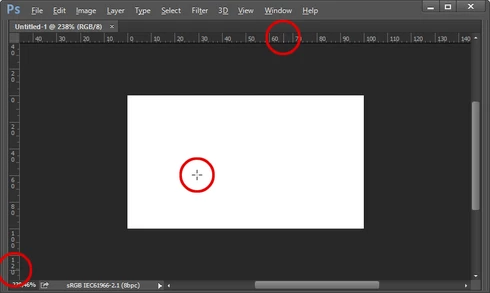
Photoshop CC 2015.0.1 - With the rulers visible, normally the movement of the cursor on the canvas is followed by some thin dotted lines (one on the vertical ruler, other on the horizontal ruler) that move along the horizontal and vertical rulers providing you with some orientation of where you are in the canvas (even if no "real" guide has been placed.

But for some time now, these thin dotted lines on the rulers appear offset from the real cursor position on the canvas. I've tried changing the units, disabling graphic procesor and doing other things, but they don't "snap" back to the real cursor position. When drawing out a guide, I can place it precisely, and the info palette also shows the correct values. It's just that this "reference" on the rulers is always offset (please note I'm not talking about the scale being offset (that would be fixed by double clicking on the rulers corner/origin).

I'm attaching a picture, I hope you understand what I mean. As you'll see, the dotted lines, circled in red, are offset relative to the cursor position on the white canvas.

I tried to find a similar report but couldn't find any. I'm using Windows 8.1 x64 and PS CC 2015.0.1 (latest version). Anyone else noticing this kind of behavior? Thanks.
This topic has been closed for replies.

24 replies

Inspiring
March 7, 2020
Ruler bug - User for 20 years. This was fixed two years ago but ............ This same issue is back only worse in 21.0.1 The rulers are scrambled if you hit Ctrl+ in Windows a couple times to enlarge the view. I have a screen capture attached if you folks at Adobe want to see it. 
Carlos_Oliveras
Known Participant
January 23, 2018
Yay! At long last! Thanks a lot.
Legend
January 23, 2018
This issue should be fixed by the Photoshop CC 2018 (19.1) update that was released today.
Carlos_Oliveras
Known Participant
October 19, 2017
And yet another new version, and still nothing. 😞 Please Jeffrey... send a reminder to engineering if possible! Thanks.
Carlos_Oliveras
Known Participant
September 22, 2017
Thanks for letting me know, I'm happy for that. Still, it's more of a workaround than a fix, because it makes us choose one feature or the other (I  mean, accuracy in the rulers area versus Overscroll). I hope this gets fixed for good in CC 2018...
Inspiring
September 22, 2017
Just had the same problem. Thanks for the fix.
Carlos_Oliveras
Known Participant
January 13, 2017
Hi. Thanks for checking it on your mac. On Windows, it definitely is linked to the "overscroll" feature, or so it seems, since disabling it solves the problem, and checking it again messes the rulers indicators-thingy.
If it's not a problem on the mac, that would explain -at least to a certain degree- the low priority of this bug. But since this was already acknowledged, I didn't think it would take so long to fix...

By the way, I agree about making paths and other elements more visible. I think there is some other threads about that, at least for paths...

Thanks for commenting about this.
Inspiring
January 12, 2017
It seems to be a Windows problem. I've tried testing this on my Mac with the latest release and it's working just fine. I also have overscroll on, btw, so I don't think it's that. I have GPU enabled. I've tried it on different documents, different sizes. It's looks quite accurate, whereas your screenshots look very offset. Do wish we could make it more visible (like with other UI items (paths, color samplers, etc) that disappear into the woodwork, it would be nice if we could select a contrasting color for them).

I suspect you're right that it has a very low priority of things that need fixing. <sigh>
Carlos_Oliveras
Known Participant
January 12, 2017
Aaaand 2017.0.1 came along, and guess what... nothing either! xD Ah, the sweet passing of time...
I understand there are priorities and you can only do so much with every release, but I thought this one was easier to fix, specially after one year or more. I'll keep hoping for a fix. Thanks!
Carlos_Oliveras
Known Participant
November 2, 2016
Photoshop CC 2017 is out... and same problem still happening *sigh* 😞