

Carlos_Oliveras
Known Participant
November 3, 2015

P: Rulers indicators appear offset from real cursor position

  • November 3, 2015
  • 24 replies
  • 1752 views

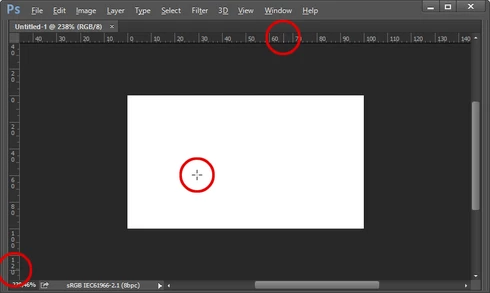
Photoshop CC 2015.0.1 - With the rulers visible, normally the movement of the cursor on the canvas is followed by some thin dotted lines (one on the vertical ruler, other on the horizontal ruler) that move along the horizontal and vertical rulers providing you with some orientation of where you are in the canvas (even if no "real" guide has been placed.

But for some time now, these thin dotted lines on the rulers appear offset from the real cursor position on the canvas. I've tried changing the units, disabling graphic procesor and doing other things, but they don't "snap" back to the real cursor position. When drawing out a guide, I can place it precisely, and the info palette also shows the correct values. It's just that this "reference" on the rulers is always offset (please note I'm not talking about the scale being offset (that would be fixed by double clicking on the rulers corner/origin).

I'm attaching a picture, I hope you understand what I mean. As you'll see, the dotted lines, circled in red, are offset relative to the cursor position on the white canvas.

I tried to find a similar report but couldn't find any. I'm using Windows 8.1 x64 and PS CC 2015.0.1 (latest version). Anyone else noticing this kind of behavior? Thanks.
This topic has been closed for replies.

24 replies

Carlos_Oliveras
Known Participant
October 2, 2016
Yes... same here, three updates already, and still not fixed. In fact, it's almost one year since this was first reported - it's a pity not being able to use this visual aid in a reliable way for so long.
Anyway, I keep my fingers crossed with every new PS update!
Inspiring
October 2, 2016
This problem still persists in the current version 2015.5.1
Carlos_Oliveras
Known Participant
July 2, 2016
2015.5 has been the second update since this issue was acknowledged, but still hasn't been fixed... 😞 😞 😞

I assume this is either ultra-low priority in the list, or harder to fix than I had anticipated. I guess we'll have to keep waiting! But please don't forget about this... it's a small but really annoying problem.

I'm sure you'll eventually get to it so, again, thanks in advance.
Pedro Cortez Marques
Legend
February 19, 2016
Hi 

I'm using photoshop CC2014 2.2 on windows7 and I have this same bug. Only the top indicator is wrong.
In the Info panel, the values x,y are both fine.

Carlos_Oliveras
Known Participant
January 22, 2016
Jeffrey: You're right, it's not fixed. It worked until I created a new document, then the dotted lines on the rulers were (again) out of sync with the cursor position from the very beginning 😞 😞 :(

I hope this will get fixed eventually, because if memory serves me right, there have been 2 photoshop updates since this was first reported. At least it's good to know it's on the "to do" list. Thanks for your attention and support.
Carlos_Oliveras
Known Participant
January 21, 2016
Yes, I have Overscroll enabled and when moving the canvas around (in a "fit to screen" view, or smaller, of course), everything seems okay now.

Still, sometimes everything was fine until the cursor/dotted lines went out of sync again. So maybe this update did nothing and the problem will eventually come back. But so far it seems to be working (and normally, it did not take too much effort to trigger this issue... now I haven't been able too).

I will report if the problem comes back. Under any event, thanks a lot for checking the database and replying.
Legend
January 21, 2016
Do you have Overscroll enabled in Preferences > Tools...? From my notes, it only happens with Overscroll enabled.

It's not showing as fixed in the bug database yet.
Carlos_Oliveras
Known Participant
January 21, 2016
While I think this issue is not listed in the "Customer reported issues resolved", and it still appears here as "Acknowledged", it looks like today's update fixed this issue, right? So far, the dotted lines over the rulers seems to follow the cursor position accurately after updating (with overscroll active). I hope it's really fixed! 🙂 🙂 🙂
Carlos_Oliveras
Known Participant
November 18, 2015
Jeffrey: Great, thanks.
Legend
November 18, 2015
Engineering is looking into this.