

Carlos_Oliveras
Known Participant
November 3, 2015

P: Rulers indicators appear offset from real cursor position

  • November 3, 2015
  • 24 replies
  • 1752 views

Photoshop CC 2015.0.1 - With the rulers visible, normally the movement of the cursor on the canvas is followed by some thin dotted lines (one on the vertical ruler, other on the horizontal ruler) that move along the horizontal and vertical rulers providing you with some orientation of where you are in the canvas (even if no "real" guide has been placed.

But for some time now, these thin dotted lines on the rulers appear offset from the real cursor position on the canvas. I've tried changing the units, disabling graphic procesor and doing other things, but they don't "snap" back to the real cursor position. When drawing out a guide, I can place it precisely, and the info palette also shows the correct values. It's just that this "reference" on the rulers is always offset (please note I'm not talking about the scale being offset (that would be fixed by double clicking on the rulers corner/origin).

I'm attaching a picture, I hope you understand what I mean. As you'll see, the dotted lines, circled in red, are offset relative to the cursor position on the white canvas.

I tried to find a similar report but couldn't find any. I'm using Windows 8.1 x64 and PS CC 2015.0.1 (latest version). Anyone else noticing this kind of behavior? Thanks.
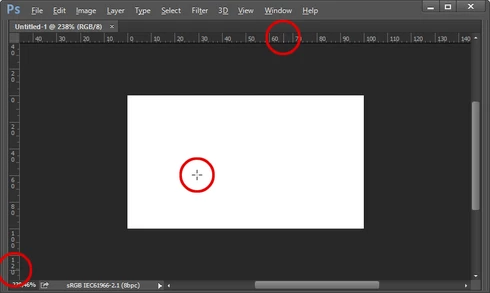
This topic has been closed for replies.

24 replies

Carlos_Oliveras
Known Participant
November 18, 2015
After 15 days, I can say for sure that on my system, checking "Overscroll" in Preferences/Tools causes the guide indicators appearing offset relative to the cursor position (see picture in original post).

Could anyone please check whether this is a bug (or not)? Thanks.
Carlos_Oliveras
Known Participant
November 3, 2015
Hi it's me again. After a lot of testing, the culprit appears to be Preferences>Tools>Overscroll (and it has taken me over an hour to narrow down the problem to that single preference, because everytime I deleted the preferences and re-configured them again, the problem would reappear, so I ended up having to configure one setting at a time, restart everytime, check everything is fine, then go on).

I absolutely love the Overscroll feature, but for some reason, turning it on makes the lines on the rulers to become offset, sometimes instantaneously, sometimes only after restarting Photoshop. If I turn overscrolling off and restart, then the rulers are precise again... but I can't overscroll (duh).

Can anybody reproduce this problem? Of course, there could be some other variable involved, but as far as I am concerned, Preferences>Tools>Overscroll seems to be key setting.

Thanks.
Carlos_Oliveras
Known Participant
November 3, 2015
Thanks for answering. I hace scaling set to Auto.
I have tried 100% (and restarting) but it happens the same, so I have left it again at Auto

(I will try trashing the preferences later today, but first I have to make a backup of them so that I can restore them if this doesn't help.)
Legend
November 3, 2015
What is your Preference>Interface for scaling set to?