

Participating Frequently
June 19, 2013

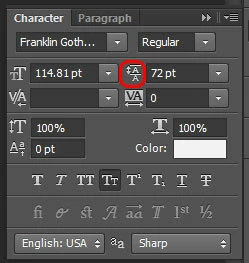
P: Scrub text leading jumps the value super high

When I use the scrub method of adjusting on my leading, PS(win) unexpectedly jumps the number way up, even if I'm scrubbing left, even if i'm holding the alt key.
このトピックへの返信は締め切られました。

返信数 90

David Mohr
Participating Frequently
October 25, 2017
Hi Bash,

We are actively working on a fix and understand this bug is a problem for many people's workflows.  As a TEMPORARY workaround, you can either work with the previous version or untransformed type, since this bug is isolated to transformed text and is new to 2018.  I know, not ideal, but it should work as a stop-gap.

Thanks,
David
Inspiring
October 25, 2017
I'm an in-house designer in a very fast paced company. I need to change the leading every 2 seconds and I have to go through  a ridiculous to try and adjust the leading between two lines now. Please fix this bug SOON (my livelihood depends on it!)
David Mohr
Participating Frequently
October 23, 2017
Yeah, this stupid bug came back.  Someone changed something right before ship and retriggered it.  We're working on a solution and know the problem -- the text was transformed at some point and the math involved to display the values correctly is colliding with user input.

If you create new type or work with type that was never transformed, you won't have the problem.

Hopefully, we'll have a fix out very soon.
Inspiring
October 22, 2017
Hello David , I just updated my photoshop to the newest one released this week, CC 2018 version and this bug appeared to me. Doesn`t matter the value that I try to type on the keyboard, the paragraph leading just start jumping to high random values, ignoring the numbers that I`m typing. Arrow keys also aren`t working either to setup the value.

update: it seems this bug happens with asian writting, as when I write in Japanese. In normal alphabet,this bug doesn`t happens. May be some conflict with Google IME or MS IME?
David Mohr
Participating Frequently
August 7, 2014
Hi Greg,

I'm not seeing this on Mac.  Are you sure you have the latest update?  Have you transformed this type at some point?

If you would like, we can do a web-hosted screenshare to get to the bottom of your issue, but at this time, I am unable to duplicate what you're seeing.

Thanks,
David
Inspiring
August 7, 2014
Inspiring
August 7, 2014
Hi Chris,
Having issues with Photoshop CC ( i have the latest update ). Mac OSX 10.9.2

The paragraph leading is behaving incorrectly.

For a 6pt text, with a leading set to 6pt, it displays a leading closer to 14pt? Other character sizes with other character leading not displaying correctly.

Any clues?

thanks Greg.
David Mohr
Participating Frequently
November 5, 2013
Click Help > Updates and you should be automatically led through the process. You can check by going to Help > System Info.

If you continue to have trouble, ping me and I'll set up a screenshare so we can troubleshoot the problem.

Thanks,
David
Inspiring
November 5, 2013
Hi David. My Creative Cloud subscription tells me I'm "up to date", but my Photoshop CC version is 14.0. How do I download 14.1?

Best,
Gabe
David Mohr
Participating Frequently
September 19, 2013
Hi Adam,

The bug is due to transformed type. This problem is fixed in the latest update of CC, 14.1.1. You can download it today.

Thanks,
David
