

Participating Frequently
June 19, 2013

P: Scrub text leading jumps the value super high

  • June 19, 2013
  • 90 replies
  • 1995 views

When I use the scrub method of adjusting on my leading, PS(win) unexpectedly jumps the number way up, even if I'm scrubbing left, even if i'm holding the alt key.
This topic has been closed for replies.

90 replies

Inspiring
September 19, 2013
Hi Chris,
Just dragging increases in units of 1.
Option-dragging increases in units of 0.1 for higher precision.
Inspiring
September 18, 2013
Also, there is no need to option-drag, just click the label and drag.
Inspiring
September 18, 2013


I've just started using Photoshop CC today and have a bee in my bonnet!
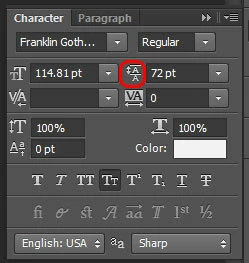
In Photoshop CS5 a really quick and user friendly shortcut was option-dragging the icon beside a value in a palette (such as the character pallette), and this would increase or decrease the value as you dragged the mouse. (i.e if you had written some text on the canvas you could increase/decrease font size on the fly by option dragging the 'T' font size icon within the character pallette).
In Photoshop CC on my machine this action now behaves extremely erratically and is no longer is useful because of this! Is this happening for everyone or just me? I'm on a mac OS 10.8.4.

Image below highlights where you can option-dragging to increase/decrease values.

David Mohr
Participating Frequently
September 16, 2013
Hi Amber,

Check out the end of the thread for some solutions.

Also, a work-around is to simply not transform type but instead change the point size. Or, if that is too inimical to your workflow, go ahead and make the transformations that you want, note the new point size of the font, and Undo. Afterwards, you can simply change the point size of the font WITHOUT a transformation and the bug will not be triggered.

Thanks,
David
Inspiring
September 14, 2013
Update Photoshop CC 14.0 to 14.1.1 for fix problem

download link:
http://s9.davvas.com:182/d/jp37f3qdkv...
Participant
September 13, 2013
I should add, the error just switches back and forth between text size and leading size. I can't get out of it. Just endlessly hitting okay...
Participant
September 13, 2013
I'm stuck in Photoshop nightmare right now where I went to change text size with the scrubber... then it added at least 1,000 points. Now I'm getting an error message about "A value between 0.01 point and 1296" and every time I hit OK, it jumps to the leading number scrubber and gives the same error (despite leading only being at 132.81). Come on, Adobe.

I'm CS6 too... having this issue for a while with the scrubbed number jumping but the weird error messages just started today. Have had to shut down and lose lots of work 3 times now...
David Mohr
Participating Frequently
September 13, 2013
We have been working on a solution to these bugs for CS6 as well a for CC. While the transformed type fix for the Creative Cloud is already released, that for CS6 is still being refined.

If you are interested, I would invite you to join a special prerelease program to validate these bugs really are resolved. All you have to do is respond to this message. I will then submit your name and email address to the program. You will need to sign a non-disclosure agreement, since this software is not available to the general public. Then, you can download and tryout the fix for yourself. If we've missed something, your voice can help us catch it and repair it.

Thanks,
David
Inspiring
September 10, 2013
David,
Please see my above reply to you. My intent was not to spam, but to reply to your repeated posts - to let users know who were only following specific threads that this update did not fix the same bug in CS6. I apologize if my post was offensive to you or any Photoshop.com user. That was not my intention.

And... Any word on a fix for the PDF text corruption bug also introduced in a CS6 update?

Having these two Photoshop CS6 text bugs fixed will make a world of difference to professional users who rely on Photoshop's text capabilities for quality output.
Inspiring
September 10, 2013
"p.s. -- posting the same complaint in every thread is annoying and sorta childish. It's also SPAM."
David, I was simply responding to the identical duplicate posts you had made in numerous threads. My only goal was to make users who were following specific threads aware that this "fix" did not apply to CS6. My intent was not to spam. Sorry if it came across as childish, but realize these fora are so segmented that, as you have demonstrated, duplicate posting may be the best way to get information distributed.

CB
